

Minecraft Player Locator Bar: How to Hide & Server Options
Opublikowano przez

Udostępnij:

Udostępnij na X

Udostępnij na Facebooku

Udostępnij na Threads

Udostępnij na Bluesky

Skopiuj do schowka

Udostępnij przez e-mail
Minecraft servers will soon have a new feature that helps keep players together, but can it be turned off? Are there ways to hide just yourself? Today, we answer that and more in “Minecraft Player Locator Bar: How to Hide & Server Options.”
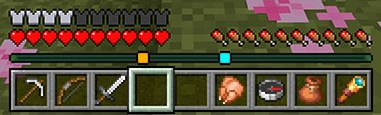 When in a multiplayer server, players will now find that their XP bar looks a bit different. Instead of your XP progress and current level, a bar of the same size will display small squares of varying colors that each represent a different player. Players that are above or below will also have arrows on their square indicating as such.
As for the old XP bar, it will still be visible but only temporarily when XP is earned.
When in a multiplayer server, players will now find that their XP bar looks a bit different. Instead of your XP progress and current level, a bar of the same size will display small squares of varying colors that each represent a different player. Players that are above or below will also have arrows on their square indicating as such.
As for the old XP bar, it will still be visible but only temporarily when XP is earned.
 As of writing this article, the method for disabling the Minecraft player locator bar is not yet available in Minecraft Preview. However, Mojang has confirmed that once testing is complete, it will be entirely optional and controlled by server owners. A great thing to hear, especially for PVP servers.
So, how will the player locator bar eventually be disabled? With this feature being for both Bedrock and Java Edition, chances are server owners will be able to turn it off via a command or game rule. The moment the option enters testing, we will update this portion of the article to let you know here.
As of writing this article, the method for disabling the Minecraft player locator bar is not yet available in Minecraft Preview. However, Mojang has confirmed that once testing is complete, it will be entirely optional and controlled by server owners. A great thing to hear, especially for PVP servers.
So, how will the player locator bar eventually be disabled? With this feature being for both Bedrock and Java Edition, chances are server owners will be able to turn it off via a command or game rule. The moment the option enters testing, we will update this portion of the article to let you know here.
The Minecraft Player Locator Bar
When in a multiplayer server, players will now find that their XP bar looks a bit different. Instead of your XP progress and current level, a bar of the same size will display small squares of varying colors that each represent a different player. Players that are above or below will also have arrows on their square indicating as such.
As for the old XP bar, it will still be visible but only temporarily when XP is earned.
How to Hide Yourself
- Holding Shift to Sneak
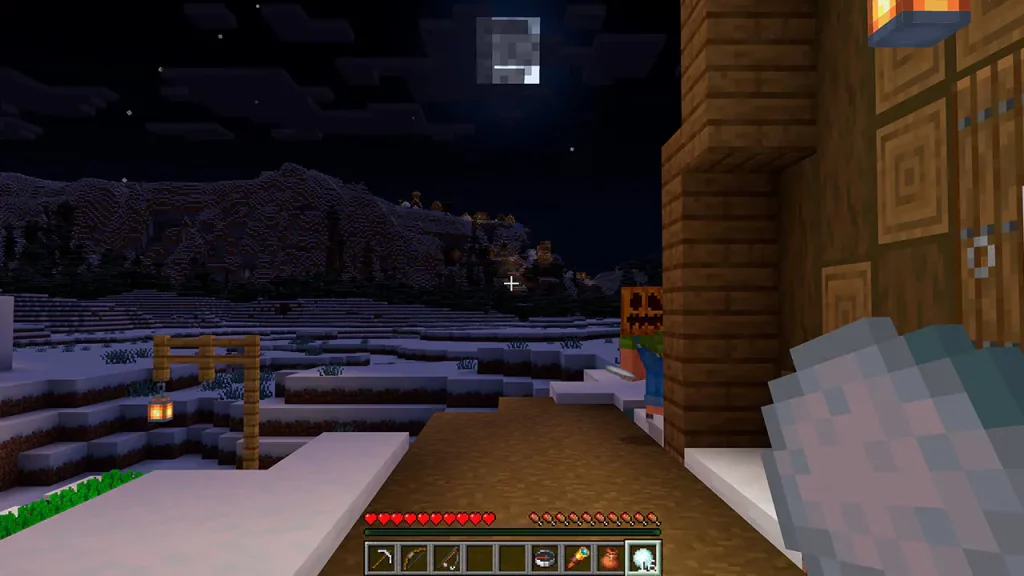
- Wearing a Carved Pumpkin
- Wearing a Mob Head
- Being Invisible (Potion of Invisibility, For Example)
- Entering Spectator Mode
How to Turn Off the Player Locator Bar on Servers
As of writing this article, the method for disabling the Minecraft player locator bar is not yet available in Minecraft Preview. However, Mojang has confirmed that once testing is complete, it will be entirely optional and controlled by server owners. A great thing to hear, especially for PVP servers.
So, how will the player locator bar eventually be disabled? With this feature being for both Bedrock and Java Edition, chances are server owners will be able to turn it off via a command or game rule. The moment the option enters testing, we will update this portion of the article to let you know here.Zapisz się do newslettera
Subskrybuj, aby otrzymywać najnowsze informacje ze świata gier!

Dołącz do naszego Discorda
Zostań częścią naszej społeczności ponad 20,000 podobnie myślących członków!
Jak oceniasz ten wpis?
Podziel się swoją opinią i pomóż nam tworzyć jeszcze lepsze artykuły!
Nie podobał mi się
Neutralnie
Podobał mi się

Potrzebujesz serwera do gry?
Wynajmij serwer gier, na którym Ty i Twoi znajomi możecie grać prywatnie z niskim opóźnieniem i własnymi ustawieniami. Wybieraj spośród 110+ gier, zaproś ludzi z całego świata i ciesz się prywatnymi rozgrywkami lub zbuduj własną społeczność online z własnymi zasadami.

Powiązane wpisy







BĄDŹ NA BIEŻĄCO!
Dołącz do naszego newslettera, aby otrzymywać informacje o naszych hostowanych grach, nowościach firmowych i ekskluzywnych ofertach. Bądź na bieżąco!













