

Minecraft 1.21 Bundles Guide: Recipe & Controls
Opublikowano przez

Udostępnij:

Udostępnij na X

Udostępnij na Facebooku

Udostępnij na Threads

Udostępnij na Bluesky

Skopiuj do schowka

Udostępnij przez e-mail
(Estimated Read Time: 3 Minutes)
Long ago, an item called a bundle was announced for the Minecraft Caves and Cliffs update, yet bundles would instead find themselves in an experimental limbo lasting years. So, today, we explore the exciting confirmation that bundles are almost here in our Minecraft 1.21 bundles guide!What Are Bundles?

How to Craft Minecraft 1.21 Bundles
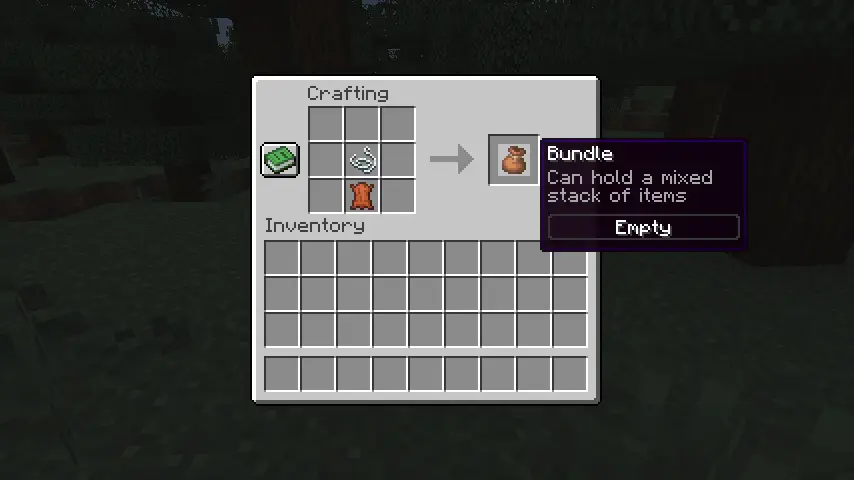 Bundles can be crafted on a crafting table or within one’s inventory using one leather and string. Simply place the leather on the crafting grid and then place the string directly above it. For a visual representation of this recipe, please see the image we included above.
How to Use Minecraft 1.21 Bundles
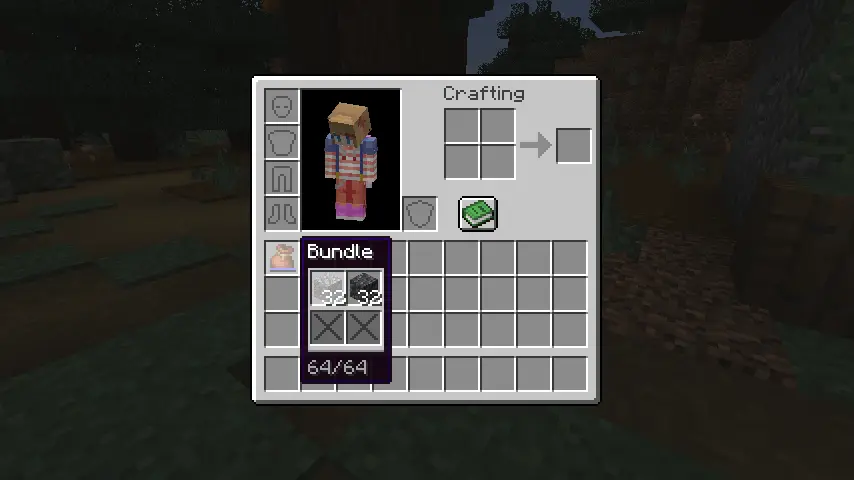 Bundles can be interacted with right from one’s inventory by picking it up and right-clicking the blocks and items to place within. Alternatively, one can pick up each individual item and right-click on the bundle instead. Bundles can also be actively used within one’s inventory to automatically remove the last item put in or outside one’s inventory to dump all the items within out into the world.
Zapisz się do newslettera
Subskrybuj, aby otrzymywać najnowsze informacje ze świata gier!

Dołącz do naszego Discorda
Zostań częścią naszej społeczności ponad 20,000 podobnie myślących członków!
Jak oceniasz ten wpis?
Podziel się swoją opinią i pomóż nam tworzyć jeszcze lepsze artykuły!
Nie podobał mi się
Neutralnie
Podobał mi się

Potrzebujesz serwera do gry?
Wynajmij serwer gier, na którym Ty i Twoi znajomi możecie grać prywatnie z niskim opóźnieniem i własnymi ustawieniami. Wybieraj spośród 110+ gier, zaproś ludzi z całego świata i ciesz się prywatnymi rozgrywkami lub zbuduj własną społeczność online z własnymi zasadami.

Powiązane wpisy







BĄDŹ NA BIEŻĄCO!
Dołącz do naszego newslettera, aby otrzymywać informacje o naszych hostowanych grach, nowościach firmowych i ekskluzywnych ofertach. Bądź na bieżąco!













