

Minecraft 1.20 Smithing Guide
Opublikowano przez

Udostępnij:

Udostępnij na X

Udostępnij na Facebooku

Udostępnij na Threads

Udostępnij na Bluesky

Skopiuj do schowka

Udostępnij przez e-mail
With the release of Minecraft 1.20, smithing is entirely new! Today we explore what that means for you, the process of upgrading diamond to netherite, and how to trim armor too. So, without further ado, let us jump into our Minecraft 1.20 Smithing Guide!
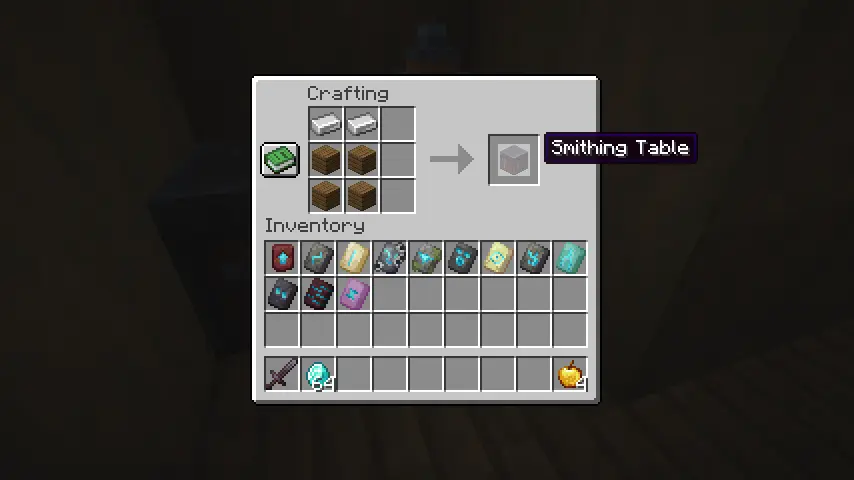 Step one of our Minecraft 1.20 Smithing Guide is making sure a smithing table has been acquired! They can be found in villages throughout the world but are more easily obtained by placing four planks on a crafting table with two iron ingots on top.
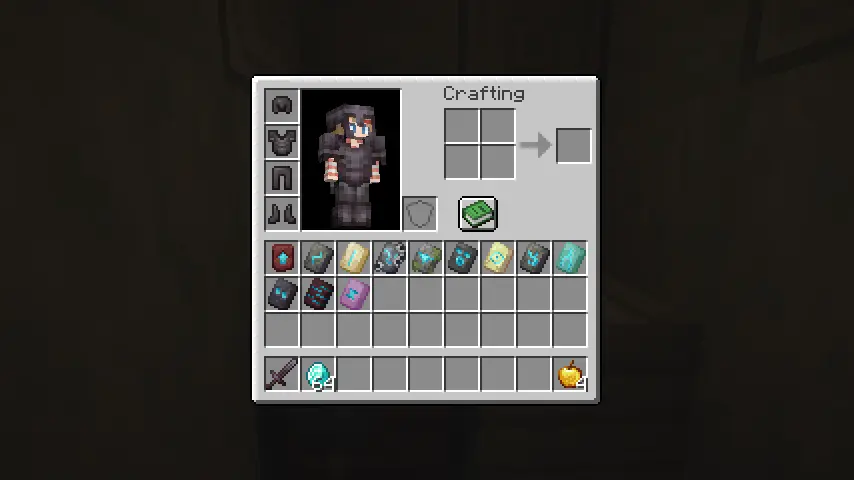 Step two is acquiring templates found across all three of the dimensions Minecraft has to offer. There are a total of 12 templates, with one being for upgrading diamond to netherite armor. Their locations are each listed below:
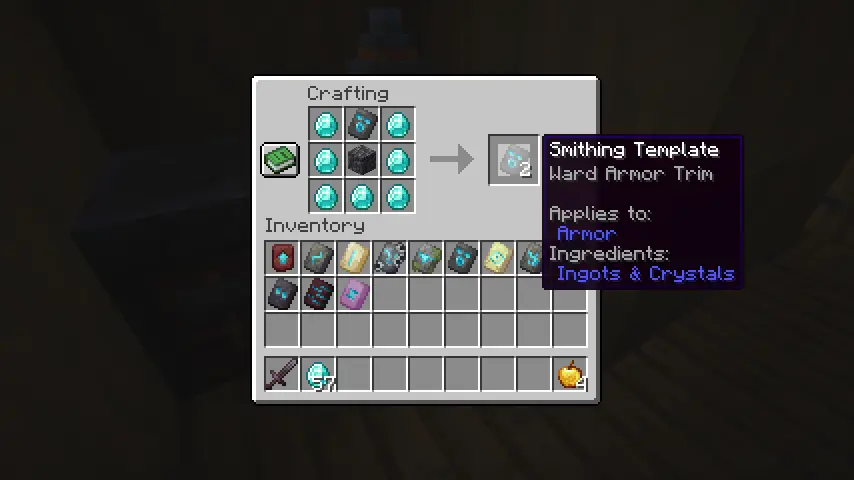 Once a template has been found, it can be duplicated on a crafting table using seven diamonds in a “U” shape, the template itself on the top middle slot, and finally, a block specific to each template in the middle.
Following the example shown in the image above, a second Ward Armor Trim Template can be crafted by placing one cobbled deepslate block in the center with the Ward Armor Trim Template directly on top. The middle block required for each template crafting recipe can be found below:
Once a template has been found, it can be duplicated on a crafting table using seven diamonds in a “U” shape, the template itself on the top middle slot, and finally, a block specific to each template in the middle.
Following the example shown in the image above, a second Ward Armor Trim Template can be crafted by placing one cobbled deepslate block in the center with the Ward Armor Trim Template directly on top. The middle block required for each template crafting recipe can be found below:
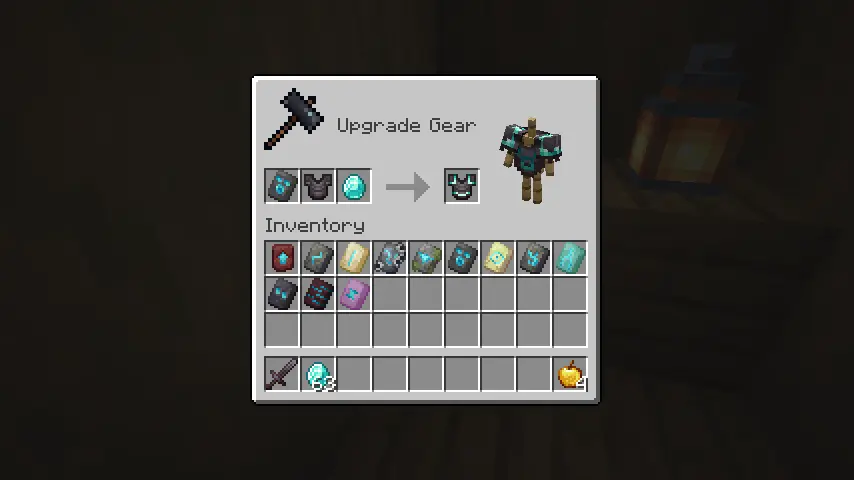
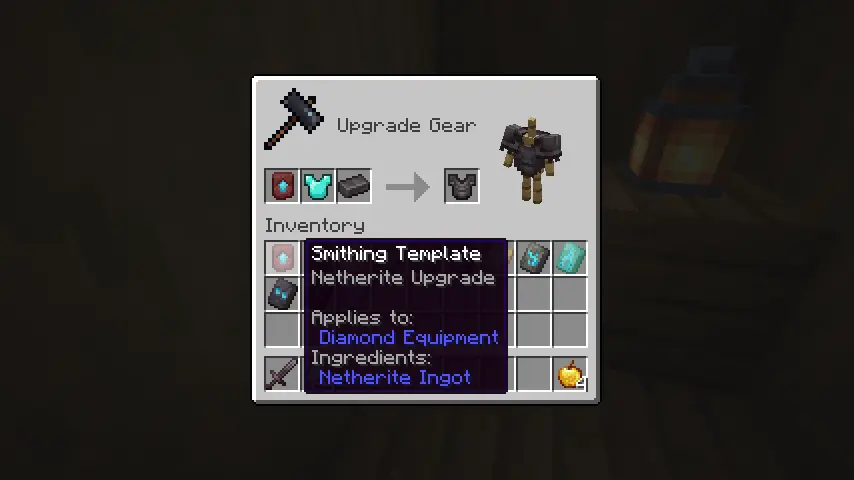 The process of obtaining netherite tools and armor has remained about the same, but with one key change. Netherite Upgrade Templates are now required alongside a netherite ingot to turn diamond armor and tools into their netherite versions.
Once both have been obtained, place the diamond armor in the smithing table, followed by the Netherite Upgrade Template and then the netherite ingot to smith your netherite tools and armor just like before.
But be warned! Templates are consumed, so make sure to craft a few backups before each use!
The process of obtaining netherite tools and armor has remained about the same, but with one key change. Netherite Upgrade Templates are now required alongside a netherite ingot to turn diamond armor and tools into their netherite versions.
Once both have been obtained, place the diamond armor in the smithing table, followed by the Netherite Upgrade Template and then the netherite ingot to smith your netherite tools and armor just like before.
But be warned! Templates are consumed, so make sure to craft a few backups before each use!
 The main feature of the reworked smithing table is armor trims! Each of the templates listed prior have unique designs for all but leather armor. First place the armor on the smithing table, then place the desired template, and finally, choose the material for the trim. Diamond as the third material will result in a diamond trim, for example.
The third material can be iron, copper, gold, lapis, emerald, diamond, netherite, redstone, amethyst, or quartz. Everything, including the template, is consumed upon applying the trim, so be sure to create backups of each template beforehand!
The main feature of the reworked smithing table is armor trims! Each of the templates listed prior have unique designs for all but leather armor. First place the armor on the smithing table, then place the desired template, and finally, choose the material for the trim. Diamond as the third material will result in a diamond trim, for example.
The third material can be iron, copper, gold, lapis, emerald, diamond, netherite, redstone, amethyst, or quartz. Everything, including the template, is consumed upon applying the trim, so be sure to create backups of each template beforehand!
Crafting a Smithing Table
Step one of our Minecraft 1.20 Smithing Guide is making sure a smithing table has been acquired! They can be found in villages throughout the world but are more easily obtained by placing four planks on a crafting table with two iron ingots on top.
Acquiring Templates
Step two is acquiring templates found across all three of the dimensions Minecraft has to offer. There are a total of 12 templates, with one being for upgrading diamond to netherite armor. Their locations are each listed below:
- Pillager Outpost – Sentry Armor Trim Template
- Desert Pyramid – Dune Armor Trim Template
- Shipwreck – Coast Armor Trim Template
- Jungle Temple – Wild Armor Trim Template
- Ocean Monument – Tide Armor Trim Template
- Ancient City – Ward Armor Trim Template
- Woodland Mansion – Vex Armor Trim Template
- Nether Fortress – Rib Armor Trim Template
- Bastion Remnant – Snout Armor Trim Template
- Bastion Remnant – Netherite Upgrade Template
- Stronghold – Eye Armor Trim Template
- End City – Spire Armor Trim Template
Crafting Templates
Once a template has been found, it can be duplicated on a crafting table using seven diamonds in a “U” shape, the template itself on the top middle slot, and finally, a block specific to each template in the middle.
Following the example shown in the image above, a second Ward Armor Trim Template can be crafted by placing one cobbled deepslate block in the center with the Ward Armor Trim Template directly on top. The middle block required for each template crafting recipe can be found below:
- Netherite Upgrade Template = Netherrack
- Sentry Armor Trim Template = Cobblestone
- Dune Armor Trim Template = Sandstone
- Coast Armor Trim Template = Cobblestone
- Wild Armor Trim Template = Mossy Cobblestone
- Tide Armor Trim Template = Prismarine
- Ward Armor Trim Template = Cobbled Deepslate
- Vex Armor Trim Template = Cobblestone
- Rib Armor Trim Template = Netherrack
- Snout Armor Trim Template = Blackstone
- Eye Armor Trim Template = End Stone
- Spire Armor Trim Template = Purpur Block
Upgrading Diamond to Netherite
The process of obtaining netherite tools and armor has remained about the same, but with one key change. Netherite Upgrade Templates are now required alongside a netherite ingot to turn diamond armor and tools into their netherite versions.
Once both have been obtained, place the diamond armor in the smithing table, followed by the Netherite Upgrade Template and then the netherite ingot to smith your netherite tools and armor just like before.
But be warned! Templates are consumed, so make sure to craft a few backups before each use!
Armor Trims
The main feature of the reworked smithing table is armor trims! Each of the templates listed prior have unique designs for all but leather armor. First place the armor on the smithing table, then place the desired template, and finally, choose the material for the trim. Diamond as the third material will result in a diamond trim, for example.
The third material can be iron, copper, gold, lapis, emerald, diamond, netherite, redstone, amethyst, or quartz. Everything, including the template, is consumed upon applying the trim, so be sure to create backups of each template beforehand!
Minecraft 1.20 Smithing Guide
https://twitter.com/Minecraft/status/1617916297920282624And so ends our Minecraft 1.20 Smithing Guide. We hope it helps as both a step-by-step guide and quick reference on the fly! What are your thoughts on smithing? We can’t help but feel it finally makes armor truly shine! Until Next Time, BisectHosting =)
Zapisz się do newslettera
Subskrybuj, aby otrzymywać najnowsze informacje ze świata gier!

Dołącz do naszego Discorda
Zostań częścią naszej społeczności ponad 20,000 podobnie myślących członków!
Jak oceniasz ten wpis?
Podziel się swoją opinią i pomóż nam tworzyć jeszcze lepsze artykuły!
Nie podobał mi się
Neutralnie
Podobał mi się

Potrzebujesz serwera do gry?
Wynajmij serwer gier, na którym Ty i Twoi znajomi możecie grać prywatnie z niskim opóźnieniem i własnymi ustawieniami. Wybieraj spośród 110+ gier, zaproś ludzi z całego świata i ciesz się prywatnymi rozgrywkami lub zbuduj własną społeczność online z własnymi zasadami.

Powiązane wpisy







BĄDŹ NA BIEŻĄCO!
Dołącz do naszego newslettera, aby otrzymywać informacje o naszych hostowanych grach, nowościach firmowych i ekskluzywnych ofertach. Bądź na bieżąco!













