

Minecraft 1.21 Bundles Guide: Recipe & Controls
Pubblicato il da

Condividi:

Condividi su X

Condividi su Facebook

Condividi su Threads

Condividi su Bluesky

Copia negli Appunti

Condividi via email
(Estimated Read Time: 3 Minutes)
Long ago, an item called a bundle was announced for the Minecraft Caves and Cliffs update, yet bundles would instead find themselves in an experimental limbo lasting years. So, today, we explore the exciting confirmation that bundles are almost here in our Minecraft 1.21 bundles guide!What Are Bundles?

How to Craft Minecraft 1.21 Bundles
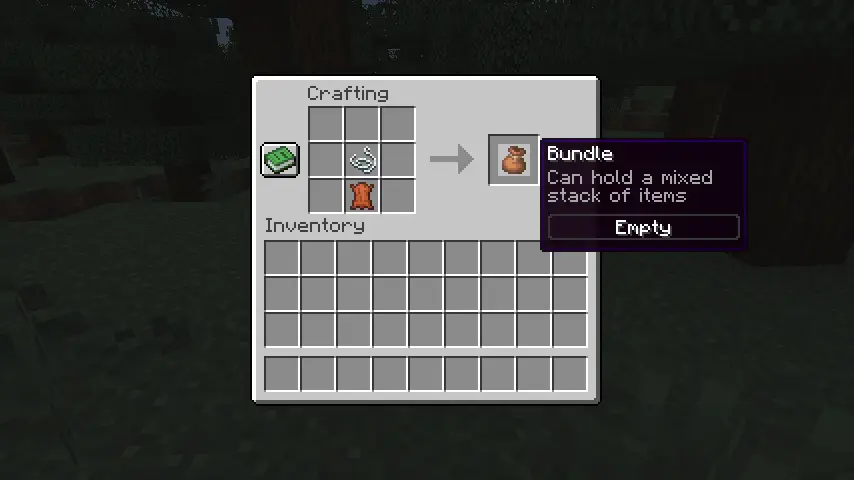 Bundles can be crafted on a crafting table or within one’s inventory using one leather and string. Simply place the leather on the crafting grid and then place the string directly above it. For a visual representation of this recipe, please see the image we included above.
How to Use Minecraft 1.21 Bundles
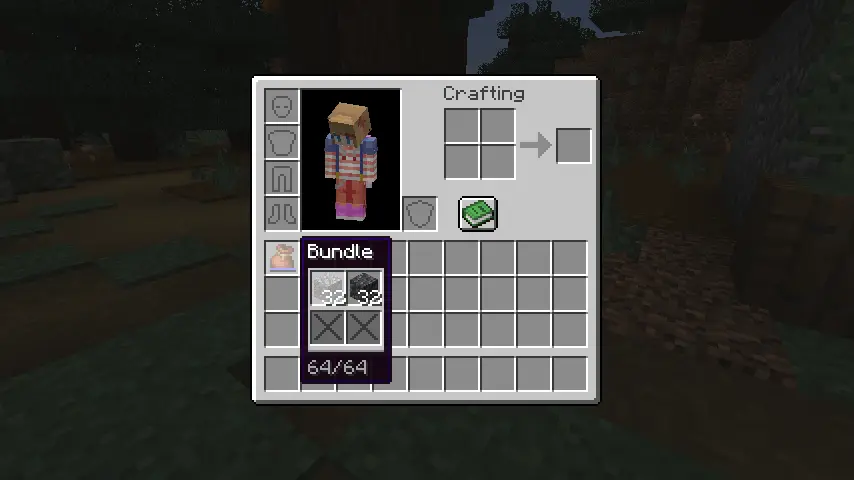 Bundles can be interacted with right from one’s inventory by picking it up and right-clicking the blocks and items to place within. Alternatively, one can pick up each individual item and right-click on the bundle instead. Bundles can also be actively used within one’s inventory to automatically remove the last item put in or outside one’s inventory to dump all the items within out into the world.
Crea il tuo server
Minecraft
Minecraft
Scegli un piano, seleziona un gioco e gioca con i tuoi amici!
Iscriviti alla nostra Newsletter
Iscriviti per ricevere gli ultimi aggiornamenti sul mondo del gaming!

Unisciti al nostro Discord
Entra a far parte della nostra community con oltre 20.000 membri appassionati come te!
Come valuteresti questo blog?
Condividi la tua opinione e aiutaci a migliorare sempre di più i nostri blog!
Non mi è piaciuto
Neutrale
Mi è piaciuto

Hai bisogno di un server di gioco?
Noleggia un server di gioco dove tu e i tuoi amici potrete giocare in privato con bassa latenza e impostazioni personalizzate. Scegli tra 110+ giochi, invita persone da tutto il mondo, goditi le partite private o costruisci la tua community online con le tue regole.

Blog Pertinenti







SCOPRI LE ULTIME NOVITÀ!
Iscriviti alla nostra newsletter per ricevere aggiornamenti sui nostri giochi ospitati, novità aziendali e offerte esclusive. Rimani sempre aggiornato!













