

Minecraft Player Locator Bar: How to Hide & Server Options
Publié le par

Partager :

Partager sur X

Partager sur Facebook

Partager sur Threads

Partager sur Bluesky

Copier dans le presse-papiers

Partager par e-mail
Minecraft servers will soon have a new feature that helps keep players together, but can it be turned off? Are there ways to hide just yourself? Today, we answer that and more in “Minecraft Player Locator Bar: How to Hide & Server Options.”
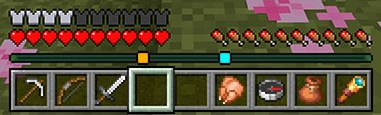 When in a multiplayer server, players will now find that their XP bar looks a bit different. Instead of your XP progress and current level, a bar of the same size will display small squares of varying colors that each represent a different player. Players that are above or below will also have arrows on their square indicating as such.
As for the old XP bar, it will still be visible but only temporarily when XP is earned.
When in a multiplayer server, players will now find that their XP bar looks a bit different. Instead of your XP progress and current level, a bar of the same size will display small squares of varying colors that each represent a different player. Players that are above or below will also have arrows on their square indicating as such.
As for the old XP bar, it will still be visible but only temporarily when XP is earned.
 As of writing this article, the method for disabling the Minecraft player locator bar is not yet available in Minecraft Preview. However, Mojang has confirmed that once testing is complete, it will be entirely optional and controlled by server owners. A great thing to hear, especially for PVP servers.
So, how will the player locator bar eventually be disabled? With this feature being for both Bedrock and Java Edition, chances are server owners will be able to turn it off via a command or game rule. The moment the option enters testing, we will update this portion of the article to let you know here.
As of writing this article, the method for disabling the Minecraft player locator bar is not yet available in Minecraft Preview. However, Mojang has confirmed that once testing is complete, it will be entirely optional and controlled by server owners. A great thing to hear, especially for PVP servers.
So, how will the player locator bar eventually be disabled? With this feature being for both Bedrock and Java Edition, chances are server owners will be able to turn it off via a command or game rule. The moment the option enters testing, we will update this portion of the article to let you know here.
The Minecraft Player Locator Bar
When in a multiplayer server, players will now find that their XP bar looks a bit different. Instead of your XP progress and current level, a bar of the same size will display small squares of varying colors that each represent a different player. Players that are above or below will also have arrows on their square indicating as such.
As for the old XP bar, it will still be visible but only temporarily when XP is earned.
How to Hide Yourself
- Holding Shift to Sneak
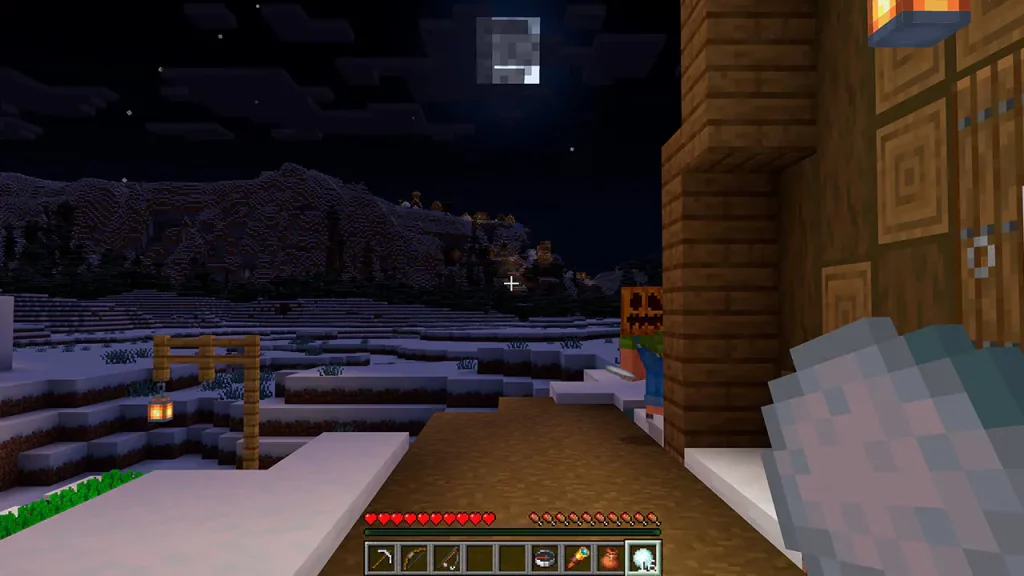
- Wearing a Carved Pumpkin
- Wearing a Mob Head
- Being Invisible (Potion of Invisibility, For Example)
- Entering Spectator Mode
How to Turn Off the Player Locator Bar on Servers
As of writing this article, the method for disabling the Minecraft player locator bar is not yet available in Minecraft Preview. However, Mojang has confirmed that once testing is complete, it will be entirely optional and controlled by server owners. A great thing to hear, especially for PVP servers.
So, how will the player locator bar eventually be disabled? With this feature being for both Bedrock and Java Edition, chances are server owners will be able to turn it off via a command or game rule. The moment the option enters testing, we will update this portion of the article to let you know here.Créez votre propre
serveur Minecraft
serveur Minecraft
Choisissez un plan, sélectionnez un jeu et jouez avec vos amis !
Abonnez-vous à notre newsletter
Abonnez-vous pour recevoir les dernières mises à jour sur l'univers du jeu vidéo !

Rejoignez notre Discord
Rejoignez notre communauté de plus de 20 000 membres passionnés !
Comment évalueriez-vous ce blog ?
Partagez votre avis et aidez-nous à améliorer nos blogs !
Pas aimé
Neutre
Aimé

Besoin d'un serveur de jeu ?
Louez un serveur de jeu où vous et vos amis pouvez jouer en privé avec une faible latence et des paramètres personnalisés. Choisissez parmi 110+ jeux, invitez des joueurs du monde entier et profitez de parties privées, ou créez votre propre communauté en ligne avec vos propres règles.

Blogs pertinents







OBTENEZ LES DERNIÈRES INFOS !
Inscrivez-vous à nos e-mails pour obtenir des mises à jour sur nos jeux hébergés, des nouvelles de l'entreprise et des offres exclusives. Restez au courant !













