

Minecraft 1.21 Bundles Guide: Recipe & Controls
Publié le par

Partager :

Partager sur X

Partager sur Facebook

Partager sur Threads

Partager sur Bluesky

Copier dans le presse-papiers

Partager par e-mail
(Estimated Read Time: 3 Minutes)
Long ago, an item called a bundle was announced for the Minecraft Caves and Cliffs update, yet bundles would instead find themselves in an experimental limbo lasting years. So, today, we explore the exciting confirmation that bundles are almost here in our Minecraft 1.21 bundles guide!What Are Bundles?

How to Craft Minecraft 1.21 Bundles
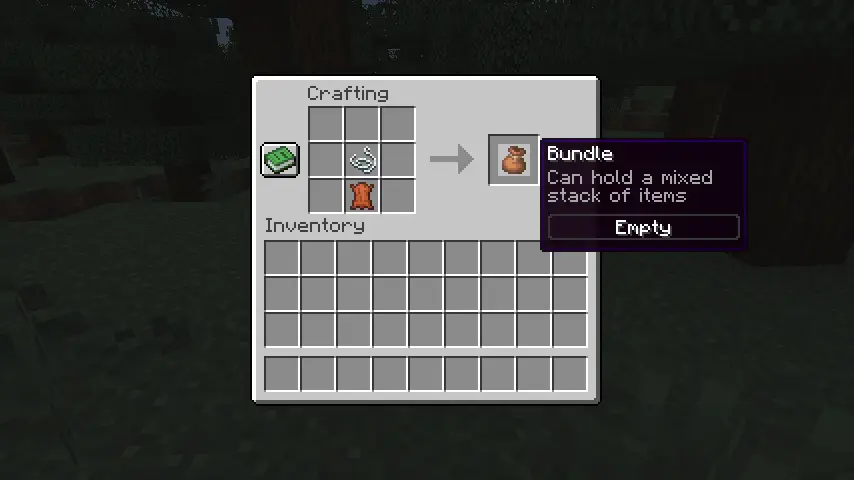 Bundles can be crafted on a crafting table or within one’s inventory using one leather and string. Simply place the leather on the crafting grid and then place the string directly above it. For a visual representation of this recipe, please see the image we included above.
How to Use Minecraft 1.21 Bundles
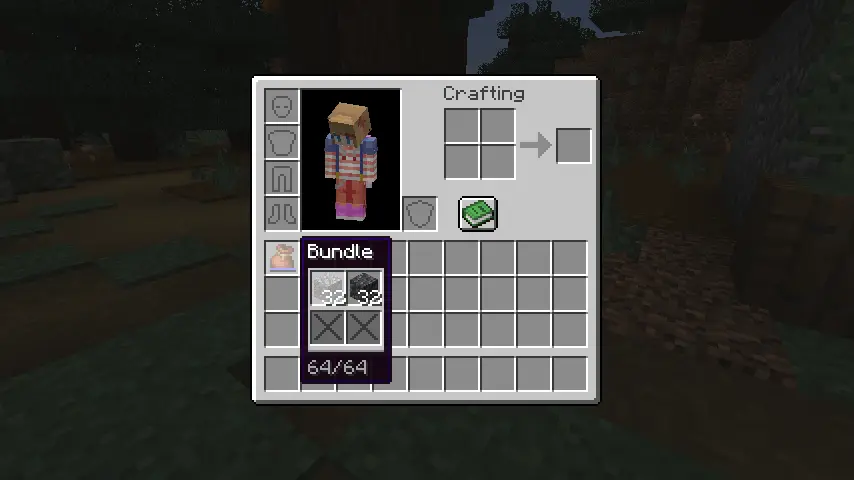 Bundles can be interacted with right from one’s inventory by picking it up and right-clicking the blocks and items to place within. Alternatively, one can pick up each individual item and right-click on the bundle instead. Bundles can also be actively used within one’s inventory to automatically remove the last item put in or outside one’s inventory to dump all the items within out into the world.
Créez votre propre
serveur Minecraft
serveur Minecraft
Choisissez un plan, sélectionnez un jeu et jouez avec vos amis !
Abonnez-vous à notre newsletter
Abonnez-vous pour recevoir les dernières mises à jour sur l'univers du jeu vidéo !

Rejoignez notre Discord
Rejoignez notre communauté de plus de 20 000 membres passionnés !
Comment évalueriez-vous ce blog ?
Partagez votre avis et aidez-nous à améliorer nos blogs !
Pas aimé
Neutre
Aimé

Besoin d'un serveur de jeu ?
Louez un serveur de jeu où vous et vos amis pouvez jouer en privé avec une faible latence et des paramètres personnalisés. Choisissez parmi 110+ jeux, invitez des joueurs du monde entier et profitez de parties privées, ou créez votre propre communauté en ligne avec vos propres règles.

Blogs pertinents







OBTENEZ LES DERNIÈRES INFOS !
Inscrivez-vous à nos e-mails pour obtenir des mises à jour sur nos jeux hébergés, des nouvelles de l'entreprise et des offres exclusives. Restez au courant !













