
Astroneer Leveling Block Guide
Publié le par

Partager :

Partager sur X

Partager sur Facebook

Partager sur Threads

Partager sur Bluesky

Copier dans le presse-papiers

Partager par e-mail
(Estimated Read Time: 3 minutes)
Gathering resources with the Terrain tool in Astroneer can leave uneven ground, making it unfit for placing items and structures. Thankfully, the Astroneer Leveling Block exists to remedy this concern. If you’re having trouble using this utility item, keep reading!Crafting the Leveling Block in Astroneer
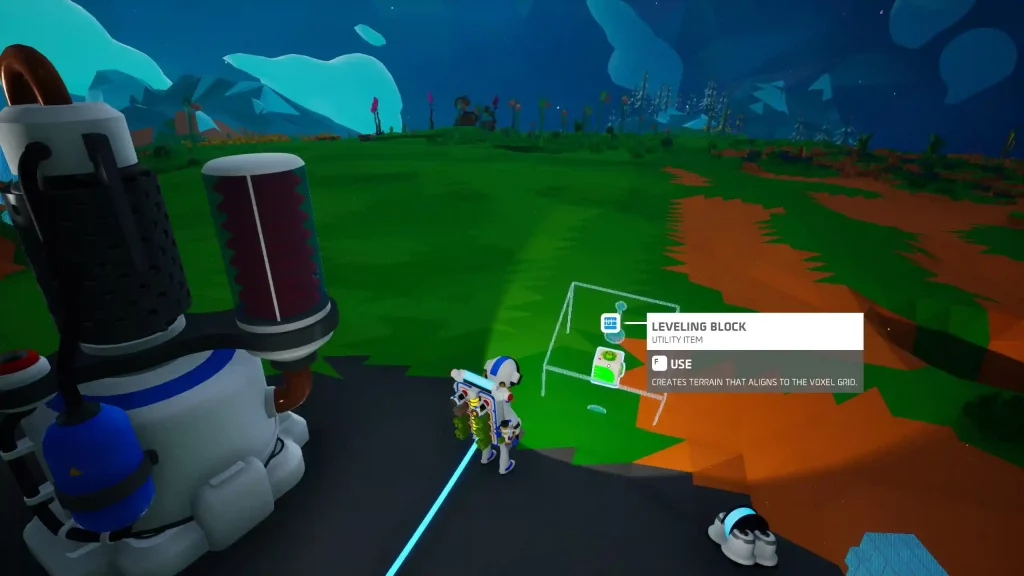 Introduced in Update 1.10.9 as an exclusive item in Creative Mode and introduced in Adventure Mode in Update 1.20.265, players must craft the Astroneer Leveling Block before they can use it. Thankfully, you only need 1x Soil using the Backpack Printer to craft this utility item.
How to Use the Leveling Block in Astroneer
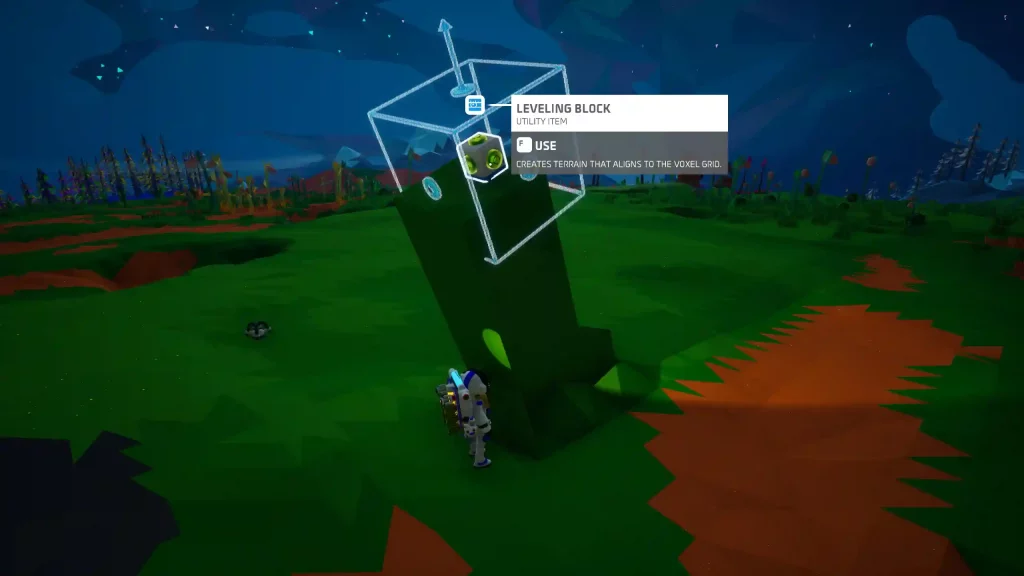 Like the Oxygen Filter and other items in Astroneer, proper usage of the Leveling Block is vital to take advantage of it fully. As mentioned earlier, use the Leveling Block to create uniformly even surfaces on the ground. The leveled surface aligns with the planet’s voxel grid, and the results have no bumps or ridges.
After crafting the Leveling Block, place it on a particular area you want to be leveled. Next, press the Use key (the “F” key by default for PC users). The block should animate, flattening the ground underneath it.
Note: Hover the cursor above the Leveling Block before pressing the Use key to preview the leveled area.
Players can only use the Leveling Block up to 10 times in Adventure Mode. However, this utility item has an unlimited number of uses in Creative Mode.
Also, the area to be leveled by the block will start at a 60-degree angle. Players can set the angle of the resulting even surface to 45 or 90 degrees for a practical finish. However, this can be quite challenging since the block aligns with the planet’s voxel grid, and there’s no way to rotate it manually at the time of writing.
Tip: Pair a Leveling Block with a Narrow Mod to expand the flattened surface. Craft a Narrow Mod from the Backpack Printer using 1x Zinc (made from refining 1x Sphalerite from the Smelting Furnace).
Like the Oxygen Filter and other items in Astroneer, proper usage of the Leveling Block is vital to take advantage of it fully. As mentioned earlier, use the Leveling Block to create uniformly even surfaces on the ground. The leveled surface aligns with the planet’s voxel grid, and the results have no bumps or ridges.
After crafting the Leveling Block, place it on a particular area you want to be leveled. Next, press the Use key (the “F” key by default for PC users). The block should animate, flattening the ground underneath it.
Note: Hover the cursor above the Leveling Block before pressing the Use key to preview the leveled area.
Players can only use the Leveling Block up to 10 times in Adventure Mode. However, this utility item has an unlimited number of uses in Creative Mode.
Also, the area to be leveled by the block will start at a 60-degree angle. Players can set the angle of the resulting even surface to 45 or 90 degrees for a practical finish. However, this can be quite challenging since the block aligns with the planet’s voxel grid, and there’s no way to rotate it manually at the time of writing.
Tip: Pair a Leveling Block with a Narrow Mod to expand the flattened surface. Craft a Narrow Mod from the Backpack Printer using 1x Zinc (made from refining 1x Sphalerite from the Smelting Furnace).Créez votre propre
serveur Astroneer
serveur Astroneer
Choisissez un plan, sélectionnez un jeu et jouez avec vos amis !
Abonnez-vous à notre newsletter
Abonnez-vous pour recevoir les dernières mises à jour sur l'univers du jeu vidéo !

Rejoignez notre Discord
Rejoignez notre communauté de plus de 20 000 membres passionnés !
Comment évalueriez-vous ce blog ?
Partagez votre avis et aidez-nous à améliorer nos blogs !
Pas aimé
Neutre
Aimé

Besoin d'un serveur de jeu ?
Louez un serveur de jeu où vous et vos amis pouvez jouer en privé avec une faible latence et des paramètres personnalisés. Choisissez parmi 110+ jeux, invitez des joueurs du monde entier et profitez de parties privées, ou créez votre propre communauté en ligne avec vos propres règles.

Blogs pertinents







OBTENEZ LES DERNIÈRES INFOS !
Inscrivez-vous à nos e-mails pour obtenir des mises à jour sur nos jeux hébergés, des nouvelles de l'entreprise et des offres exclusives. Restez au courant !













