
Xbox Anniversary: How to Get the Minecraft Bedrock Edition OG Green Skin
发布于 ,作者

分享:

分享至 X

分享至 Facebook

分享至 Threads

分享至 Bluesky

复制到剪贴板

通过电子邮件分享
Xbox is celebrating 25 years with free items across many of its games, including Minecraft! So, today, we explain step by step how to get the Minecraft OG Green Skin before it is gone forever.
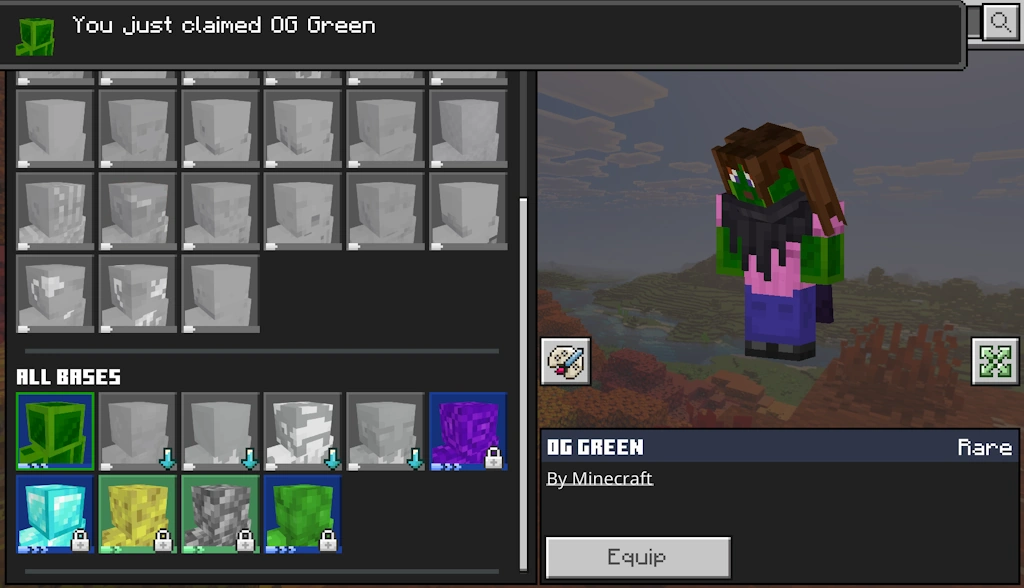 Available from November 10, 2026, at 10 AM PT to December 10, 2026, at 10 AM PT, the Minecraft OG Green Skin is a free full-body skin in the classic Xbox green color for Bedrock Edition players. To claim it, you need only a copy of Bedrock Edition and an internet connection.
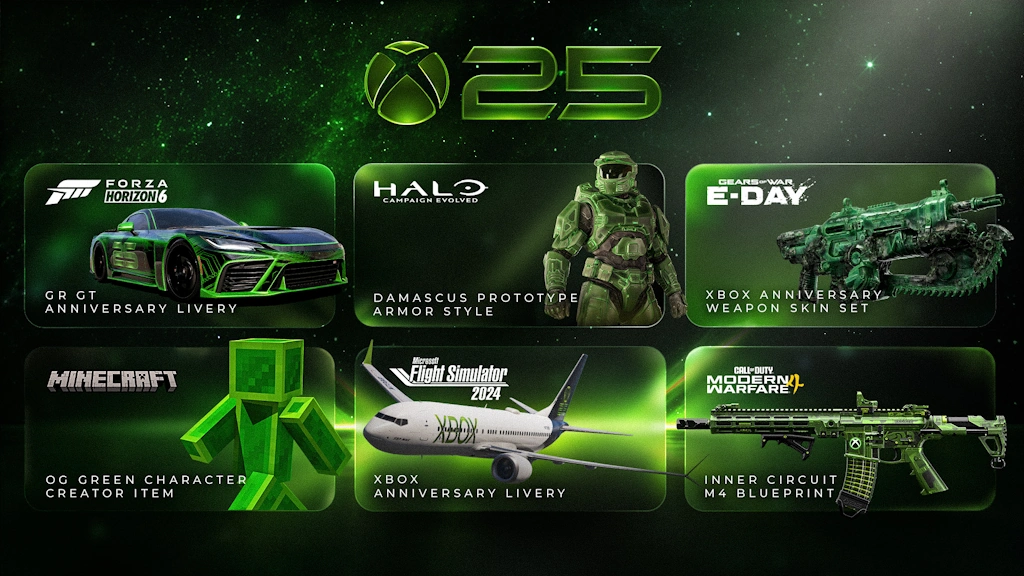 Alongside the OG Green Skin, Xbox players on console, PC, and mobile can claim the limited time Xbox 25th Anniversary badge for their profile. This reward only requires logging in for it to be automatically obtained. Other possible cosmetics include a weapons skin set for Gears of War E-Day, an anniversary GR GT livery for Forza Horizon 6, Halo Campaign Evolved prototype armor, Xbox livery for Flight Simulator 2024 planes, and an Xbox M4 skin in Call of Duty Modern Warfare 4. The dates and availability do, however, vary for each.
Finally, while it is not a cosmetic, Minecraft Bedrock Edition players can now take a look at their account statistics with Xbox Playback. It provides every detail from the first game on the account to the sometimes-frightening number of hours spent in each and every one, including Minecraft. If any of the numbers are too high, remember that “I forgot to close the game” is a valid excuse!
How to Get the Minecraft OG Green Skin
Available from November 10, 2026, at 10 AM PT to December 10, 2026, at 10 AM PT, the Minecraft OG Green Skin is a free full-body skin in the classic Xbox green color for Bedrock Edition players. To claim it, you need only a copy of Bedrock Edition and an internet connection.
- Launch Minecraft Bedrock Edition.
- Click or tap “Dressing Room”.
- Open the “Character Creator” tab.
- Expand the “Body” menu.
- Click or tap “Bases”.
- Under “All Bases” select OG Green.
- Click “Get”.
Other Xbox Anniversary Celebration Cosmetics
Alongside the OG Green Skin, Xbox players on console, PC, and mobile can claim the limited time Xbox 25th Anniversary badge for their profile. This reward only requires logging in for it to be automatically obtained. Other possible cosmetics include a weapons skin set for Gears of War E-Day, an anniversary GR GT livery for Forza Horizon 6, Halo Campaign Evolved prototype armor, Xbox livery for Flight Simulator 2024 planes, and an Xbox M4 skin in Call of Duty Modern Warfare 4. The dates and availability do, however, vary for each.
Finally, while it is not a cosmetic, Minecraft Bedrock Edition players can now take a look at their account statistics with Xbox Playback. It provides every detail from the first game on the account to the sometimes-frightening number of hours spent in each and every one, including Minecraft. If any of the numbers are too high, remember that “I forgot to close the game” is a valid excuse!
您对这篇博客有何评价?
分享您的看法,帮助我们将博客做得更好!
不喜欢
一般
喜欢

需要游戏服务器吗?
租用一台游戏服务器,您可以和朋友们在极低延迟和自定义设置下私密游玩。从 110+ 款游戏中挑选您的最爱,邀请全球玩家,享受私密对战,或者按照您自己的规则建立属于您的在线社区。








获取第一手独家资讯!
订阅我们的电子邮件,获取有关我们托管游戏、公司新闻和独家优惠的最新动态。随时掌握一手资讯!













