What is the Minecraft2Shell Vulnerability?
发布于 ,作者

分享:

分享至 X

分享至 Facebook

分享至 Threads

分享至 Bluesky

复制到剪贴板

通过电子邮件分享
In the digital age, cybersecurity is more important than ever. But threats can come from areas least expected, even with great caution. Today, we answer the question “What is the Minecraft2Shell Vulnerability?”
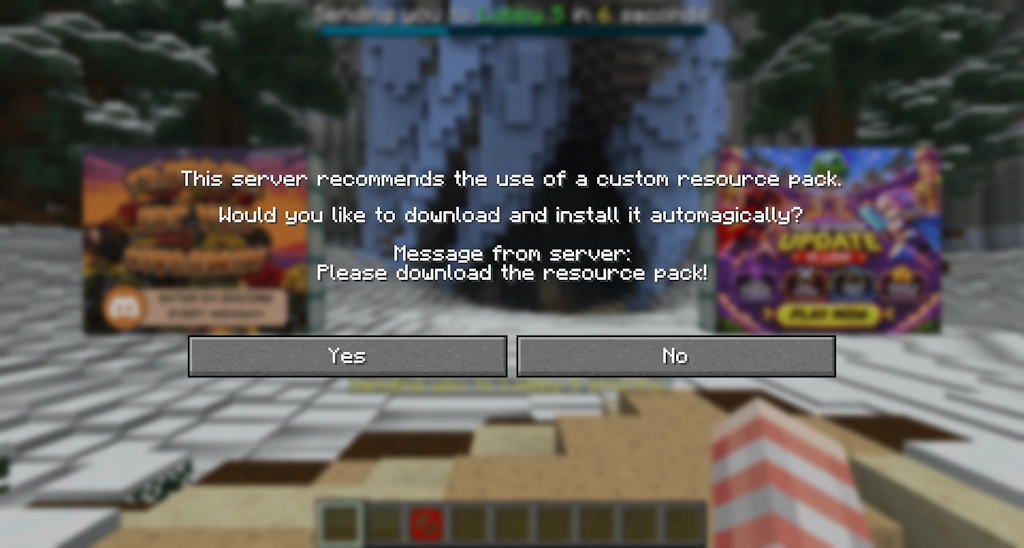 The Minecraft2Shell vulnerability allowed Java Edition server operators to use server-side resource packs, which players can opt to download when joining their servers, to run commands on the downloader’s PC. For example, a command could be run by the malicious operator to open multiple programs. Thankfully, Mojang has since fixed this vulnerability, and it is no longer a threat to those using the latest version on the official Minecraft launcher.
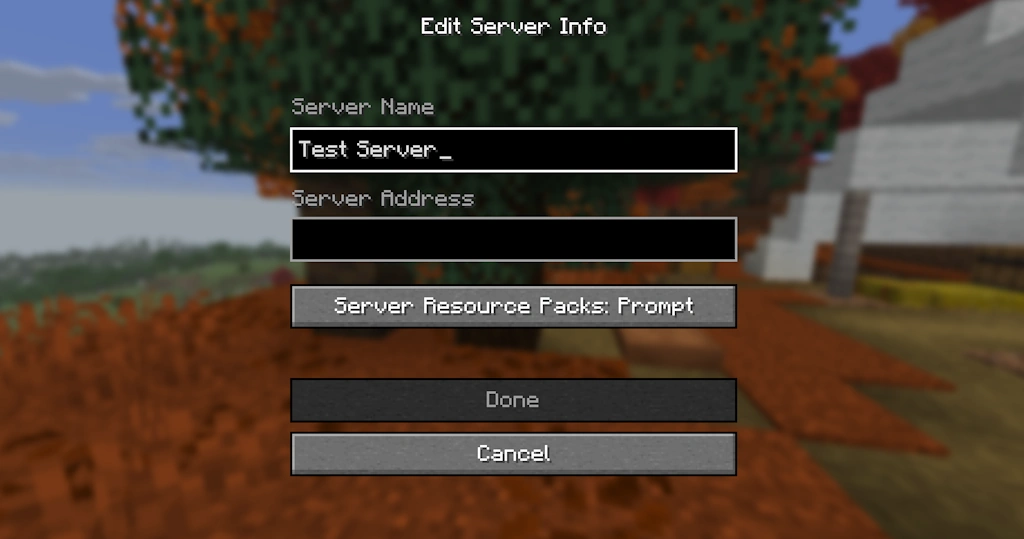 Minecraft is largely safe to trust, and resource packs, despite being third-party, typically are as well. But it is always best to proceed with some caution. Avoid joining servers or downloading resource packs from servers you do not know or trust. And, most importantly, always ensure servers must ask your permission before downloading anything.
Asking to download resource packs is the default setting for Minecraft. However, if allowed for an individual server, that specific server retains permission to install resource packs in the future. The steps below can be used to change these servers back to the prompt setting so that they must continue to ask.
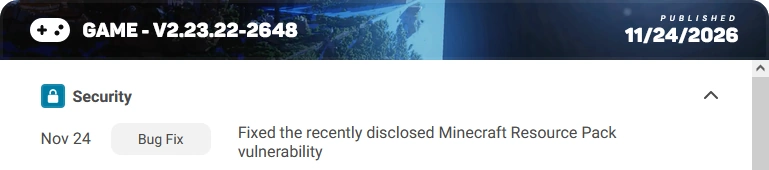 We recommend those on third-party clients confirm that the developers have applied the latest security update from Mojang. Most large clients will have an announcement regarding progress for serious issues such as this within the client, through their social media, or on their website. Lunar client, for example, confirmed the fix within their changelog for client version 2.23.22-2648 on November 24, 2026.
What is the Minecraft2Shell Vulnerability?
The Minecraft2Shell vulnerability allowed Java Edition server operators to use server-side resource packs, which players can opt to download when joining their servers, to run commands on the downloader’s PC. For example, a command could be run by the malicious operator to open multiple programs. Thankfully, Mojang has since fixed this vulnerability, and it is no longer a threat to those using the latest version on the official Minecraft launcher.
Safety & Security
Minecraft is largely safe to trust, and resource packs, despite being third-party, typically are as well. But it is always best to proceed with some caution. Avoid joining servers or downloading resource packs from servers you do not know or trust. And, most importantly, always ensure servers must ask your permission before downloading anything.
Asking to download resource packs is the default setting for Minecraft. However, if allowed for an individual server, that specific server retains permission to install resource packs in the future. The steps below can be used to change these servers back to the prompt setting so that they must continue to ask.
- Open Minecraft Java Edition.
- Click “Multiplayer”.
- Select a server.
- Click “Edit”.
- If Server Resource Packs are “Enabled”, click the button until it becomes “Prompt”.
- Return to step 3 and repeat the process for the next saved server.
Third Party Clients
We recommend those on third-party clients confirm that the developers have applied the latest security update from Mojang. Most large clients will have an announcement regarding progress for serious issues such as this within the client, through their social media, or on their website. Lunar client, for example, confirmed the fix within their changelog for client version 2.23.22-2648 on November 24, 2026.
您对这篇博客有何评价?
分享您的看法,帮助我们将博客做得更好!
不喜欢
一般
喜欢

需要游戏服务器吗?
租用一台游戏服务器,您可以和朋友们在极低延迟和自定义设置下私密游玩。从 120+ 款游戏中挑选您的最爱,邀请全球玩家,享受私密对战,或者按照您自己的规则建立属于您的在线社区。






获取第一手独家资讯!
订阅我们的电子邮件,获取有关我们托管游戏、公司新闻和独家优惠的最新动态。随时掌握一手资讯!