

Once Human Controls Guide: All PC & Controller Keybinds (Xbox, PlayStation)
发布于 ,作者

分享:

分享至 X

分享至 Facebook

分享至 Threads

分享至 Bluesky

复制到剪贴板

通过电子邮件分享
There is danger around every corner in the surreal apocalypse of Once Human. While the game has a tutorial that teaches you the basics, it's always good to brush up on the game's controls when starting. We've gathered all the info you need on Once Human controls when playing on PC with a mouse & keyboard or controller.
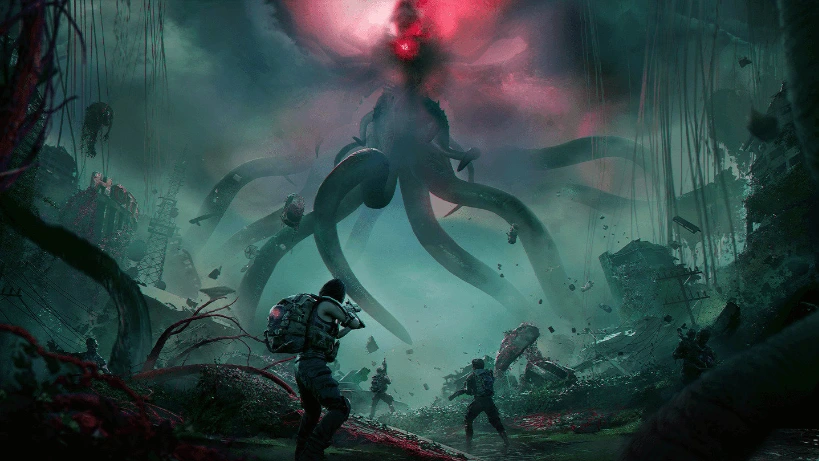 In Once Human, you'll need to manage basic exploration and combat controls. However, you also need to manage situational controls, such as navigating the game's interface, driving vehicles, and more. Pay careful attention to the game's tutorials to learn how everything works. However, you can always return to our handy guide if you need a reminder!
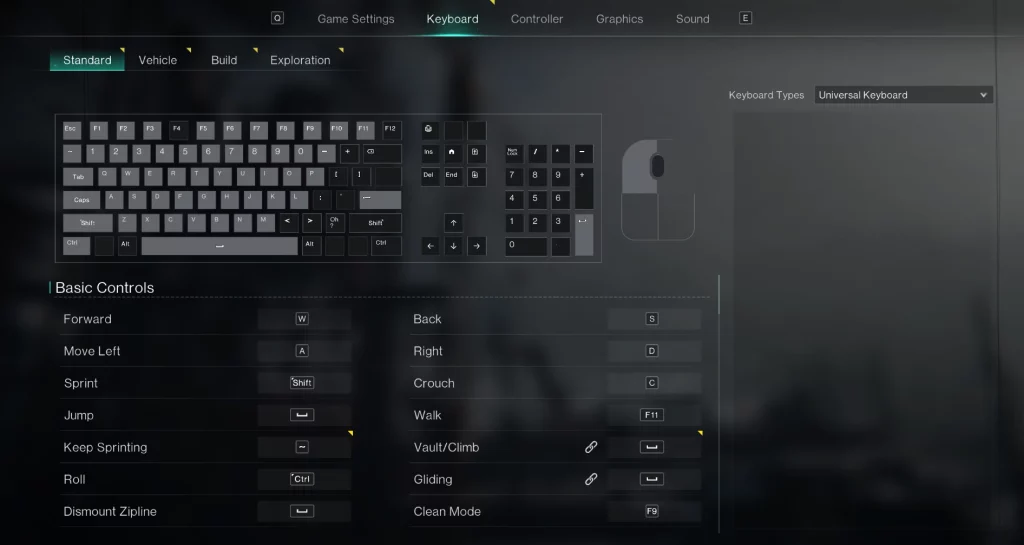
Once Human Controls & Keybinds (PC)
In Once Human, you'll need to manage basic exploration and combat controls. However, you also need to manage situational controls, such as navigating the game's interface, driving vehicles, and more. Pay careful attention to the game's tutorials to learn how everything works. However, you can always return to our handy guide if you need a reminder!
Basic Controls
- Forward: W
- Back: S
- Move Left: A
- Move Right: D
- Sprint: Shift
- Crouch: C
- Jump: Spacebar
- Walk: F11
- Keep Sprinting: ~
- Vault/Climb: Spacebar
- Roll: Ctrl
- Gliding: Spacebar
- Dismount Zipline: Spacebar
- Clean Mode: F9
Common Functions
- Summon Vehicles: G
- Interact with Target: F
- Spacetime: Q
- Collect Water: G
- Launch PvP: P
- Camp: T
- Function Wheel: Tab
- Expressions Wheel: X
- Quick Pin: Click in Scroll Wheel
- Track Task: Y
- Flashlight: N
- Pin Wheel: Click in Scroll Wheel
- Whispers: H
- Check Player: Z
System Interface
- Item Backpack: I
- Gear Backpack: K
- Cradle: O
- Blueprint: Unbound by default
- Mods: Unbound by default
- Cosmetics: Unbound by default
- World Map: M
- Task: L
- Journey: J
- Survival Manual: F6
- Field Guide: Unbound by default
- Build: B
- Team: U
- HIVE: Unbound by default
- Warband: Unbound by default
- Shop: F2
- Battle Pass: Unbound by default
- Sign Up: Y
- Events: F3
- Settings: Unbound by default
- System Menu: Esc
- Manage Eternaland: F7
- Logistics: F8
Combat
- Fire: Left Mouse Click
- Aim: Right Mouse Click
- Reload: R
- Switch to OTS: Right Mouse Click
- Weapon 1: 1
- Weapon 2: 2
- Switch to Melee Weapon: 3
- Quick Switch Weapon: Use Scroll Wheel
- Holster Weapon: H
- Switch Camera: Caps
- Melee Attack: V
- Melee Heavy Attack: Right Mouse Click
- Place Vehicle_Exit: Esc
- Place Vehicle_Confirm: Left Mouse Click
- Vehicle Camera Zoom: Alt + Use Scroll Wheel
- Deviation Control: E
- Deviation Battle Skill: E
- Deviation Signature Move: X
Hotbar
- Item 1: 4
- Item 2: 5
- Item 3: 6
- Item 4: 7
- Item 5: 8
- Item 6: 9
- Item 7: 0
- Item 8: -
Chat
- Send Messages: Enter
- Voice Chat: F5
- Open Private Chat: F1
- Interact: H
Story
- Skip Cutscene: Spacebar
- Upload Configuration data: F10
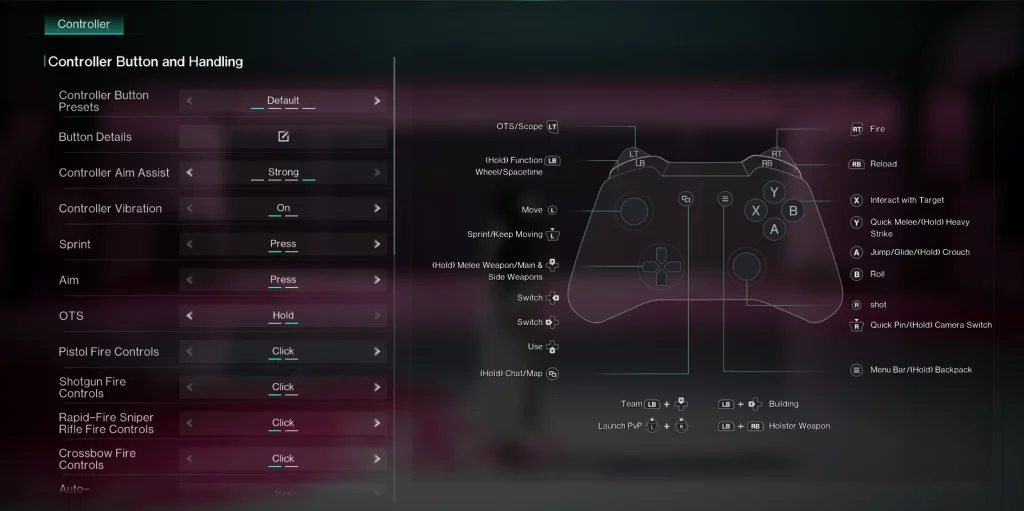
Once Human Controls on Controller (Xbox & PlayStation)
Xbox Controller
- OTS/Scope: LT
- Fire: RT
- (Hold) Function & Wheel/Spacetime: LB
- Reload: RB
- Move: Move Left Stick
- Sprint/Keep Moving: Click in Left Stick
- (Hold) Melee Weapon/Main & Side Weapons: Up on Directional Pad
- Switch: Right & Left on Directional Pad
- Use: Down on Directional Pad
- (Hold) Chat/Map: View Button
- Interact with Target: X
- Quick Melee/(Hold) Heavy Strike: Y
- Jump/Glide/(Hold) Crouch: A
- Roll: B
- Move Camera: Move Right Stick
- Quick Pin/(Hold) Camera Switch: Click in Right Stick
- Menu Bar/(Hold) Backpack: Menu Button
- Team: LB + Up on Directional Pad
- Building: LB + Left on Directional Pad
- Launch PvP: Click in Left Stick + Click in Right Stick
- Holster Weapon: LB + RB
PlayStation Controller
- OTS/Scope: L2
- Fire: R2
- (Hold) Function & Wheel/Spacetime: L1
- Reload: R1
- Move: Move Left Stick
- Sprint/Keep Moving: Click in Left Stick
- (Hold) Melee Weapon/Main & Side Weapons: Up on Directional Pad
- Switch: Right & Left on Directional Pad
- Use: Down on Directional Pad
- (Hold) Chat/Map: Click in Touchpad
- Interact with Target: Square
- Quick Melee/(Hold) Heavy Strike: Triangle
- Jump/Glide/(Hold) Crouch: Cross
- Roll: Circle
- Move Camera: Move Right Stick
- Quick Pin/(Hold) Camera Switch: Click in Right Stick
- Menu Bar/(Hold) Backpack: Options Button
- Team: L1 + Up on Directional Pad
- Building: L1 + Left on Directional Pad
- Launch PvP: Click in Left Stick + Click in Right Stick
- Holster Weapon: L1 + R1

您对这篇博客有何评价?
分享您的看法,帮助我们将博客做得更好!
不喜欢
一般
喜欢

需要游戏服务器吗?
租用一台游戏服务器,您可以和朋友们在极低延迟和自定义设置下私密游玩。从 110+ 款游戏中挑选您的最爱,邀请全球玩家,享受私密对战,或者按照您自己的规则建立属于您的在线社区。








获取第一手独家资讯!
订阅我们的电子邮件,获取有关我们托管游戏、公司新闻和独家优惠的最新动态。随时掌握一手资讯!













