

Minecraft Shelves Guide: Powered Shelf Blocks, Storage Limits, & More
发布于 ,作者

分享:

分享至 X

分享至 Facebook

分享至 Threads

分享至 Bluesky

复制到剪贴板

通过电子邮件分享
A new way to store items has arrived, and like item frames, everything within the block is visible at all times! So, today, we explore shelf blocks, and the secret features they hide, in our Minecraft shelves guide.
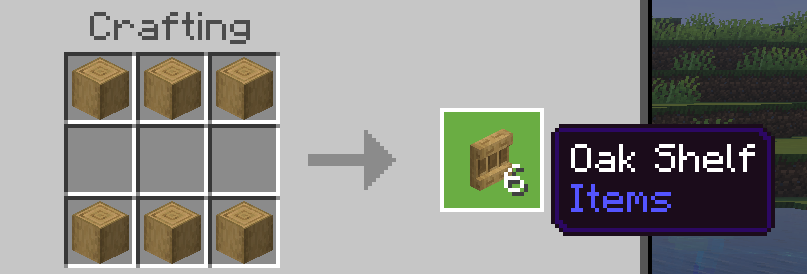 Shelf blocks have been added to all existing wood sets, including bamboo, crimson fungi, and warped fungi. To craft some of these nifty storage blocks of your very own, you need only gather six matching stripped logs and place them along the top and bottom row of a crafting table. This will produce six shelves, matching the stripped logs used to craft them.
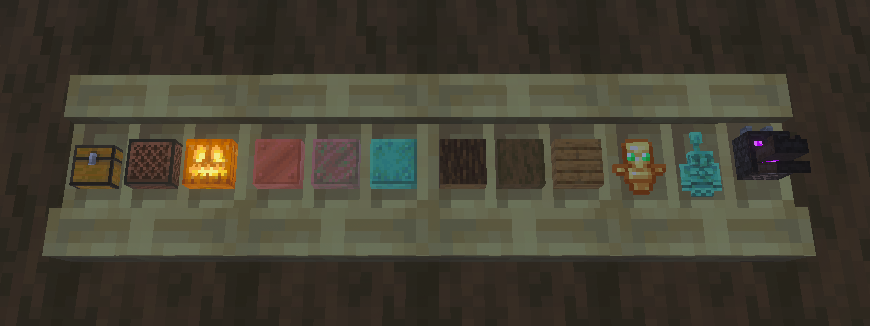 Each shelf block can store three items, with one stack of storage space for each. To store an item, simply right-click an open spot on the shelf. This will visibly store the item, much like an item frame. Right-clicking the item again will retrieve the entire stack.
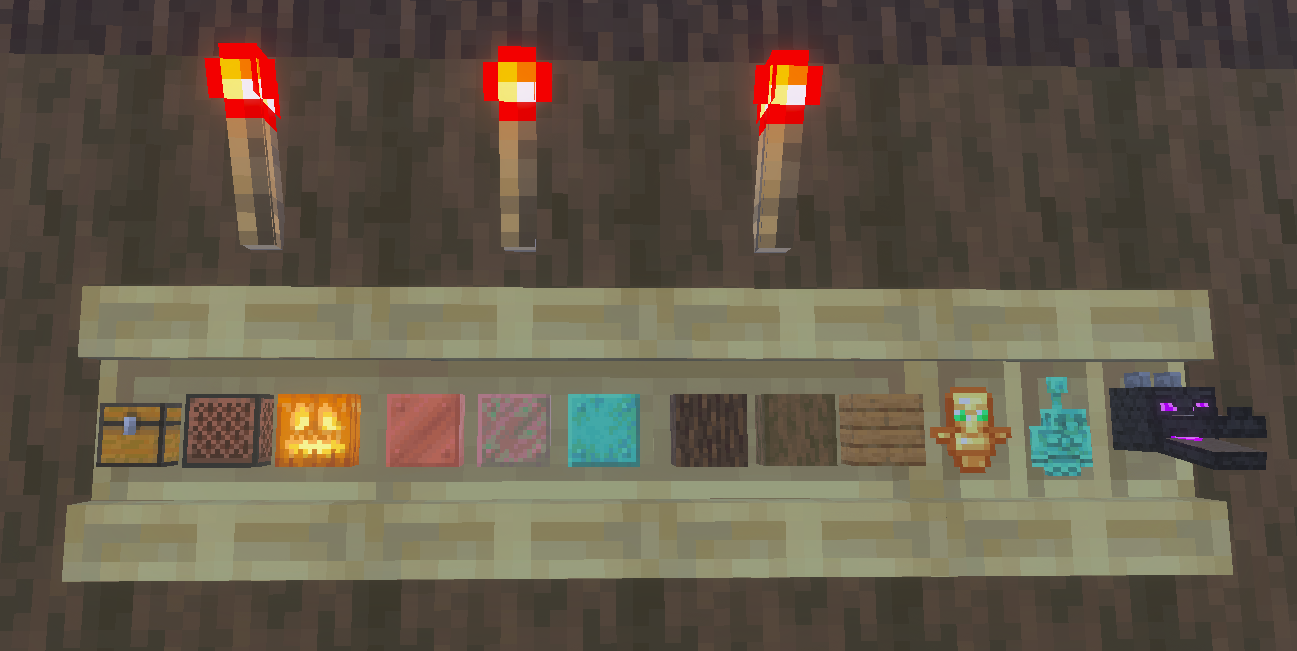 When a shelf block is powered by redstone of any kind, such as a redstone torch, it gains a new appearance alongside new features. Any player that right-clicks a powered shelf block will automatically swap the last three item slots on their hotbar with whatever is stored. This feature can be expanded further by connecting three powered shelf blocks, allowing players to swap their entire hotbar with the click of a button.
This effectively allows players to create loadouts that can be swapped with ease at any time. For example, three powered shelf blocks could be used to swap your mining hotbar on the way out of the mines for a building or combat oriented one. One could even create an armory where the most effective loadouts are available for each and every boss.
To tell if your Minecraft shelves are powered, check to see if the vertical lines that divide the stored items are still present. If they are, the shelves are not powered.
When a shelf block is powered by redstone of any kind, such as a redstone torch, it gains a new appearance alongside new features. Any player that right-clicks a powered shelf block will automatically swap the last three item slots on their hotbar with whatever is stored. This feature can be expanded further by connecting three powered shelf blocks, allowing players to swap their entire hotbar with the click of a button.
This effectively allows players to create loadouts that can be swapped with ease at any time. For example, three powered shelf blocks could be used to swap your mining hotbar on the way out of the mines for a building or combat oriented one. One could even create an armory where the most effective loadouts are available for each and every boss.
To tell if your Minecraft shelves are powered, check to see if the vertical lines that divide the stored items are still present. If they are, the shelves are not powered.
How to Craft Minecraft Shelves
Shelf blocks have been added to all existing wood sets, including bamboo, crimson fungi, and warped fungi. To craft some of these nifty storage blocks of your very own, you need only gather six matching stripped logs and place them along the top and bottom row of a crafting table. This will produce six shelves, matching the stripped logs used to craft them.
Unpowered Shelf Blocks
Each shelf block can store three items, with one stack of storage space for each. To store an item, simply right-click an open spot on the shelf. This will visibly store the item, much like an item frame. Right-clicking the item again will retrieve the entire stack.
Powered Shelf Blocks
When a shelf block is powered by redstone of any kind, such as a redstone torch, it gains a new appearance alongside new features. Any player that right-clicks a powered shelf block will automatically swap the last three item slots on their hotbar with whatever is stored. This feature can be expanded further by connecting three powered shelf blocks, allowing players to swap their entire hotbar with the click of a button.
This effectively allows players to create loadouts that can be swapped with ease at any time. For example, three powered shelf blocks could be used to swap your mining hotbar on the way out of the mines for a building or combat oriented one. One could even create an armory where the most effective loadouts are available for each and every boss.
To tell if your Minecraft shelves are powered, check to see if the vertical lines that divide the stored items are still present. If they are, the shelves are not powered.
您对这篇博客有何评价?
分享您的看法,帮助我们将博客做得更好!
不喜欢
一般
喜欢

需要游戏服务器吗?
租用一台游戏服务器,您可以和朋友们在极低延迟和自定义设置下私密游玩。从 110+ 款游戏中挑选您的最爱,邀请全球玩家,享受私密对战,或者按照您自己的规则建立属于您的在线社区。








获取第一手独家资讯!
订阅我们的电子邮件,获取有关我们托管游戏、公司新闻和独家优惠的最新动态。随时掌握一手资讯!













