

Minecraft Minecart Update: Details, Commands, & More
发布于 ,作者

分享:

分享至 X

分享至 Facebook

分享至 Threads

分享至 Bluesky

复制到剪贴板

通过电子邮件分享
(Estimated Read Time: 6 Minutes)
Despite being called Minecraft, minecarts have had less and less use with each passing update. However, as of just last week, they have become more fun than ever! So, today, we explore the Minecraft minecart update coming to experimental in Minecraft 1.21.2.Minecraft 1.21.2 Minecart Update Overview
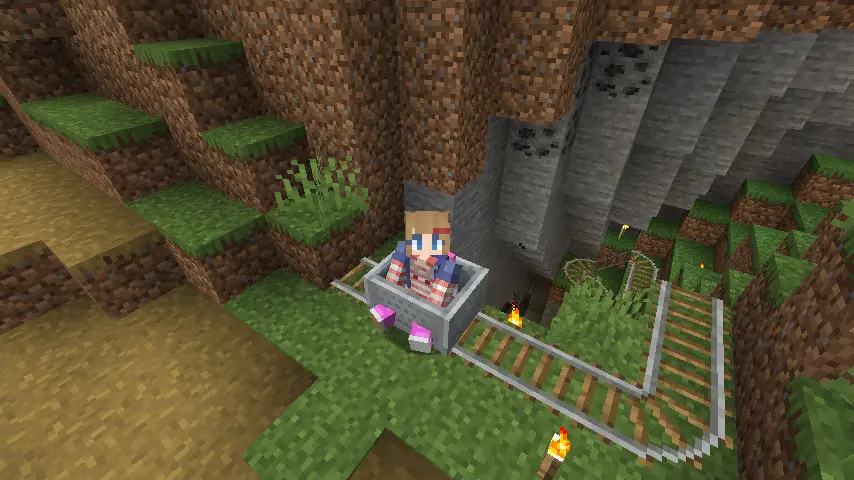 Two snapshots have been released so far, adding optional experimental updates to minecarts in 1.21.2. Below, we have listed their exact patch notes, but first, let’s get to the general overview!
Minecarts jump better than ever before and properly maintain momentum when launched from tracks into the air. Additionally, a new gamerule was added that changes the minecart’s maximum speed, allowing minecarts with enough powered rails to move faster than anything else in the game.
Two snapshots have been released so far, adding optional experimental updates to minecarts in 1.21.2. Below, we have listed their exact patch notes, but first, let’s get to the general overview!
Minecarts jump better than ever before and properly maintain momentum when launched from tracks into the air. Additionally, a new gamerule was added that changes the minecart’s maximum speed, allowing minecarts with enough powered rails to move faster than anything else in the game.
Minecraft 1.21.2 Snapshot 24W33A
Movement Changes- Minecarts will articulate their movement better when going fast, riding on the rail all the time
- Minecarts will now smoothly turn along with the track and are less likely to halt or derail
- Minecarts can now jump better
- They keep their vertical momentum when the track ends with a slope
- Minecarts will tilt to visually articulate while in the air
- No rail grinding sound is played when Minecarts are flying through the air
- Added a new accessibility setting that makes players follow the rotation of Minecarts they ride
- Defaults to off
- Only has effect when within a world with the experiment enabled
- Added new gamerule minecartMaxSpeed that changes the maximum speed of Minecarts
- Defaults to 8 and goes up to 1000 blocks per second.
- Setting it to a specific value does not guarantee that a minecart will reach that particular max speed - there are built in air resistances and similar effects that the speed added through slopes or powered rails need to overcome
- This gamerule only exists in worlds with the experiment enabled
- Minecarts can no longer be placed within another Minecart by the player or a dispenser
- Minecarts can now consistently be placed next to each other along a track
- Minecarts now pick up mobs more consistently when moving along a track
- We are aware that these changes will make certain contraptions such as ‘piston bolts’ not work at all, or have their behavior changed
- Very delicate rail networks will have their timings changed due to slight changes in speeds, movement distance, friction etc.
- Contraptions that rely on Minecarts snapping to rails will no longer work, or have their behavior changed
Minecraft 1.21.2 Snapshot 24W34A
Minecart Improvements- Minecarts no longer forcefully snap to the center of a block when landing on a rail
- Minecarts snap to corners along the diagonal, and snaps after being pushed by a Piston
- This allows for Piston bolts and similar contraptions
- Dispensers are allowed to stack Minecarts again
- Minecarts now more easily come to rest at opposing slopes
- Minecarts no longer tilt during a short fall, or when they are falling straight down
- Minecarts are now placed (or dispensed) with the correct rotation straight away when put on rails
- They are also placed with the correct rotation onto slopes
- Minecarts no longer phase through blocks on slopes when going up or down, they collide instead
The New Minecart Gamerule
- /gamerule minecartMaxSpeed 1000
How to Install the Minecraft Minecart Update Snapshot
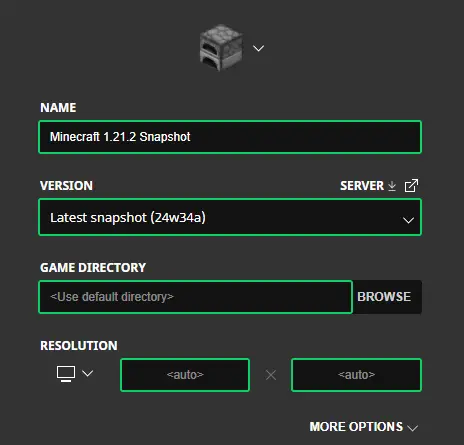 Installing the Minecraft minecart update begins right inside the Minecraft Launcher before clicking play. Below, we have detailed every step, including those needed to enable experimental features once in-game.
- First, open the Minecraft Launcher and enable snapshots under the ‘Installations’ tab.
- Second, click ‘New Installation’ and then ‘Latest Snapshot’ in the drop-down menu.
- Third, click ‘Create.’
- First, click ‘Create New World’ and then ‘Experiments.’
- Second, enable all the experimental features you would like to see in your game. ‘Minecart Improvments’ is the only one required for features relating to minecarts in Minecraft 1.21.2.
- Third, click ‘Done,’ and after giving your world a fun name, select ‘Create New World’ again.

您对这篇博客有何评价?
分享您的看法,帮助我们将博客做得更好!
不喜欢
一般
喜欢

需要游戏服务器吗?
租用一台游戏服务器,您可以和朋友们在极低延迟和自定义设置下私密游玩。从 110+ 款游戏中挑选您的最爱,邀请全球玩家,享受私密对战,或者按照您自己的规则建立属于您的在线社区。








获取第一手独家资讯!
订阅我们的电子邮件,获取有关我们托管游戏、公司新闻和独家优惠的最新动态。随时掌握一手资讯!













