

Minecraft 1.21 Optifine in Five Easy Steps
发布于 ,作者

分享:

分享至 X

分享至 Facebook

分享至 Threads

分享至 Bluesky

复制到剪贴板

通过电子邮件分享
(Estimated Read Time: 3 Minutes)
Since Optifine’s initial release over ten years ago, it has gone on to help countless players across the globe achieve performances only those with higher-end computers would typically know. Now, with the recent release of Minecraft 1.21, the time has once more for updates and fresh installs. So, today, we explain step by step how to install Minecraft 1.21 Optifine.Minecraft 1.21 Optifine in Five Easy Steps
Step 1: Install Minecraft Java Edition
 The first step to installing Optifine is ensuring Minecraft Java Edition has been installed, and Minecraft 1.21 has been played at least once. Optifine cannot be properly installed if either of those requirements has not been done before. Upon completion, close Minecraft and proceed to step 2.
Step 2: Install Java


Step 3: Download Optifine
 With Minecraft 1.21 and Java installed, it is time to head to the official Optifine website to download Optifine for Minecraft 1.21. The official Optifine website, found here, is safe to download from, but be wary of its ads, especially if you find yourself on an ad webpage.
Should the downloaded jar file not include Optifine in its name alongside the version, delete the file and immediately run a virus scan. Be very careful to only select the official download button.
With Minecraft 1.21 and Java installed, it is time to head to the official Optifine website to download Optifine for Minecraft 1.21. The official Optifine website, found here, is safe to download from, but be wary of its ads, especially if you find yourself on an ad webpage.
Should the downloaded jar file not include Optifine in its name alongside the version, delete the file and immediately run a virus scan. Be very careful to only select the official download button.
Step 4: Open Optfine with Java
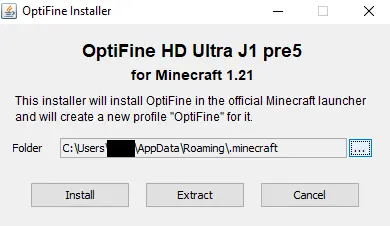 Once Optifine has been safely downloaded, move the file to your desktop, right-click it, and select “Open With…” Java should be a selectable option that can then be given a click. This will open the Optifine installer, which should have three options. Assuming the directory hasn’t been changed, simply click install, wait for the successful installation window to appear, and then open the game.
Step 5: Select the Optifine Minecraft Profile.
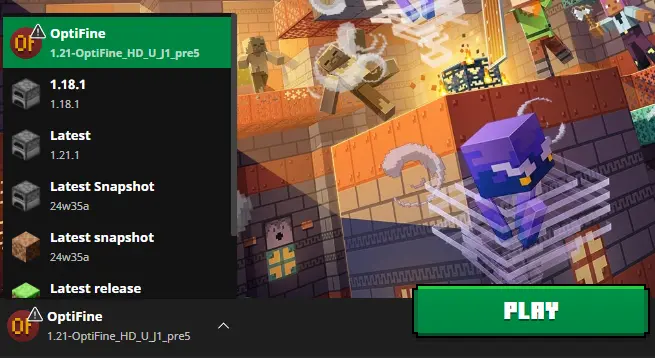 Finally, within the Minecraft launcher, a new Java Edition profile should be in the dropdown menu to the left of “Play” titled Optifine. Select it, click play, and then hop into the game. With that, the installation is complete!
您对这篇博客有何评价?
分享您的看法,帮助我们将博客做得更好!
不喜欢
一般
喜欢

需要游戏服务器吗?
租用一台游戏服务器,您可以和朋友们在极低延迟和自定义设置下私密游玩。从 110+ 款游戏中挑选您的最爱,邀请全球玩家,享受私密对战,或者按照您自己的规则建立属于您的在线社区。








获取第一手独家资讯!
订阅我们的电子邮件,获取有关我们托管游戏、公司新闻和独家优惠的最新动态。随时掌握一手资讯!













