

How to Update Minecraft Bedrock on PC
发布于 ,作者

分享:

分享至 X

分享至 Facebook

分享至 Threads

分享至 Bluesky

复制到剪贴板

通过电子邮件分享
Minecraft Bedrock Edition should update automatically upon being opened, but in the rare instances where that is not the case, we have a few easy steps to try. Today, we answer how to update Minecraft Bedrock on PC.
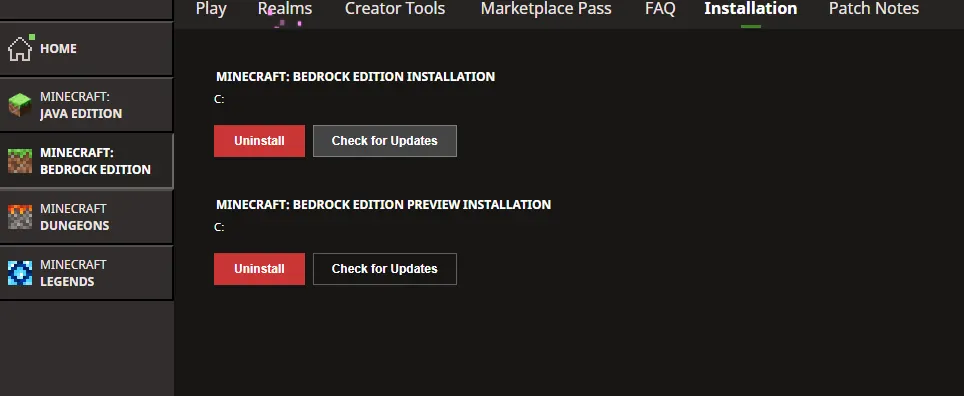 The first fix to attempt is manually checking for updates within the Minecraft launcher. This is done following the short few steps below.
 The second fix to attempt is forcing the update via the Microsoft Store. The exact steps for this will vary slightly depending on the version of Windows in use, but it is a feature on at least Windows 10 and up. Below are a general set of steps that should get you there.
 If both methods above were attempted with no luck, the update itself may simply not be out yet. Mojang has a tendency not to give out exact release times, and that can make when the update actually hits the launcher pretty random. Coming back in thirty minutes to an hour could very well resolve the problem.
Minecraft Launcher Update Check
The first fix to attempt is manually checking for updates within the Minecraft launcher. This is done following the short few steps below.
- Open the Minecraft Launcher.
- Select Minecraft Bedrock Edition in the left sidebar.
- Select the installation tab at the top of the screen.
- Click the “Check for Updates” Button.
Microsoft Store
The second fix to attempt is forcing the update via the Microsoft Store. The exact steps for this will vary slightly depending on the version of Windows in use, but it is a feature on at least Windows 10 and up. Below are a general set of steps that should get you there.
- Open the Microsoft Store.
- Click “Library” on the left sidebar. (Windows 11 Users may see an updates tab instead.)
- Find Minecraft for Windows in the list.
- Click Update.
Not Yet Out
If both methods above were attempted with no luck, the update itself may simply not be out yet. Mojang has a tendency not to give out exact release times, and that can make when the update actually hits the launcher pretty random. Coming back in thirty minutes to an hour could very well resolve the problem.
您对这篇博客有何评价?
分享您的看法,帮助我们将博客做得更好!
不喜欢
一般
喜欢

需要游戏服务器吗?
租用一台游戏服务器,您可以和朋友们在极低延迟和自定义设置下私密游玩。从 110+ 款游戏中挑选您的最爱,邀请全球玩家,享受私密对战,或者按照您自己的规则建立属于您的在线社区。








获取第一手独家资讯!
订阅我们的电子邮件,获取有关我们托管游戏、公司新闻和独家优惠的最新动态。随时掌握一手资讯!













