

How to Install RLCraft
发布于 ,作者

分享:

分享至 X

分享至 Facebook

分享至 Threads

分享至 Bluesky

复制到剪贴板

通过电子邮件分享
(Estimated Read Time: 3 Minutes)
RLCraft is one of the most difficult Minecraft modpacks ever released but installing it shouldn’t be the part that is hard. So, today, we explain step-by-step how to install RLCraft for both single-player and online.Step 1: Install a Mod Manager
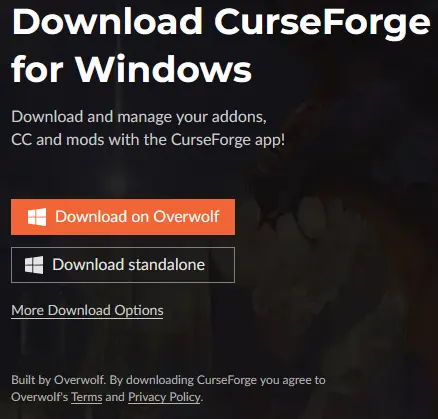 The easiest method for installing RLCraft is using a mod manager such as the CurseForge app. This will not only download all the files but also set them up in a custom Minecraft profile, making the hardest step of this guide merely clicking play.
For this guide, we will be proceeding with the CurseForge app, which can be found here.
The easiest method for installing RLCraft is using a mod manager such as the CurseForge app. This will not only download all the files but also set them up in a custom Minecraft profile, making the hardest step of this guide merely clicking play.
For this guide, we will be proceeding with the CurseForge app, which can be found here.
Step 2: Select “Add a Game”
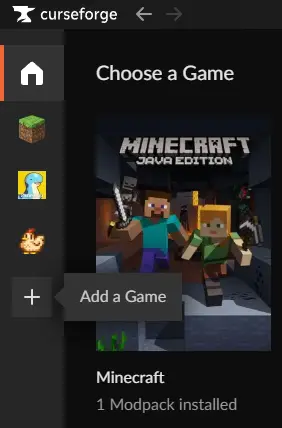 The CurseForge app can be used for many games ranging from Stardew Valley to World of Warcraft, but in this case, our goal is to add Minecraft. Minecraft may already be present for some users, but for others, the scan option or manually locating it are both options found by clicking the “+” symbol on the left side of the window.
Step 3: Install RLCraft
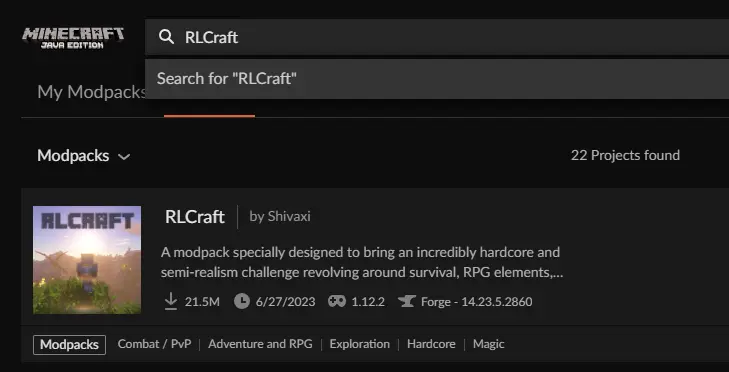 Once Minecraft has been added, select the grass block icon on the left side of the window. This will open a page with “My Modpacks,” “Browse,” and “Servers” along the top. In our case, browse will be selected which should then list a variety of modpacks.
Select the search bar at the top and type RLCraft. The very first modpack should be RLCraft by Shivaxi with over 20,000,000 downloads. Select it and click “Install” on the top right of the window.
Once Minecraft has been added, select the grass block icon on the left side of the window. This will open a page with “My Modpacks,” “Browse,” and “Servers” along the top. In our case, browse will be selected which should then list a variety of modpacks.
Select the search bar at the top and type RLCraft. The very first modpack should be RLCraft by Shivaxi with over 20,000,000 downloads. Select it and click “Install” on the top right of the window.
Step 4: Allocating RAM
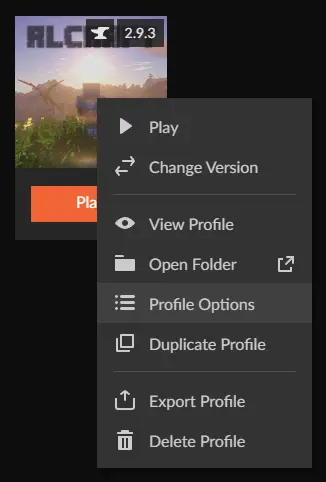 After installing RLCraft, return to the “My Modpacks” tab and right-click RLCraft. A menu should then appear with “Profile Options” listed inside. Select “Profile Options” and uncheck the box next to “Use System Memory Settings.” After doing so, a bar will appear, which can be adjusted.
For large modpacks such as RLCraft, no less than 4000MB is recommended. Once set, select “Done.”
After installing RLCraft, return to the “My Modpacks” tab and right-click RLCraft. A menu should then appear with “Profile Options” listed inside. Select “Profile Options” and uncheck the box next to “Use System Memory Settings.” After doing so, a bar will appear, which can be adjusted.
For large modpacks such as RLCraft, no less than 4000MB is recommended. Once set, select “Done.”
Step 5: Click Play!
 All that remains is simply clicking play. This will open the Minecraft Launcher, where a brand new modded profile is completely set up and ready to go. Upon clicking play there, RLCraft will start up and begin to load.
How to Install RLCraft
With the five steps above complete, RLCraft can now be enjoyed in both multiplayer and alone! For those seeking a server to play with friends, look further than BisectHosting, where code Shivaxi gets 25% off your first order. Until Next Time, BisectHosting =)
您对这篇博客有何评价?
分享您的看法,帮助我们将博客做得更好!
不喜欢
一般
喜欢

需要游戏服务器吗?
租用一台游戏服务器,您可以和朋友们在极低延迟和自定义设置下私密游玩。从 110+ 款游戏中挑选您的最爱,邀请全球玩家,享受私密对战,或者按照您自己的规则建立属于您的在线社区。








获取第一手独家资讯!
订阅我们的电子邮件,获取有关我们托管游戏、公司新闻和独家优惠的最新动态。随时掌握一手资讯!













