

How to Get the Minecraft Twitch Cape & Glitch Mask
发布于 ,作者

分享:

分享至 X

分享至 Facebook

分享至 Threads

分享至 Bluesky

复制到剪贴板

通过电子邮件分享
(Estimated Read Time: 4 Minutes)
Minecraft’s 15th anniversary is finally here, featuring multiple celebrations with more already near! So, today, we explore how to get the Minecraft Twitch cape and glitch mask alongside other secrets that Mojang is likely to share.Minecraft’s 15th Anniversary Celebration!
https://twitter.com/Minecraft/status/1790446035996639572In celebration of Minecraft’s 15th anniversary, Mojang will be releasing new cosmetics every day for the next 15 days, including the Minecraft Twitch cape and glitch mask, which we have provided the details for below. Each daily reward will have different requirements, and many will likely come from collaborations, with TikTok being a confirmed example of another one. Regardless of their source, all Minecraft 15th anniversary codes expire towards the end of June 2024, so make sure to get them before they are gone!
How to Get the Minecraft Twitch Cape & Glitch Mask
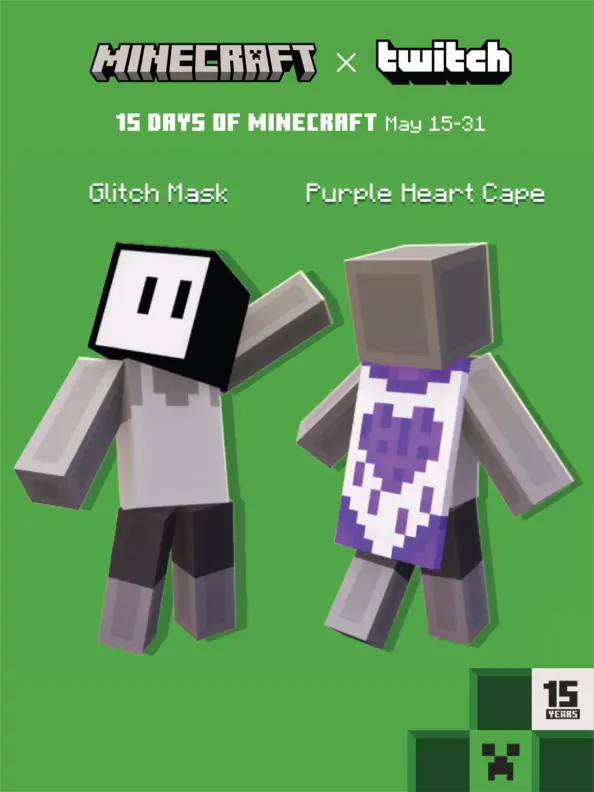 Twitch users will have a chance to earn two exclusive codes from May 15 to May 31. The Minecraft Twitch cape is confirmed to be rewarded from a watch quest, while the glitch mask is confirmed to be from a support a streamer event. Below, we have listed the exact requirements for both.
- Minecraft Twitch Cape: Watch 15 minutes of any participating Twitch Partner or Affiliate broadcasting in the Minecraft category.
- Glitch Mask: Visit any participating Twitch Partner or Affiliate broadcasting in the Minecraft category and purchase one subscription of any tier. Prime Subs will not grant the reward.
How to Change Capes: Java Edition
To check if you have any capes or to change the one you are wearing on Java Edition, simply open the official Minecraft website and follow the steps below.- Select “Account” in the top right corner and then “Login.”
- Click “My Games” on the left side of your Minecraft profile.
- Under “Minecraft: Java Edition,” select “Change Skin.”
- Scroll down to “Change Your Cape - PC/Mac.”
- Click your desired cape.
How to Change Capes: Bedrock Edition
To check if you have any capes or to change the one you are wearing on Bedrock Edition, simply open the Bedrock Edition client and follow the steps below.- Login to the Minecraft Bedrock Edition client.
- Select “Dressing Room.”
- Click the red cape icon on the left side of the screen.
- Pick your desired cape and select “Equipped.”

您对这篇博客有何评价?
分享您的看法,帮助我们将博客做得更好!
不喜欢
一般
喜欢

需要游戏服务器吗?
租用一台游戏服务器,您可以和朋友们在极低延迟和自定义设置下私密游玩。从 110+ 款游戏中挑选您的最爱,邀请全球玩家,享受私密对战,或者按照您自己的规则建立属于您的在线社区。








获取第一手独家资讯!
订阅我们的电子邮件,获取有关我们托管游戏、公司新闻和独家优惠的最新动态。随时掌握一手资讯!













