

How to Find Minecraft Fireflies
发布于 ,作者

分享:

分享至 X

分享至 Facebook

分享至 Threads

分享至 Bluesky

复制到剪贴板

通过电子邮件分享
As of Minecraft snapshot 25w05a, fireflies are illuminating the night and keeping mobs at bay, but not every biome will have their light show on display. So, today, we answer how to find Minecraft fireflies and firefly bush blocks in game.
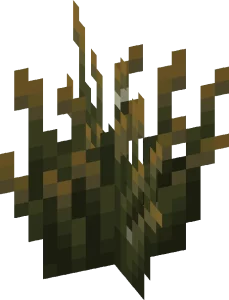
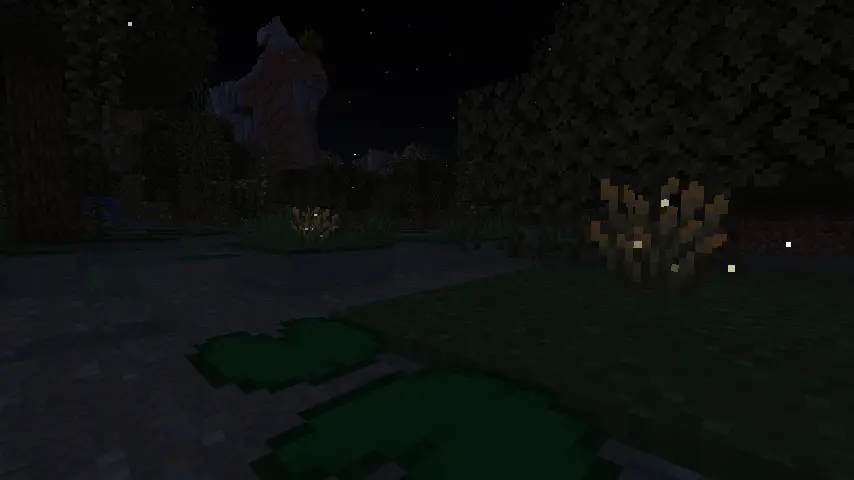 Minecraft fireflies are not mobs like bees or frogs but instead glowing particles that float around a new block called a firefly bush. During the day, these firefly bush blocks can be distinguished from regular bush blocks by their darker green base, yellowish leaf tips, and glowing (firefly) pixels on their leaves. At night, however, fireflies fly around the block’s surroundings in a beautiful mob-like display.
 Players searching for Minecraft Fireflies will need to locate and gather firefly bush blocks, which generate in swamp biomes and along rivers as of Minecraft snapshot 25w05a (Minecraft 1.21.5.) Thankfully, neither swamp biomes nor rivers are rare, and rivers can typically be found by adventuring out into the world within a few minutes’ time.
Once located, Firefly bush blocks can be gathered by hand, placed anywhere, and duplicated with bone meal. They also produce a light level of two, which prevents mobs from spawning in a very small radius around them.
Players searching for Minecraft Fireflies will need to locate and gather firefly bush blocks, which generate in swamp biomes and along rivers as of Minecraft snapshot 25w05a (Minecraft 1.21.5.) Thankfully, neither swamp biomes nor rivers are rare, and rivers can typically be found by adventuring out into the world within a few minutes’ time.
Once located, Firefly bush blocks can be gathered by hand, placed anywhere, and duplicated with bone meal. They also produce a light level of two, which prevents mobs from spawning in a very small radius around them.

 Should bad luck or an unfortunate spawn be encountered, there is always the option of using the “/locate” command. This nifty tool provides the exact coordinates of the nearest structure or biome, and by clicking them, teleports the player there.
Some would consider this cheating, but in Minecraft, that is for you to decide. The full locate biome command for swamp biomes is as follows:
Should bad luck or an unfortunate spawn be encountered, there is always the option of using the “/locate” command. This nifty tool provides the exact coordinates of the nearest structure or biome, and by clicking them, teleports the player there.
Some would consider this cheating, but in Minecraft, that is for you to decide. The full locate biome command for swamp biomes is as follows:
Minecraft Fireflies: Mob Vs Particle
Minecraft fireflies are not mobs like bees or frogs but instead glowing particles that float around a new block called a firefly bush. During the day, these firefly bush blocks can be distinguished from regular bush blocks by their darker green base, yellowish leaf tips, and glowing (firefly) pixels on their leaves. At night, however, fireflies fly around the block’s surroundings in a beautiful mob-like display.
How to Find Minecraft Fireflies
Players searching for Minecraft Fireflies will need to locate and gather firefly bush blocks, which generate in swamp biomes and along rivers as of Minecraft snapshot 25w05a (Minecraft 1.21.5.) Thankfully, neither swamp biomes nor rivers are rare, and rivers can typically be found by adventuring out into the world within a few minutes’ time.
Once located, Firefly bush blocks can be gathered by hand, placed anywhere, and duplicated with bone meal. They also produce a light level of two, which prevents mobs from spawning in a very small radius around them.
How to Find Swamp Biomes with Commands
- /locate biome minecraft:swamp

您对这篇博客有何评价?
分享您的看法,帮助我们将博客做得更好!
不喜欢
一般
喜欢

需要游戏服务器吗?
租用一台游戏服务器,您可以和朋友们在极低延迟和自定义设置下私密游玩。从 110+ 款游戏中挑选您的最爱,邀请全球玩家,享受私密对战,或者按照您自己的规则建立属于您的在线社区。








获取第一手独家资讯!
订阅我们的电子邮件,获取有关我们托管游戏、公司新闻和独家优惠的最新动态。随时掌握一手资讯!













