
Don’t Starve Together Controls Guide: PC (Controller, Keyboard), Xbox, PlayStation, & Nintendo Switch
发布于 ,作者

分享:

分享至 X

分享至 Facebook

分享至 Threads

分享至 Bluesky

复制到剪贴板

通过电子邮件分享
Don’t Starve Together is available on different gaming platforms, particularly for the PC (Windows, macOS, and Linux), Nintendo Switch, PlayStation 4 & 5, and Xbox One. So, surviving The Constant requires players to learn the controls in Don’t Starve Together.
 Remember, learning the controls in Don't Starve Together is important to ensure you'll survive and thrive in The Constant. Otherwise, you might fumble with the controls during boss fights, like the Deerclops. Below are the different controls for each Don't Starve Together version to help you learn which button to press during the right moments.
Don’t Starve Together Controls Guide
Remember, learning the controls in Don't Starve Together is important to ensure you'll survive and thrive in The Constant. Otherwise, you might fumble with the controls during boss fights, like the Deerclops. Below are the different controls for each Don't Starve Together version to help you learn which button to press during the right moments.
PC (Keyboard & Mouse)
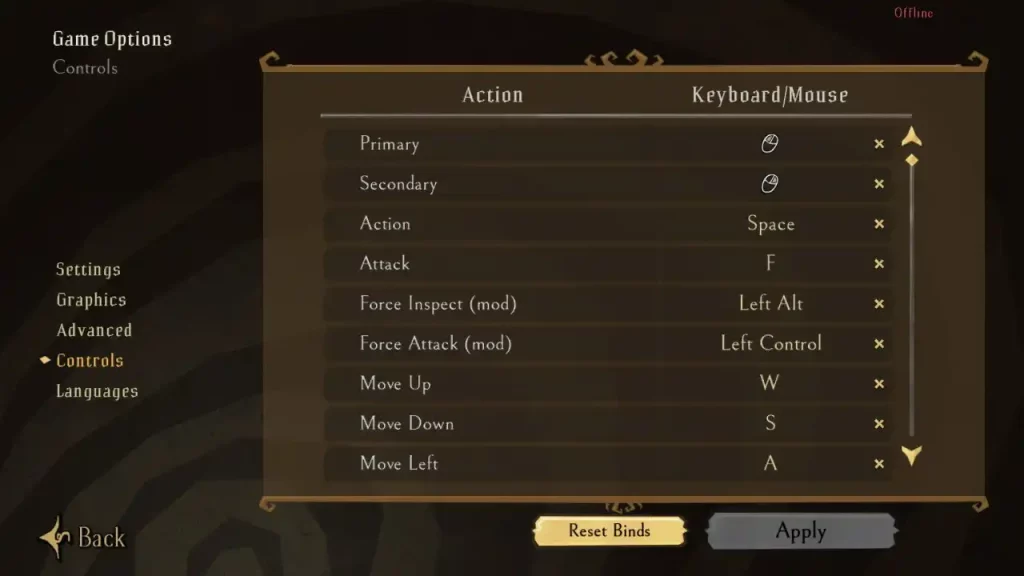
- Primary: Left mouse button
- Secondary: Right mouse button
- Action: Space
- Attack: F
- Force Inspect (mod): Left Alt
- Force Attack (mod): Left Ctrl
- Move Forward: W
- Move Left: A
- Move Backward: S
- Move Right: D
- Map: M
- Map Zoom In/Out: Mouse scroll wheel
- Rotate Left: Q
- Rotate Right: E
- Zoom In/Out: Mouse scroll wheel
- Global Chat: Y
- Whisper Chat: U
- Scoreboard: Tab
- Pause Menu: Esc
- Pause Server: P
- Inspect Self: I
- Open Crafting Menu: C
- Crafting Menu (mod): Left Ctrl
- Pinned Recipes Page Left: Comma (,)
- Pinned Recipes Page Right: Period (.)
- Force Container (mod): Left Shift
- Force Stack (mod): Left Ctrl
- Use Items in Hotbar Slots: Numbers 1 to 0
- Menu Accept: Enter
- Menu Cancel: Esc
- Menu Up: Directional button up
- Menu Down: Directional button down
- Menu Left: Directional button left
- Menu Right: Directional button right
- Menu Previous Value: Left Bracket ([)
- Menu Next Value: Right Bracket (])
- Menu Scroll Up/Down: Mouse scroll wheel
- Slash Command: Slash (/)
- Start Emoticon: Right Shift + Semicolon (;)
- Debug Console: Tilde (~)
- Debug Log: Left Ctrl + L
- Debug Render: Backspace
PC (Controller)
Note: The following Don’t Starve Together Controls uses the Xbox 360 controller as a reference. Using other controllers may change the keybinds.- Attack: X
- Action: A
- Alternate Action: B
- Move Up: Left analog stick up
- Move Down: Left analog stick down
- Move Left: Left analog stick left
- Move Right: Left analog stick right
- Rotate Left: Left bumper
- Rotate Right: Right bumper
- Map Zoom In: Left trigger
- Map Zoom Out: Right trigger
- Pause: Start
- Map: Back
- Open Crafting: Left trigger
- Open Inventory: Right trigger
- Inventory Left: Right analog stick left
- Inventory Right: Right analog stick right
- Inventory Up: Right analog stick up
- Inventory Down: Right analog stick down
- Inventory Use Self: Right directional button
- Inventory Use Scene: Left directional button
- Inventory Drop: Down directional button
- Inventory Adjust Stack: X
- Inventory Use on Item: Y
- Inventory Inspect: Y
- Menu Accept: A
- Menu Cancel: B
- Menu Previous Page: Left bumper
- Menu Next Page: Right bumper
- Menu Previous Value: Right analog stick right
- Menu Next Value: Right analog stick left
- Menu Up: Up directional button
- Menu Down: Down directional button
- Menu Left: Left directional button
- Menu Right: Right directional button
- Debug Menu: Right analog stick
Nintendo Switch
- Walk: Left analog stick
- Rotate Camera: L/R
- Inspect Item: Up directional button
- Use on World: Left directional button
- Drop Item: Down directional button
- Use on Self: Right directional button
- Map: Minus button (-)
- Pause: Plus button (+)
- Open Crafting: ZL
- Manage Inventory: ZR
- Inspect: X
- Attack: Y
- Alternate Action/Cancel: A
- Do Action/Accept: B
- Inventory Selection Social Menu: Right analog stick
PlayStation
- Walk: Left analog stick
- Rotate Camera: L1/R1
- Inspect Item: Up directional button
- Use on World: Left directional button
- Drop Item: Down directional button
- Use on Self: Right directional button
- Map: Click touch pad
- Pause: Options
- Open Crafting: L2
- Manage Inventory: R2
- Inspect: Triangle
- Attack: Square
- Alternate Action/Cancel: Circle
- Do Action/Accept: X/Cross
- Inventory Selection Social Menu: Right analog stick
Xbox
- Walk: Left analog stick
- Rotate Camera: Left bumper/Right bumper
- Inspect Item: Up directional button
- Use on World: Left directional button
- Drop Item: Down directional button
- Use on Self: Right directional button
- Map: Back
- Pause: Start
- Open Crafting: Left trigger
- Manage Inventory: Right trigger
- Inspect: Y
- Attack: X
- Alternate Action/Cancel: B
- Do Action/Accept: A
- Inventory Selection Social Menu: Right analog stick

您对这篇博客有何评价?
分享您的看法,帮助我们将博客做得更好!
不喜欢
一般
喜欢

需要游戏服务器吗?
租用一台游戏服务器,您可以和朋友们在极低延迟和自定义设置下私密游玩。从 110+ 款游戏中挑选您的最爱,邀请全球玩家,享受私密对战,或者按照您自己的规则建立属于您的在线社区。








获取第一手独家资讯!
订阅我们的电子邮件,获取有关我们托管游戏、公司新闻和独家优惠的最新动态。随时掌握一手资讯!













