Clone Hero: How to Add Songs
发布于 ,作者

分享:

分享至 X

分享至 Facebook

分享至 Threads

分享至 Bluesky

复制到剪贴板

通过电子邮件分享
Unlock near-endless music adventures in Clone Hero by adding more tracks to the game’s library. Although adding custom songs is a rewarding experience, some players may have trouble completing this task successfully. So, here’s a guide on how to add songs in Clone Hero to help you expand your personal in-game playlist today.
 Note that Clone Hero is a freeware music rhythm game with a loyal and active community. With that, certain community members frequently add chart tracks for Clone Hero for other players to download and play.
With that, the first step to adding songs to Clone Hero is to download the files. Some notable portals are the following:
Custom Songs Central
Chorus Encore
RhythmVerse
Clone Hero Download Sheet Master List
Extract the files if they come in a .zip/.rar/.7z or similar format. Then, place the extracted files in the game’s Songs folder. Remember, the files must have an audio file, song.ini, and notes.chart/notes.mid. Normally, the Clone Hero's Songs folder should be under the main Documents folder on your Windows PC unless moved. If you’re playing Clone Hero in portable mode, ensure to place the songs and other files in the Songs folder in the PlayerData folder of the game’s location on your PC.
As for Mac users, the Songs folder should be in your system’s Home folder by default. In particular, navigate to the Clone Hero folder and open the Songs folder from there. Linux users can find the Songs folder in the ~/.clonehero folder.
Next, launch Clone Hero and navigate to the Settings menu from the main screen. Here, click the General tab, and then select “Scan Songs.” Confirm the action afterward, which may take a few seconds to a few minutes, depending on various factors.
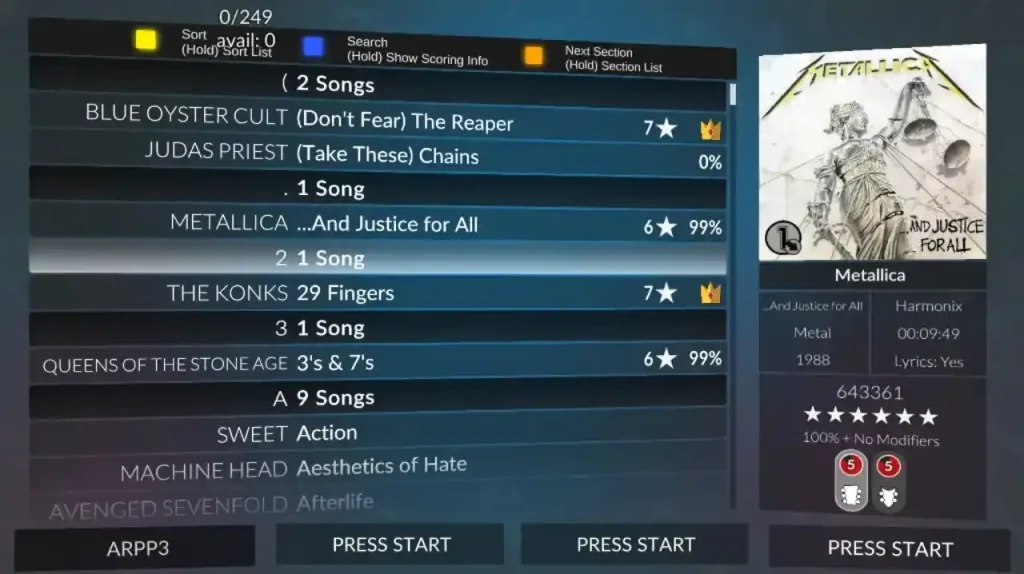
Finally, go back to the main screen and select “Quickplay.” If successful, you should see the newly added songs in the list. Now, all that’s left is to play the song and unleash your inner guitar maestro.
Note that Clone Hero is a freeware music rhythm game with a loyal and active community. With that, certain community members frequently add chart tracks for Clone Hero for other players to download and play.
With that, the first step to adding songs to Clone Hero is to download the files. Some notable portals are the following:
Custom Songs Central
Chorus Encore
RhythmVerse
Clone Hero Download Sheet Master List
Extract the files if they come in a .zip/.rar/.7z or similar format. Then, place the extracted files in the game’s Songs folder. Remember, the files must have an audio file, song.ini, and notes.chart/notes.mid. Normally, the Clone Hero's Songs folder should be under the main Documents folder on your Windows PC unless moved. If you’re playing Clone Hero in portable mode, ensure to place the songs and other files in the Songs folder in the PlayerData folder of the game’s location on your PC.
As for Mac users, the Songs folder should be in your system’s Home folder by default. In particular, navigate to the Clone Hero folder and open the Songs folder from there. Linux users can find the Songs folder in the ~/.clonehero folder.
Next, launch Clone Hero and navigate to the Settings menu from the main screen. Here, click the General tab, and then select “Scan Songs.” Confirm the action afterward, which may take a few seconds to a few minutes, depending on various factors.
Finally, go back to the main screen and select “Quickplay.” If successful, you should see the newly added songs in the list. Now, all that’s left is to play the song and unleash your inner guitar maestro.
How to Add Songs in Clone Hero
Note that Clone Hero is a freeware music rhythm game with a loyal and active community. With that, certain community members frequently add chart tracks for Clone Hero for other players to download and play.
With that, the first step to adding songs to Clone Hero is to download the files. Some notable portals are the following:
Custom Songs Central
Chorus Encore
RhythmVerse
Clone Hero Download Sheet Master List
Extract the files if they come in a .zip/.rar/.7z or similar format. Then, place the extracted files in the game’s Songs folder. Remember, the files must have an audio file, song.ini, and notes.chart/notes.mid. Normally, the Clone Hero's Songs folder should be under the main Documents folder on your Windows PC unless moved. If you’re playing Clone Hero in portable mode, ensure to place the songs and other files in the Songs folder in the PlayerData folder of the game’s location on your PC.
As for Mac users, the Songs folder should be in your system’s Home folder by default. In particular, navigate to the Clone Hero folder and open the Songs folder from there. Linux users can find the Songs folder in the ~/.clonehero folder.
Next, launch Clone Hero and navigate to the Settings menu from the main screen. Here, click the General tab, and then select “Scan Songs.” Confirm the action afterward, which may take a few seconds to a few minutes, depending on various factors.
Finally, go back to the main screen and select “Quickplay.” If successful, you should see the newly added songs in the list. Now, all that’s left is to play the song and unleash your inner guitar maestro.
您对这篇博客有何评价?
分享您的看法,帮助我们将博客做得更好!
不喜欢
一般
喜欢

需要游戏服务器吗?
租用一台游戏服务器,您可以和朋友们在极低延迟和自定义设置下私密游玩。从 110+ 款游戏中挑选您的最爱,邀请全球玩家,享受私密对战,或者按照您自己的规则建立属于您的在线社区。








获取第一手独家资讯!
订阅我们的电子邮件,获取有关我们托管游戏、公司新闻和独家优惠的最新动态。随时掌握一手资讯!