
7 Days to Die: How to Play the Experimental Branch
发布于 ,作者

分享:

分享至 X

分享至 Facebook

分享至 Threads

分享至 Bluesky

复制到剪贴板

通过电子邮件分享
Starting June 16, zombie apocalypse survivors can experience the 7 Days to Die 2.0: Storm’s Brewing Update, along with its new content, features, and improvements, by playing in the Experimental Branch. So, keep reading to learn how to access the Experimental Branch in 7 Days to Die, and enjoy Update 2.0 before everyone else!
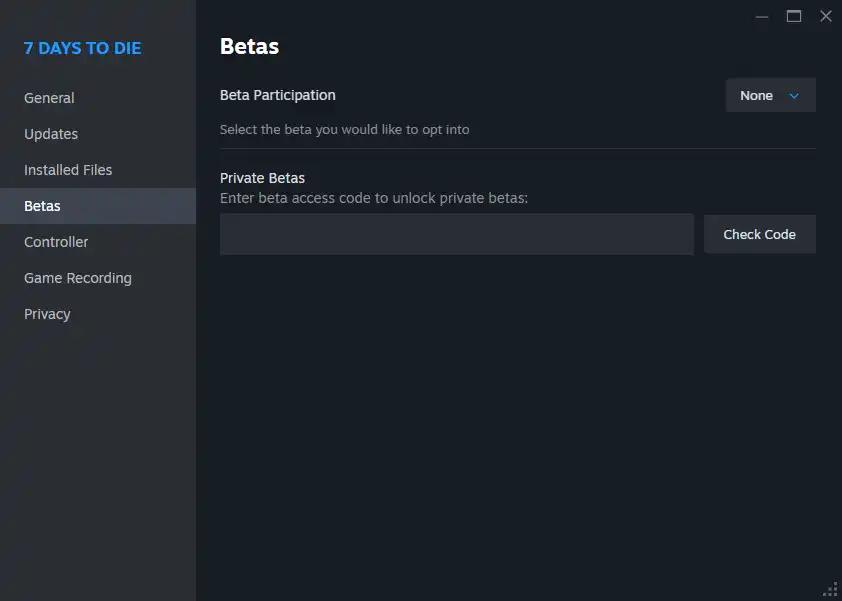 Note that the 7 Days to Die Experimental Branch is only available for PC players through Steam. The game’s console versions, particularly on PlayStation and Xbox, will generally receive the stable versions of each patch, including Update 2.0. Thankfully, the update's Stable version should be released on June 30, not too long after the Experimental Branch's version's launch date.
With that, here’s how to access the 7 Days to Die Experimental Branch and experience Update 2.0:
Note that the 7 Days to Die Experimental Branch is only available for PC players through Steam. The game’s console versions, particularly on PlayStation and Xbox, will generally receive the stable versions of each patch, including Update 2.0. Thankfully, the update's Stable version should be released on June 30, not too long after the Experimental Branch's version's launch date.
With that, here’s how to access the 7 Days to Die Experimental Branch and experience Update 2.0:
How to Play in the 7 Days to Die Experimental Branch
Note that the 7 Days to Die Experimental Branch is only available for PC players through Steam. The game’s console versions, particularly on PlayStation and Xbox, will generally receive the stable versions of each patch, including Update 2.0. Thankfully, the update's Stable version should be released on June 30, not too long after the Experimental Branch's version's launch date.
With that, here’s how to access the 7 Days to Die Experimental Branch and experience Update 2.0:
- 1. Log into your Steam account
- 2. Access your game Library and right-click on 7 Days to Die in the left sidebar
- 3. Select Properties in the context menu
- 4. Select the Betas tab in the Properties window
- 5. Click the dropdown box next to Beta Participation, and choose the latest experimental version from the list

您对这篇博客有何评价?
分享您的看法,帮助我们将博客做得更好!
不喜欢
一般
喜欢

需要游戏服务器吗?
租用一台游戏服务器,您可以和朋友们在极低延迟和自定义设置下私密游玩。从 110+ 款游戏中挑选您的最爱,邀请全球玩家,享受私密对战,或者按照您自己的规则建立属于您的在线社区。








获取第一手独家资讯!
订阅我们的电子邮件,获取有关我们托管游戏、公司新闻和独家优惠的最新动态。随时掌握一手资讯!