

Once Human Controls Guide: All PC & Controller Keybinds (Xbox, PlayStation)
tarihinde yazan:

Paylaş:

X'te Paylaş

Facebook'ta Paylaş

Threads'te Paylaş

Bluesky'da Paylaş

Panoya Kopyala

E-posta ile Paylaş
There is danger around every corner in the surreal apocalypse of Once Human. While the game has a tutorial that teaches you the basics, it's always good to brush up on the game's controls when starting. We've gathered all the info you need on Once Human controls when playing on PC with a mouse & keyboard or controller.
 In Once Human, you'll need to manage basic exploration and combat controls. However, you also need to manage situational controls, such as navigating the game's interface, driving vehicles, and more. Pay careful attention to the game's tutorials to learn how everything works. However, you can always return to our handy guide if you need a reminder!
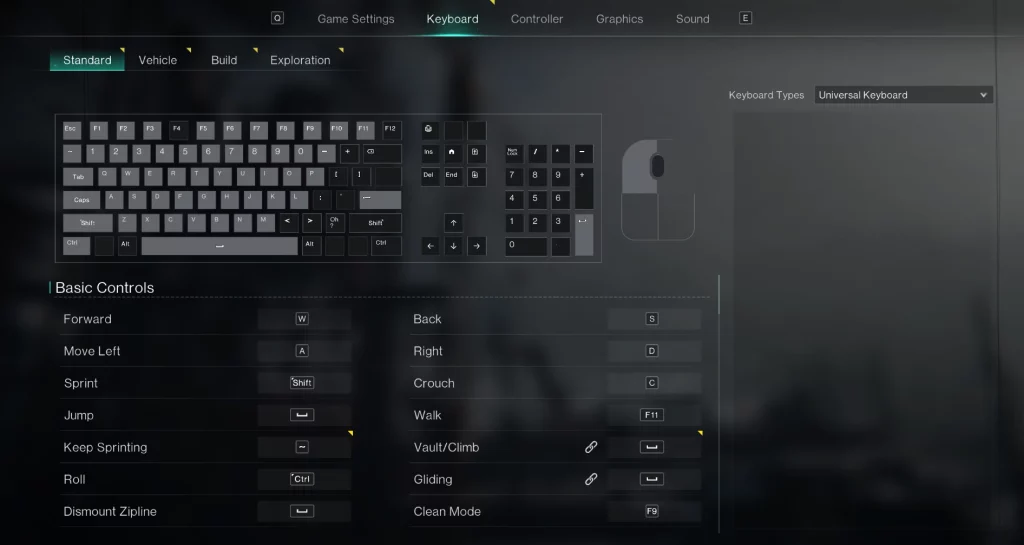
Once Human Controls & Keybinds (PC)
In Once Human, you'll need to manage basic exploration and combat controls. However, you also need to manage situational controls, such as navigating the game's interface, driving vehicles, and more. Pay careful attention to the game's tutorials to learn how everything works. However, you can always return to our handy guide if you need a reminder!
Basic Controls
- Forward: W
- Back: S
- Move Left: A
- Move Right: D
- Sprint: Shift
- Crouch: C
- Jump: Spacebar
- Walk: F11
- Keep Sprinting: ~
- Vault/Climb: Spacebar
- Roll: Ctrl
- Gliding: Spacebar
- Dismount Zipline: Spacebar
- Clean Mode: F9
Common Functions
- Summon Vehicles: G
- Interact with Target: F
- Spacetime: Q
- Collect Water: G
- Launch PvP: P
- Camp: T
- Function Wheel: Tab
- Expressions Wheel: X
- Quick Pin: Click in Scroll Wheel
- Track Task: Y
- Flashlight: N
- Pin Wheel: Click in Scroll Wheel
- Whispers: H
- Check Player: Z
System Interface
- Item Backpack: I
- Gear Backpack: K
- Cradle: O
- Blueprint: Unbound by default
- Mods: Unbound by default
- Cosmetics: Unbound by default
- World Map: M
- Task: L
- Journey: J
- Survival Manual: F6
- Field Guide: Unbound by default
- Build: B
- Team: U
- HIVE: Unbound by default
- Warband: Unbound by default
- Shop: F2
- Battle Pass: Unbound by default
- Sign Up: Y
- Events: F3
- Settings: Unbound by default
- System Menu: Esc
- Manage Eternaland: F7
- Logistics: F8
Combat
- Fire: Left Mouse Click
- Aim: Right Mouse Click
- Reload: R
- Switch to OTS: Right Mouse Click
- Weapon 1: 1
- Weapon 2: 2
- Switch to Melee Weapon: 3
- Quick Switch Weapon: Use Scroll Wheel
- Holster Weapon: H
- Switch Camera: Caps
- Melee Attack: V
- Melee Heavy Attack: Right Mouse Click
- Place Vehicle_Exit: Esc
- Place Vehicle_Confirm: Left Mouse Click
- Vehicle Camera Zoom: Alt + Use Scroll Wheel
- Deviation Control: E
- Deviation Battle Skill: E
- Deviation Signature Move: X
Hotbar
- Item 1: 4
- Item 2: 5
- Item 3: 6
- Item 4: 7
- Item 5: 8
- Item 6: 9
- Item 7: 0
- Item 8: -
Chat
- Send Messages: Enter
- Voice Chat: F5
- Open Private Chat: F1
- Interact: H
Story
- Skip Cutscene: Spacebar
- Upload Configuration data: F10
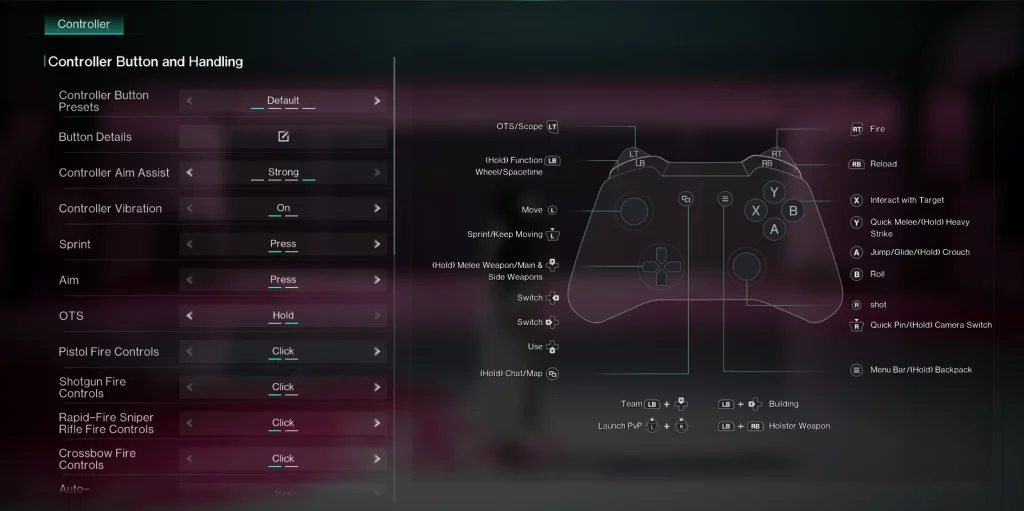
Once Human Controls on Controller (Xbox & PlayStation)
Xbox Controller
- OTS/Scope: LT
- Fire: RT
- (Hold) Function & Wheel/Spacetime: LB
- Reload: RB
- Move: Move Left Stick
- Sprint/Keep Moving: Click in Left Stick
- (Hold) Melee Weapon/Main & Side Weapons: Up on Directional Pad
- Switch: Right & Left on Directional Pad
- Use: Down on Directional Pad
- (Hold) Chat/Map: View Button
- Interact with Target: X
- Quick Melee/(Hold) Heavy Strike: Y
- Jump/Glide/(Hold) Crouch: A
- Roll: B
- Move Camera: Move Right Stick
- Quick Pin/(Hold) Camera Switch: Click in Right Stick
- Menu Bar/(Hold) Backpack: Menu Button
- Team: LB + Up on Directional Pad
- Building: LB + Left on Directional Pad
- Launch PvP: Click in Left Stick + Click in Right Stick
- Holster Weapon: LB + RB
PlayStation Controller
- OTS/Scope: L2
- Fire: R2
- (Hold) Function & Wheel/Spacetime: L1
- Reload: R1
- Move: Move Left Stick
- Sprint/Keep Moving: Click in Left Stick
- (Hold) Melee Weapon/Main & Side Weapons: Up on Directional Pad
- Switch: Right & Left on Directional Pad
- Use: Down on Directional Pad
- (Hold) Chat/Map: Click in Touchpad
- Interact with Target: Square
- Quick Melee/(Hold) Heavy Strike: Triangle
- Jump/Glide/(Hold) Crouch: Cross
- Roll: Circle
- Move Camera: Move Right Stick
- Quick Pin/(Hold) Camera Switch: Click in Right Stick
- Menu Bar/(Hold) Backpack: Options Button
- Team: L1 + Up on Directional Pad
- Building: L1 + Left on Directional Pad
- Launch PvP: Click in Left Stick + Click in Right Stick
- Holster Weapon: L1 + R1
Kendi
Once Human sunucunuzu oluşturun
Once Human sunucunuzu oluşturun
Bir plan seçin, bir oyun belirleyin ve arkadaşlarınızla oynayın!
Bültenimize Katılın
Oyun dünyasındaki en son güncellemeler için abone olun!

Discord'umuza Katılın
20.000'den fazla kafa dengi üyeden oluşan topluluğumuzun bir parçası olun!
Bu blogu nasıl değerlendirirsiniz?
Fikrinizi paylaşın ve bloglarımızı daha da iyi hale getirmemize yardımcı olun!
Beğenmedim
Nötr
Beğendim

Bir oyun sunucusuna mı ihtiyacınız var?
Siz ve arkadaşlarınızın düşük gecikme süresi ve özel ayarlarla özel olarak oynayabileceğiniz bir oyun sunucusu kiralayın. 110+ oyun arasından seçim yapın, dünyanın dört bir yanından insanları davet edin ve özel maçların keyfini çıkarın veya kendi kurallarınızla kendi çevrimiçi topluluğunuzu oluşturun.

İlgili Bloglar







İLK SENİN HABERİN OLSUN!
Barındırdığımız oyunlar, şirket haberleri ve özel fırsatlar hakkında güncellemeler için e-posta listemize katılın. Haberdar olun!













