

Minecraft 1.21 Optifine in Five Easy Steps
tarihinde yazan:

Paylaş:

X'te Paylaş

Facebook'ta Paylaş

Threads'te Paylaş

Bluesky'da Paylaş

Panoya Kopyala

E-posta ile Paylaş
(Estimated Read Time: 3 Minutes)
Since Optifine’s initial release over ten years ago, it has gone on to help countless players across the globe achieve performances only those with higher-end computers would typically know. Now, with the recent release of Minecraft 1.21, the time has once more for updates and fresh installs. So, today, we explain step by step how to install Minecraft 1.21 Optifine.Minecraft 1.21 Optifine in Five Easy Steps
Step 1: Install Minecraft Java Edition
 The first step to installing Optifine is ensuring Minecraft Java Edition has been installed, and Minecraft 1.21 has been played at least once. Optifine cannot be properly installed if either of those requirements has not been done before. Upon completion, close Minecraft and proceed to step 2.
Step 2: Install Java

Step 3: Download Optifine
 With Minecraft 1.21 and Java installed, it is time to head to the official Optifine website to download Optifine for Minecraft 1.21. The official Optifine website, found here, is safe to download from, but be wary of its ads, especially if you find yourself on an ad webpage.
Should the downloaded jar file not include Optifine in its name alongside the version, delete the file and immediately run a virus scan. Be very careful to only select the official download button.
With Minecraft 1.21 and Java installed, it is time to head to the official Optifine website to download Optifine for Minecraft 1.21. The official Optifine website, found here, is safe to download from, but be wary of its ads, especially if you find yourself on an ad webpage.
Should the downloaded jar file not include Optifine in its name alongside the version, delete the file and immediately run a virus scan. Be very careful to only select the official download button.
Step 4: Open Optfine with Java
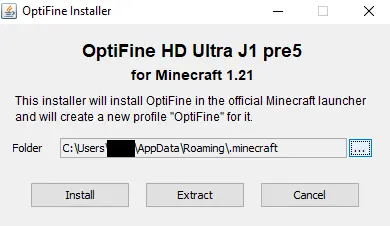 Once Optifine has been safely downloaded, move the file to your desktop, right-click it, and select “Open With…” Java should be a selectable option that can then be given a click. This will open the Optifine installer, which should have three options. Assuming the directory hasn’t been changed, simply click install, wait for the successful installation window to appear, and then open the game.
Step 5: Select the Optifine Minecraft Profile.
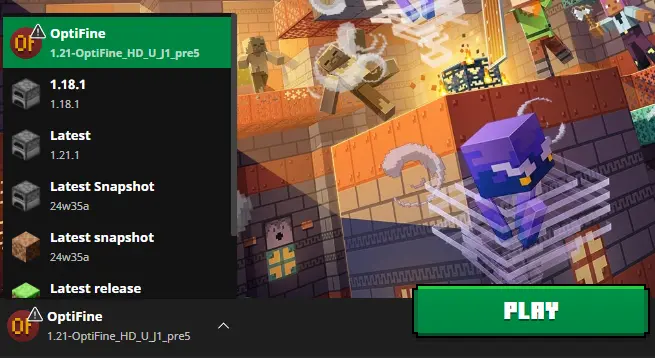 Finally, within the Minecraft launcher, a new Java Edition profile should be in the dropdown menu to the left of “Play” titled Optifine. Select it, click play, and then hop into the game. With that, the installation is complete!
Kendi
Minecraft sunucunuzu oluşturun
Minecraft sunucunuzu oluşturun
Bir plan seçin, bir oyun belirleyin ve arkadaşlarınızla oynayın!
Bültenimize Katılın
Oyun dünyasındaki en son güncellemeler için abone olun!

Discord'umuza Katılın
20.000'den fazla kafa dengi üyeden oluşan topluluğumuzun bir parçası olun!
Bu blogu nasıl değerlendirirsiniz?
Fikrinizi paylaşın ve bloglarımızı daha da iyi hale getirmemize yardımcı olun!
Beğenmedim
Nötr
Beğendim

Bir oyun sunucusuna mı ihtiyacınız var?
Siz ve arkadaşlarınızın düşük gecikme süresi ve özel ayarlarla özel olarak oynayabileceğiniz bir oyun sunucusu kiralayın. 110+ oyun arasından seçim yapın, dünyanın dört bir yanından insanları davet edin ve özel maçların keyfini çıkarın veya kendi kurallarınızla kendi çevrimiçi topluluğunuzu oluşturun.

İlgili Bloglar







İLK SENİN HABERİN OLSUN!
Barındırdığımız oyunlar, şirket haberleri ve özel fırsatlar hakkında güncellemeler için e-posta listemize katılın. Haberdar olun!













