

Introducing Starbase Fleets: A New, Simple Way to Manage Multiple Game Servers
tarihinde yazan:

Paylaş:

X'te Paylaş

Facebook'ta Paylaş

Threads'te Paylaş

Bluesky'da Paylaş

Panoya Kopyala

E-posta ile Paylaş
Running a game server can be straightforward, but managing an entire network of them can be another story. As communities grow, so does the workload for keeping servers organized, monitoring their performance, and handling maintenance.
That's why BisectHosting is excited to announce Starbase Fleets, a new feature in the BisectHosting Starbase control panel designed to make managing multiple game servers much, much easier!
With shared configurations, bulk server management tools, centralized performance monitoring, and more, Starbase Fleets brings everything you need to oversee a growing server network in one central place.
Whether you're managing a handful of independent Minecraft servers or coordinating an established gaming community across multiple regions, here's what you can expect from Starbase Fleets!
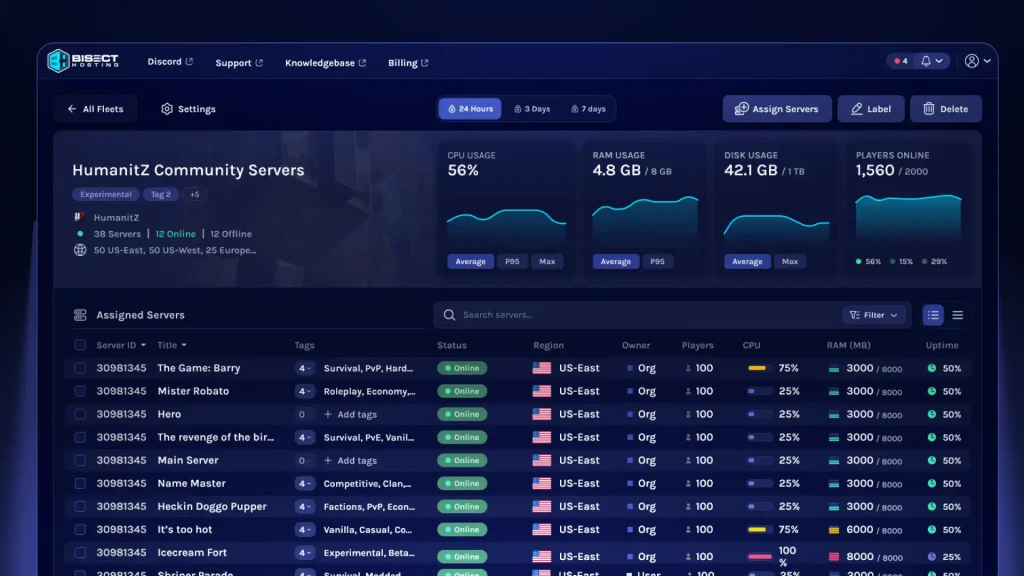
Starbase Fleets is a new feature that lets BisectHosting server owners group multiple game servers and manage them together through the Starbase control panel. Rather than handling every administrative task individually, server owners can use Fleets to monitor their servers, organize configurations, manage access, and perform actions across them. That means you can monitor CPU, RAM, and disk usage, as well as player activity and historical performance, all under one roof. You can also create organizations to manage collections of servers and invite team members with different access levels, like assigning admins.
Each fleet is built around a specific game, with shared game settings and startup variables that can be locked to maintain consistency or unlocked to allow individual server overrides. You can assign existing compatible servers to a fleet and even expand your network across BisectHosting's 20+ worldwide server locations to manage a truly global community!
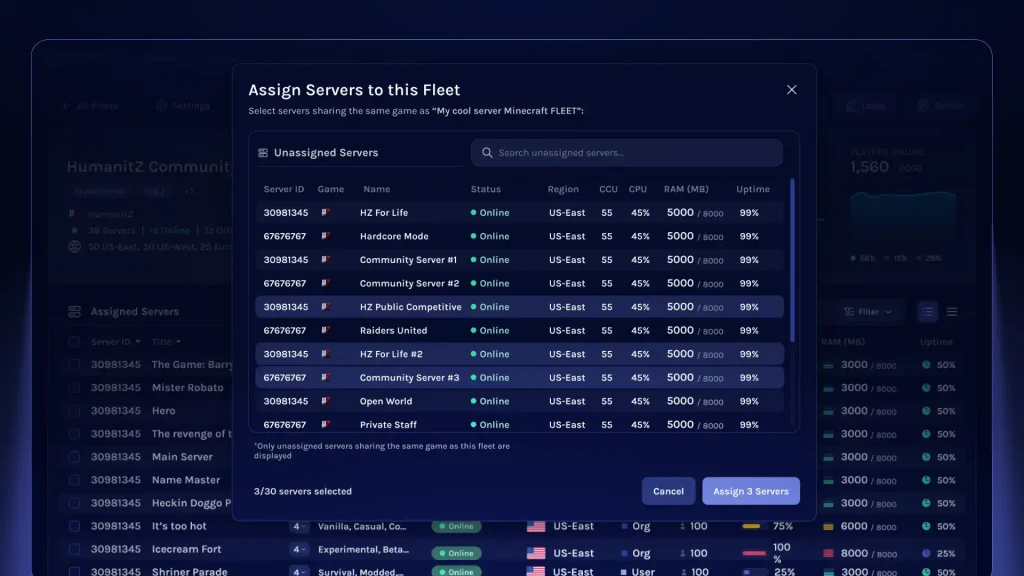 Creating a fleet starts in the Starbase games panel, where you can select a game and establish its shared configuration. From there, you can assign compatible servers to your fleet, bringing them into the same management interface.
The process displays available servers running the selected game, along with their current status, region, player count, CPU usage, RAM usage, and uptime. Here you can search for specific servers and manage multiple instances at a time. For example, a Minecraft network could include separate servers for Survival Mode adventures and Creative Mode building. With Fleets, administrators can monitor their performance, check player activity, manage settings, and perform bulk actions across both servers.
As your network grows, Starbase Fleets also provides search, filtering, and customizable tags so you can keep your servers organized. This includes tags like Survival, PVP, Modded, Economy, or Competitive, which can help distinguish your servers by their purpose, and you can assign multiple tags to any server. This is perfect for larger communities with different servers serving different groups of players, and it ensures server owners don’t have to rely on server names alone.
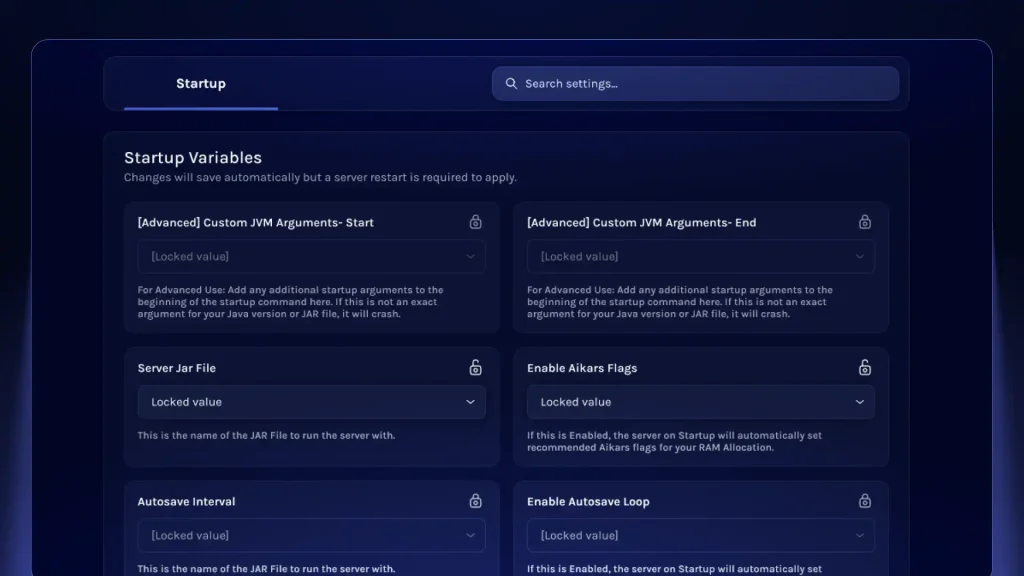 Fleets help make managing startup variables for your servers easier than ever. Each fleet is built around a specific game with shared game settings and environment variables. Server owners can choose to lock any of these startup variables to enforce consistent values across the fleet, or unlock these settings to allow individual server-specific overrides.
This lets admins maintain consistent settings across their fleet while still customizing individual servers when needed, without managing every startup configuration separately.
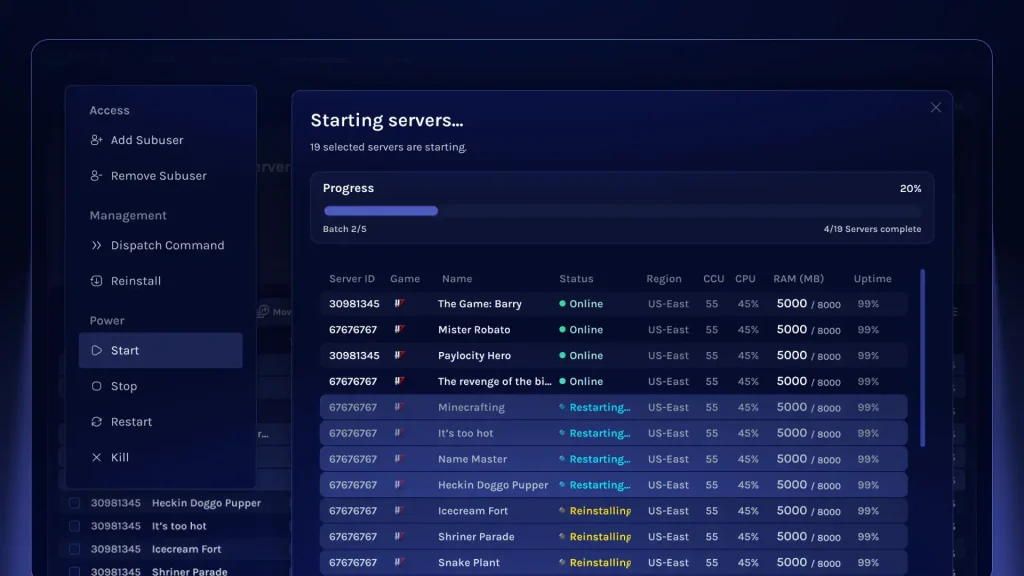 One of the biggest advantages of Starbase Fleets isn’t just the ability to keep tabs on all your servers in one place, but also to modify them en masse via Bulk Actions.
Read over the full list of available Bulk Actions for Starbase Fleets below:
Introducing Starbase Fleets: A New, Simple Way to Manage Multiple Game Servers
Setting Up and Organizing Your Fleet
Creating a fleet starts in the Starbase games panel, where you can select a game and establish its shared configuration. From there, you can assign compatible servers to your fleet, bringing them into the same management interface.
The process displays available servers running the selected game, along with their current status, region, player count, CPU usage, RAM usage, and uptime. Here you can search for specific servers and manage multiple instances at a time. For example, a Minecraft network could include separate servers for Survival Mode adventures and Creative Mode building. With Fleets, administrators can monitor their performance, check player activity, manage settings, and perform bulk actions across both servers.
As your network grows, Starbase Fleets also provides search, filtering, and customizable tags so you can keep your servers organized. This includes tags like Survival, PVP, Modded, Economy, or Competitive, which can help distinguish your servers by their purpose, and you can assign multiple tags to any server. This is perfect for larger communities with different servers serving different groups of players, and it ensures server owners don’t have to rely on server names alone.
Managing Startup Variables (Locked and Unlocked Settings)
Fleets help make managing startup variables for your servers easier than ever. Each fleet is built around a specific game with shared game settings and environment variables. Server owners can choose to lock any of these startup variables to enforce consistent values across the fleet, or unlock these settings to allow individual server-specific overrides.
This lets admins maintain consistent settings across their fleet while still customizing individual servers when needed, without managing every startup configuration separately.
Tagging, Categorizing, and Organizing Servers
When creating a fleet, your group of servers doesn't have to align with a single gameplay experience. You don't need to create different fleets for Hardcore servers or Casual servers, and you don't need to manage them the same way either. With customizable tags, fleets also help categorize servers by their purpose, keeping your network organized even when individual servers serve different communities or gameplay experiences.Managing Multiple Servers at Once (Bulk Actions)
One of the biggest advantages of Starbase Fleets isn’t just the ability to keep tabs on all your servers in one place, but also to modify them en masse via Bulk Actions.
Read over the full list of available Bulk Actions for Starbase Fleets below:
- Add or Remove Subusers - Manage administrator access across multiple servers at once
- Dispatch Commands - Send commands to selected servers without ever having to open their individual consoles
- Reinstall Servers - Initiate reinstalls across multiple instances simultaneously
- Start, Stop, Restart, or Kill Servers - Control server power across your entire fleet and force-stop server processes when necessary
Getting the Most Out of Starbase Fleets: How Can It Help?
Starbase Fleets is a very useful feature for any BisectHosting server owner managing multiple servers at once, whether it's 20 servers with 100 player slots or just a few servers for a smaller community. Here are a few examples of how Starbase Fleets can make server owners' lives much, much easier. Managing Official Community Servers As part of our partnership with HumanitZ, the team is using Starbase Fleets to manage its fleet of community game servers. That means mass-restarting servers for maintenance and updates, managing subusers across servers, and dispatching commands as needed. For any game team, community servers are an integral part of the entire experience. Keeping them organized and manageable matters, especially as the number of servers continues to grow. Fleets brings shared configuration, grouped telemetry, and bulk management into that workflow, making it all simpler and more efficient than ever! Managing A Growing, Global Server Network Starbase Fleets is perfect for server owners who are managing a growing community of players across multiple servers. Say you run a Minecraft network with several servers that need the same game settings and startup environment variables. With Starbase Fleets, you can create a fleet around that configuration and even assign servers to different locations that best suit your evolving player base. A new admin joins your team? With Fleets, you can add their access across relevant servers all at once. Maintenance approaching? Dispatch a command en masse or restart your group of selected servers with a single action. With Fleets, managing a growing community is much more approachable. Coordinating Large-Scale Community Events For server owners who are looking to coordinate events across multiple servers, Fleets is perfect for the job. For example, if you're looking to host a massive PVP tournament, Fleets' bulk subuser management means it's easy to grant referees and event admins access to relevant servers, and bulk commands and power controls help coordinate maintenance between matches, all while tags help distinguish tournament servers from any practice servers or community instances. With fleets, you can manage time-sensitive events more easily and efficiently, avoiding the administrative headaches. Preparing Servers for a Major Update We all know the feeling. An upcoming update is set to bring massive changes, and players are counting down the days, hours, and even minutes leading up to its launch. If you make a mistake or are slow with the process, your players will know it, and you'll certainly hear about it. With fleets, administrators can easily coordinate server downtime, communicate with connected players, and bring servers back online promptly after completing necessary updates, all while minimizing actions and reducing the chance of mistakes. That means less downtime for your players and a more efficient, streamlined process for you and your administrators, without having to dig into individual servers and track each one's progress separately.Try Out Starbase Fleets Today!
Ready to take full control of your server network? Starbase Fleets brings everything you need to manage multiple game servers together in one convenient place. Head over to the BisectHosting Starbase control panel to explore fleets today so you can spend less time managing servers and more time enjoying them!Kendi
Game sunucunuzu oluşturun
Game sunucunuzu oluşturun
Bir plan seçin, bir oyun belirleyin ve arkadaşlarınızla oynayın!
Bültenimize Katılın
Oyun dünyasındaki en son güncellemeler için abone olun!

Discord'umuza Katılın
20.000'den fazla kafa dengi üyeden oluşan topluluğumuzun bir parçası olun!
Bu blogu nasıl değerlendirirsiniz?
Fikrinizi paylaşın ve bloglarımızı daha da iyi hale getirmemize yardımcı olun!
Beğenmedim
Nötr
Beğendim

Bir oyun sunucusuna mı ihtiyacınız var?
Siz ve arkadaşlarınızın düşük gecikme süresi ve özel ayarlarla özel olarak oynayabileceğiniz bir oyun sunucusu kiralayın. 110+ oyun arasından seçim yapın, dünyanın dört bir yanından insanları davet edin ve özel maçların keyfini çıkarın veya kendi kurallarınızla kendi çevrimiçi topluluğunuzu oluşturun.

İlgili Bloglar







İLK SENİN HABERİN OLSUN!
Barındırdığımız oyunlar, şirket haberleri ve özel fırsatlar hakkında güncellemeler için e-posta listemize katılın. Haberdar olun!













