

Hytale Teleporter Guide: How to Build & Use Teleporters
tarihinde yazan:

Paylaş:

X'te Paylaş

Facebook'ta Paylaş

Threads'te Paylaş

Bluesky'da Paylaş

Panoya Kopyala

E-posta ile Paylaş
There's more than one way to zip around the world of Hytale. You can use a glider, you can (kind of) tromp around on mounts, and you can also use teleporters. Here we'll tell you everything you need to know about how to build and use teleporters in Hytale so you can spend more time adventuring than walking!
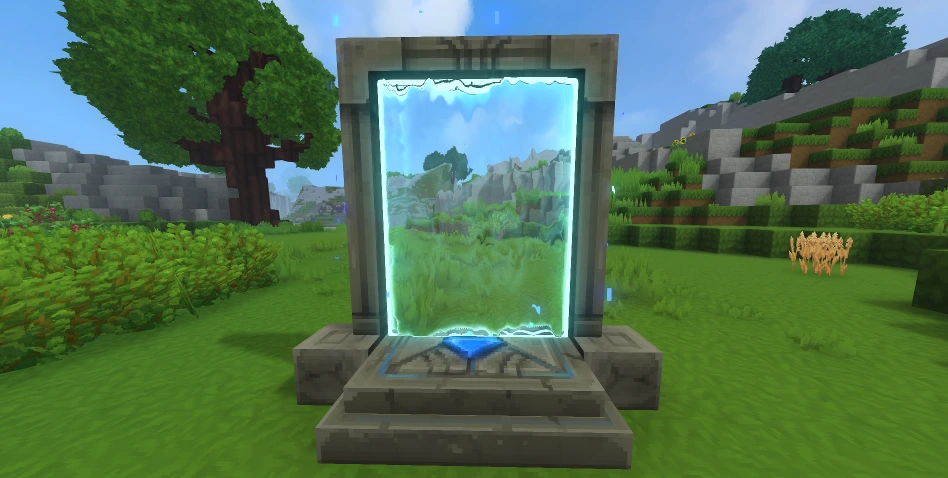 First things first: you need a teleporter before you can use a teleporter. Some of the materials you'll need are fairly rare. As a result, don't expect to hop in and start crafting teleporters right away. Before you can bend the fabric of space to your will, you'll need an Arcanist's Workbench.
First, you need to upgrade a standard Workbench to Tier 2 with the following:
First things first: you need a teleporter before you can use a teleporter. Some of the materials you'll need are fairly rare. As a result, don't expect to hop in and start crafting teleporters right away. Before you can bend the fabric of space to your will, you'll need an Arcanist's Workbench.
First, you need to upgrade a standard Workbench to Tier 2 with the following:
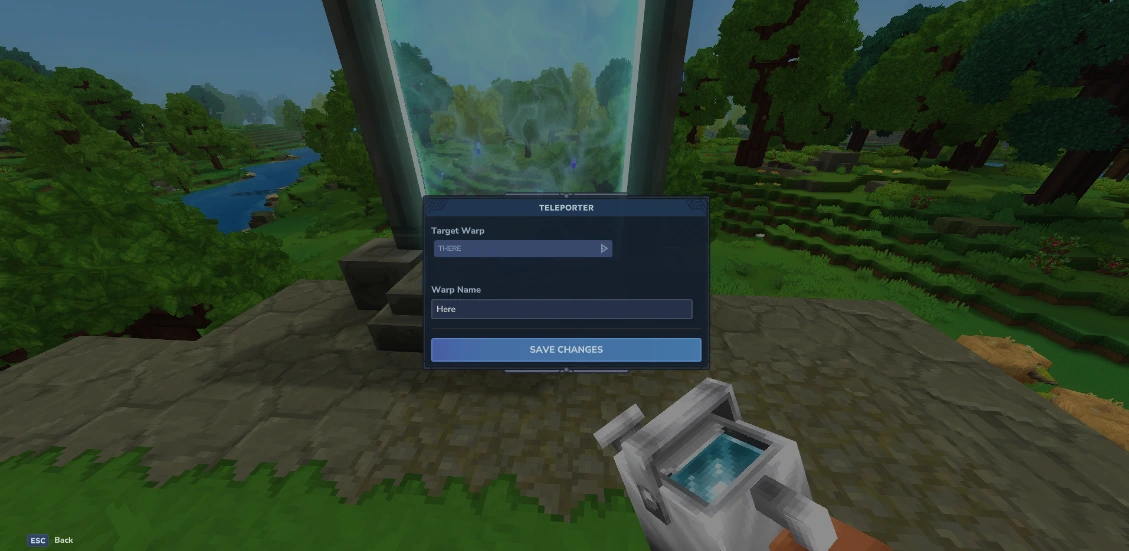 Once you've crafted your teleporter, you're still not ready to zip around. You need at least two teleporters planted in the world before you can use one. Once you have your teleporters planted, simply interact with them. Then, a small teleporter menu will open. Here you can set the name of the current teleporter you're using in the bar labeled "Warp Name," and you can choose the teleporter you'll travel to from the drop-down menu labeled "Target Warp."
Having a drop-down menu for only two teleporters might seem strange, but that's because you can place up to eight teleporters once you meet the right conditions. To earn the ability to place more teleporters, you need to gather memories using the Forgotten Temple.
This is how many memories you need to unlock more teleporters:
Once you've crafted your teleporter, you're still not ready to zip around. You need at least two teleporters planted in the world before you can use one. Once you have your teleporters planted, simply interact with them. Then, a small teleporter menu will open. Here you can set the name of the current teleporter you're using in the bar labeled "Warp Name," and you can choose the teleporter you'll travel to from the drop-down menu labeled "Target Warp."
Having a drop-down menu for only two teleporters might seem strange, but that's because you can place up to eight teleporters once you meet the right conditions. To earn the ability to place more teleporters, you need to gather memories using the Forgotten Temple.
This is how many memories you need to unlock more teleporters:
How to Build Hytale Teleporters
First things first: you need a teleporter before you can use a teleporter. Some of the materials you'll need are fairly rare. As a result, don't expect to hop in and start crafting teleporters right away. Before you can bend the fabric of space to your will, you'll need an Arcanist's Workbench.
First, you need to upgrade a standard Workbench to Tier 2 with the following:
- Copper Ingot: 30
- Iron Ingot: 20
- Linen Scraps: 20
- Thorium Ingot: 10
- Linen Scraps: 30
- Essence of Void: 20
- Azure Kelp: 2
- Azure Logs: 8
- Stone of Any Kind: 10
How to Use Hytale Teleporters
Once you've crafted your teleporter, you're still not ready to zip around. You need at least two teleporters planted in the world before you can use one. Once you have your teleporters planted, simply interact with them. Then, a small teleporter menu will open. Here you can set the name of the current teleporter you're using in the bar labeled "Warp Name," and you can choose the teleporter you'll travel to from the drop-down menu labeled "Target Warp."
Having a drop-down menu for only two teleporters might seem strange, but that's because you can place up to eight teleporters once you meet the right conditions. To earn the ability to place more teleporters, you need to gather memories using the Forgotten Temple.
This is how many memories you need to unlock more teleporters:
- 2 Teleporters: 0 Memories
- 3 Teleporters: 25 Memories
- 4 Teleporters: 50 Memories
- 6 Teleporters: 100 Memories
- 8 Teleporters: 200 Memories
Kendi
Hytale sunucunuzu oluşturun
Hytale sunucunuzu oluşturun
Bir plan seçin, bir oyun belirleyin ve arkadaşlarınızla oynayın!
Bültenimize Katılın
Oyun dünyasındaki en son güncellemeler için abone olun!

Discord'umuza Katılın
20.000'den fazla kafa dengi üyeden oluşan topluluğumuzun bir parçası olun!
Bu blogu nasıl değerlendirirsiniz?
Fikrinizi paylaşın ve bloglarımızı daha da iyi hale getirmemize yardımcı olun!
Beğenmedim
Nötr
Beğendim

Bir oyun sunucusuna mı ihtiyacınız var?
Siz ve arkadaşlarınızın düşük gecikme süresi ve özel ayarlarla özel olarak oynayabileceğiniz bir oyun sunucusu kiralayın. 110+ oyun arasından seçim yapın, dünyanın dört bir yanından insanları davet edin ve özel maçların keyfini çıkarın veya kendi kurallarınızla kendi çevrimiçi topluluğunuzu oluşturun.

İlgili Bloglar







İLK SENİN HABERİN OLSUN!
Barındırdığımız oyunlar, şirket haberleri ve özel fırsatlar hakkında güncellemeler için e-posta listemize katılın. Haberdar olun!













