

How to Import Hytale Prefabs
tarihinde yazan:

Paylaş:

X'te Paylaş

Facebook'ta Paylaş

Threads'te Paylaş

Bluesky'da Paylaş

Panoya Kopyala

E-posta ile Paylaş
Prefabs are a nifty tool that allow builds to come with you, no matter the server or world. All it takes is a file and navigating some menus to place it and begin anew! So, today, we answer how to import Hytale prefabs, both created in-game and found online, for your solo world or multiplayer server.
 After downloading a prefab.json file from a trusted source such as CurseForge, the next step is adding it to the Hytale files so it can be loaded and placed in-game. Separate instructions for single-player worlds and servers can be found below.
 The uploaded prefab, or one created in-game, can be imported and placed in the world with a few clicks and some menu navigation. The only difficult part is that the name of the desired prefab file must be remembered, so we recommend double-checking the name before proceeding.
Where to Place Prefabs Found Online
After downloading a prefab.json file from a trusted source such as CurseForge, the next step is adding it to the Hytale files so it can be loaded and placed in-game. Separate instructions for single-player worlds and servers can be found below.
Singleplayer Worlds
- Open the Hytale Launcher.
- Click the small gear on the top left.
- Select “Open Directory”.
- Enter the “UserData” folder.
- Enter the “Saves” folder.
- Open the folder of your desired world.
- Create a folder inside called “prefabs” in all lowercase. If a prefabs folder already exists, this step can be skipped.
- Enter the “prefabs” folder.
- Move or paste the prefab.json file inside the “prefabs” folder.
Servers
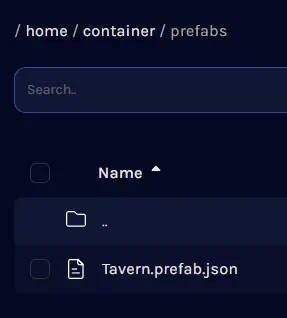
- Open the server files. With BisectHosting, this can be done via the file manager on the game server panel. If the “logs” and “universe” folders can be seen, you are in the right place!
- Create a folder called “prefabs” in all lowercase. If a prefabs folder already exists, this step can be skipped.
- Open the “prefabs” folder.
- Upload the prefab.json file into the “prefabs” folder.
- Restart the server.
How to Import Hytale Prefabs
The uploaded prefab, or one created in-game, can be imported and placed in the world with a few clicks and some menu navigation. The only difficult part is that the name of the desired prefab file must be remembered, so we recommend double-checking the name before proceeding.
- Open a creative world or enter creative mode.
- Open your inventory.
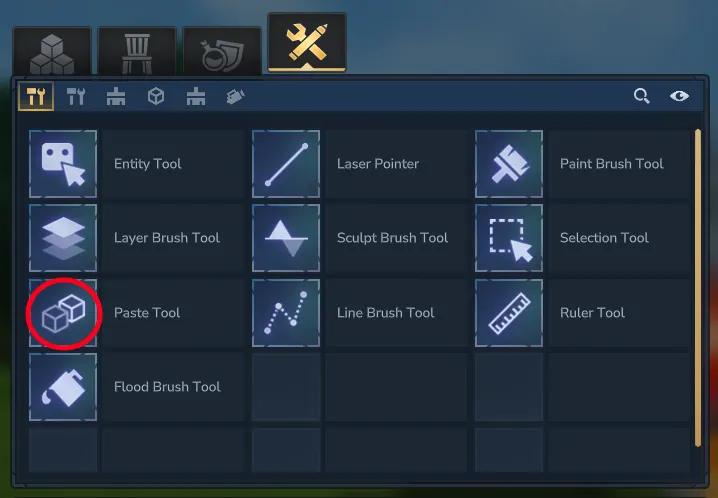
- Select the creative tools tab at the top. It should appear as a wrench crossed with a pencil.
- Click the “Paste Tool” and add it to your hotbar.
- Ready the paste tool in hand and click “E”.
- Select the desired prefab file. If not visible, try the other file destinations in the drop-down menu.
- Find a location for the prefab and left-click to place.
Kendi
Hytale sunucunuzu oluşturun
Hytale sunucunuzu oluşturun
Bir plan seçin, bir oyun belirleyin ve arkadaşlarınızla oynayın!
Bültenimize Katılın
Oyun dünyasındaki en son güncellemeler için abone olun!

Discord'umuza Katılın
20.000'den fazla kafa dengi üyeden oluşan topluluğumuzun bir parçası olun!
Bu blogu nasıl değerlendirirsiniz?
Fikrinizi paylaşın ve bloglarımızı daha da iyi hale getirmemize yardımcı olun!
Beğenmedim
Nötr
Beğendim

Bir oyun sunucusuna mı ihtiyacınız var?
Siz ve arkadaşlarınızın düşük gecikme süresi ve özel ayarlarla özel olarak oynayabileceğiniz bir oyun sunucusu kiralayın. 110+ oyun arasından seçim yapın, dünyanın dört bir yanından insanları davet edin ve özel maçların keyfini çıkarın veya kendi kurallarınızla kendi çevrimiçi topluluğunuzu oluşturun.

İlgili Bloglar







İLK SENİN HABERİN OLSUN!
Barındırdığımız oyunlar, şirket haberleri ve özel fırsatlar hakkında güncellemeler için e-posta listemize katılın. Haberdar olun!













