

How to Update Minecraft Bedrock on PC
tarihinde yazan:

Paylaş:

X'te Paylaş

Facebook'ta Paylaş

Threads'te Paylaş

Bluesky'da Paylaş

Panoya Kopyala

E-posta ile Paylaş
Minecraft Bedrock Edition should update automatically upon being opened, but in the rare instances where that is not the case, we have a few easy steps to try. Today, we answer how to update Minecraft Bedrock on PC.
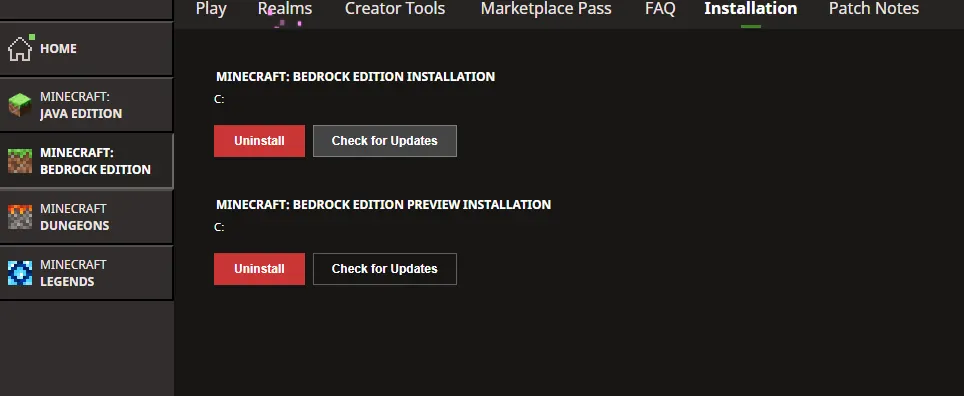 The first fix to attempt is manually checking for updates within the Minecraft launcher. This is done following the short few steps below.
 The second fix to attempt is forcing the update via the Microsoft Store. The exact steps for this will vary slightly depending on the version of Windows in use, but it is a feature on at least Windows 10 and up. Below are a general set of steps that should get you there.
 If both methods above were attempted with no luck, the update itself may simply not be out yet. Mojang has a tendency not to give out exact release times, and that can make when the update actually hits the launcher pretty random. Coming back in thirty minutes to an hour could very well resolve the problem.
Minecraft Launcher Update Check
The first fix to attempt is manually checking for updates within the Minecraft launcher. This is done following the short few steps below.
- Open the Minecraft Launcher.
- Select Minecraft Bedrock Edition in the left sidebar.
- Select the installation tab at the top of the screen.
- Click the “Check for Updates” Button.
Microsoft Store
The second fix to attempt is forcing the update via the Microsoft Store. The exact steps for this will vary slightly depending on the version of Windows in use, but it is a feature on at least Windows 10 and up. Below are a general set of steps that should get you there.
- Open the Microsoft Store.
- Click “Library” on the left sidebar. (Windows 11 Users may see an updates tab instead.)
- Find Minecraft for Windows in the list.
- Click Update.
Not Yet Out
If both methods above were attempted with no luck, the update itself may simply not be out yet. Mojang has a tendency not to give out exact release times, and that can make when the update actually hits the launcher pretty random. Coming back in thirty minutes to an hour could very well resolve the problem.Kendi
Minecraft sunucunuzu oluşturun
Minecraft sunucunuzu oluşturun
Bir plan seçin, bir oyun belirleyin ve arkadaşlarınızla oynayın!
Bültenimize Katılın
Oyun dünyasındaki en son güncellemeler için abone olun!

Discord'umuza Katılın
20.000'den fazla kafa dengi üyeden oluşan topluluğumuzun bir parçası olun!
Bu blogu nasıl değerlendirirsiniz?
Fikrinizi paylaşın ve bloglarımızı daha da iyi hale getirmemize yardımcı olun!
Beğenmedim
Nötr
Beğendim

Bir oyun sunucusuna mı ihtiyacınız var?
Siz ve arkadaşlarınızın düşük gecikme süresi ve özel ayarlarla özel olarak oynayabileceğiniz bir oyun sunucusu kiralayın. 110+ oyun arasından seçim yapın, dünyanın dört bir yanından insanları davet edin ve özel maçların keyfini çıkarın veya kendi kurallarınızla kendi çevrimiçi topluluğunuzu oluşturun.

İlgili Bloglar







İLK SENİN HABERİN OLSUN!
Barındırdığımız oyunlar, şirket haberleri ve özel fırsatlar hakkında güncellemeler için e-posta listemize katılın. Haberdar olun!













