

How to Get the Minecraft TikTok Cape
tarihinde yazan:

Paylaş:

X'te Paylaş

Facebook'ta Paylaş

Threads'te Paylaş

Bluesky'da Paylaş

Panoya Kopyala

E-posta ile Paylaş
(Estimated Read Time: 3 Minutes)
Minecraft’s 15th anniversary has arrived alongside more celebrations than ever before! So, today, we explore how to get the Minecraft TikTok cape as well as other secrets that Mojang has in store.Minecraft’s 15th Anniversary Celebration!
https://twitter.com/Minecraft/status/1790446035996639572In celebration of Minecraft’s 15th anniversary, Mojang will be releasing new cosmetics every day for the next 15 days, including the Minecraft TikTok cape, which we have provided the details for below. Each will have different requirements, and many will likely come from collaborations, with Twitch being a confirmed example of another one. Regardless of their source, all Minecraft 15th anniversary codes expire towards the end of June 2024, so make sure to get them before they are gone!
How to Get the Minecraft TikTok Cape
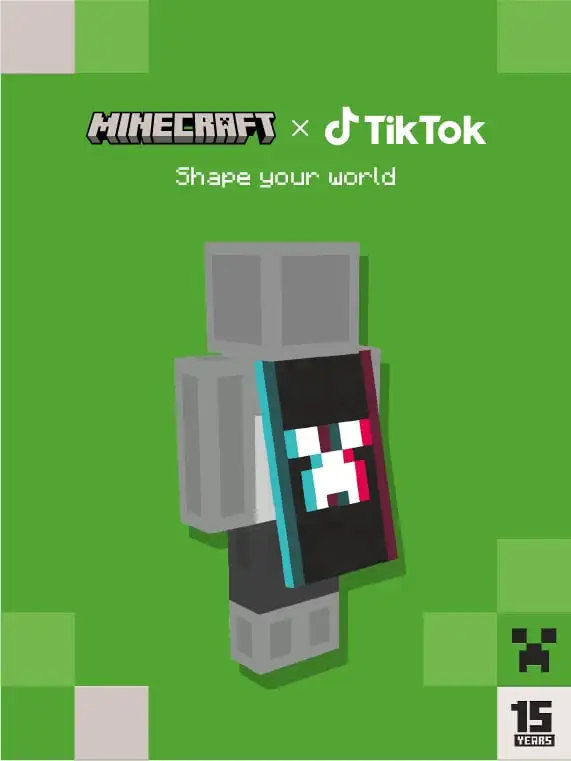 TikTok users will have a chance to earn an exclusive code drop while watching specific TikTok lives from May 18th to June 18th! At this time, it is unknown which specific TikTok lives will have the code available, but as soon as the information is shared, we will have them listed here.
Once a code is obtained, redeeming the new cape is as easy as going to the webpage here, entering the code, and clicking submit. Just make sure you’re in the right section and logged in!
Java Edition Minecraft TikTok Cape Availability is Confirmed. Codes Expire June 30, 2024.
TikTok users will have a chance to earn an exclusive code drop while watching specific TikTok lives from May 18th to June 18th! At this time, it is unknown which specific TikTok lives will have the code available, but as soon as the information is shared, we will have them listed here.
Once a code is obtained, redeeming the new cape is as easy as going to the webpage here, entering the code, and clicking submit. Just make sure you’re in the right section and logged in!
Java Edition Minecraft TikTok Cape Availability is Confirmed. Codes Expire June 30, 2024.
How to Change Capes: Java Edition
To check if you have any capes or to change the one you are wearing on Java Edition, simply open the official Minecraft website and follow the steps below.- Select “Account” in the top right corner and then “Login.”
- Click “My Games” on the left side of your Minecraft profile.
- Under “Minecraft: Java Edition,” select “Change Skin.”
- Scroll down to “Change Your Cape - PC/Mac.”
- Click your desired cape.
How to Change Capes: Bedrock Edition
To check if you have any capes or to change the one you are wearing on Bedrock Edition, simply open the Bedrock Edition client and follow the steps below.- Login to the Minecraft Bedrock Edition client.
- Select “Dressing Room.”
- Click the red cape icon on the left side of the screen.
- Pick your desired cape and select “Equipped.”
Kendi
Minecraft sunucunuzu oluşturun
Minecraft sunucunuzu oluşturun
Bir plan seçin, bir oyun belirleyin ve arkadaşlarınızla oynayın!
Bültenimize Katılın
Oyun dünyasındaki en son güncellemeler için abone olun!

Discord'umuza Katılın
20.000'den fazla kafa dengi üyeden oluşan topluluğumuzun bir parçası olun!
Bu blogu nasıl değerlendirirsiniz?
Fikrinizi paylaşın ve bloglarımızı daha da iyi hale getirmemize yardımcı olun!
Beğenmedim
Nötr
Beğendim

Bir oyun sunucusuna mı ihtiyacınız var?
Siz ve arkadaşlarınızın düşük gecikme süresi ve özel ayarlarla özel olarak oynayabileceğiniz bir oyun sunucusu kiralayın. 110+ oyun arasından seçim yapın, dünyanın dört bir yanından insanları davet edin ve özel maçların keyfini çıkarın veya kendi kurallarınızla kendi çevrimiçi topluluğunuzu oluşturun.

İlgili Bloglar







İLK SENİN HABERİN OLSUN!
Barındırdığımız oyunlar, şirket haberleri ve özel fırsatlar hakkında güncellemeler için e-posta listemize katılın. Haberdar olun!













