

How to Find Minecraft Fireflies
tarihinde yazan:

Paylaş:

X'te Paylaş

Facebook'ta Paylaş

Threads'te Paylaş

Bluesky'da Paylaş

Panoya Kopyala

E-posta ile Paylaş
As of Minecraft snapshot 25w05a, fireflies are illuminating the night and keeping mobs at bay, but not every biome will have their light show on display. So, today, we answer how to find Minecraft fireflies and firefly bush blocks in game.
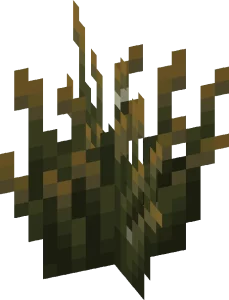
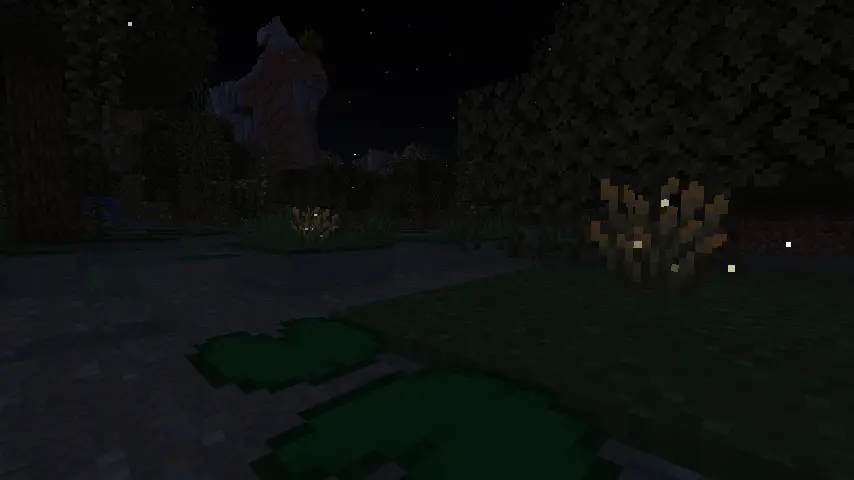 Minecraft fireflies are not mobs like bees or frogs but instead glowing particles that float around a new block called a firefly bush. During the day, these firefly bush blocks can be distinguished from regular bush blocks by their darker green base, yellowish leaf tips, and glowing (firefly) pixels on their leaves. At night, however, fireflies fly around the block’s surroundings in a beautiful mob-like display.
 Players searching for Minecraft Fireflies will need to locate and gather firefly bush blocks, which generate in swamp biomes and along rivers as of Minecraft snapshot 25w05a (Minecraft 1.21.5.) Thankfully, neither swamp biomes nor rivers are rare, and rivers can typically be found by adventuring out into the world within a few minutes’ time.
Once located, Firefly bush blocks can be gathered by hand, placed anywhere, and duplicated with bone meal. They also produce a light level of two, which prevents mobs from spawning in a very small radius around them.
Players searching for Minecraft Fireflies will need to locate and gather firefly bush blocks, which generate in swamp biomes and along rivers as of Minecraft snapshot 25w05a (Minecraft 1.21.5.) Thankfully, neither swamp biomes nor rivers are rare, and rivers can typically be found by adventuring out into the world within a few minutes’ time.
Once located, Firefly bush blocks can be gathered by hand, placed anywhere, and duplicated with bone meal. They also produce a light level of two, which prevents mobs from spawning in a very small radius around them.
 Should bad luck or an unfortunate spawn be encountered, there is always the option of using the “/locate” command. This nifty tool provides the exact coordinates of the nearest structure or biome, and by clicking them, teleports the player there.
Some would consider this cheating, but in Minecraft, that is for you to decide. The full locate biome command for swamp biomes is as follows:
Should bad luck or an unfortunate spawn be encountered, there is always the option of using the “/locate” command. This nifty tool provides the exact coordinates of the nearest structure or biome, and by clicking them, teleports the player there.
Some would consider this cheating, but in Minecraft, that is for you to decide. The full locate biome command for swamp biomes is as follows:
Minecraft Fireflies: Mob Vs Particle
Minecraft fireflies are not mobs like bees or frogs but instead glowing particles that float around a new block called a firefly bush. During the day, these firefly bush blocks can be distinguished from regular bush blocks by their darker green base, yellowish leaf tips, and glowing (firefly) pixels on their leaves. At night, however, fireflies fly around the block’s surroundings in a beautiful mob-like display.
How to Find Minecraft Fireflies
Players searching for Minecraft Fireflies will need to locate and gather firefly bush blocks, which generate in swamp biomes and along rivers as of Minecraft snapshot 25w05a (Minecraft 1.21.5.) Thankfully, neither swamp biomes nor rivers are rare, and rivers can typically be found by adventuring out into the world within a few minutes’ time.
Once located, Firefly bush blocks can be gathered by hand, placed anywhere, and duplicated with bone meal. They also produce a light level of two, which prevents mobs from spawning in a very small radius around them.
How to Find Swamp Biomes with Commands
- /locate biome minecraft:swamp
Kendi
Minecraft sunucunuzu oluşturun
Minecraft sunucunuzu oluşturun
Bir plan seçin, bir oyun belirleyin ve arkadaşlarınızla oynayın!
Bültenimize Katılın
Oyun dünyasındaki en son güncellemeler için abone olun!

Discord'umuza Katılın
20.000'den fazla kafa dengi üyeden oluşan topluluğumuzun bir parçası olun!
Bu blogu nasıl değerlendirirsiniz?
Fikrinizi paylaşın ve bloglarımızı daha da iyi hale getirmemize yardımcı olun!
Beğenmedim
Nötr
Beğendim

Bir oyun sunucusuna mı ihtiyacınız var?
Siz ve arkadaşlarınızın düşük gecikme süresi ve özel ayarlarla özel olarak oynayabileceğiniz bir oyun sunucusu kiralayın. 110+ oyun arasından seçim yapın, dünyanın dört bir yanından insanları davet edin ve özel maçların keyfini çıkarın veya kendi kurallarınızla kendi çevrimiçi topluluğunuzu oluşturun.

İlgili Bloglar







İLK SENİN HABERİN OLSUN!
Barındırdığımız oyunlar, şirket haberleri ve özel fırsatlar hakkında güncellemeler için e-posta listemize katılın. Haberdar olun!













