

7 Days to Die: How to Play the Experimental Branch
tarihinde yazan:

Paylaş:

X'te Paylaş

Facebook'ta Paylaş

Threads'te Paylaş

Bluesky'da Paylaş

Panoya Kopyala

E-posta ile Paylaş
Starting June 16, zombie apocalypse survivors can experience the 7 Days to Die 2.0: Storm’s Brewing Update, along with its new content, features, and improvements, by playing in the Experimental Branch. So, keep reading to learn how to access the Experimental Branch in 7 Days to Die, and enjoy Update 2.0 before everyone else!
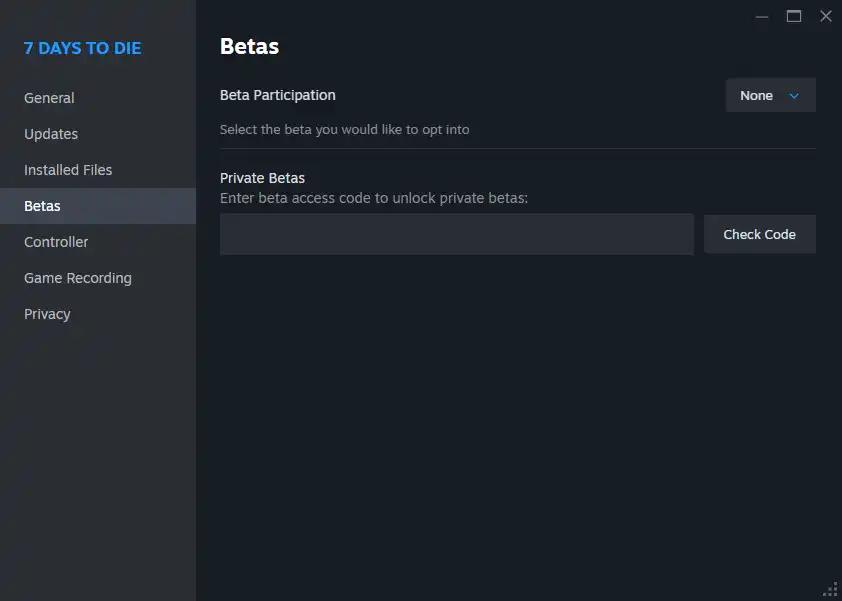 Note that the 7 Days to Die Experimental Branch is only available for PC players through Steam. The game’s console versions, particularly on PlayStation and Xbox, will generally receive the stable versions of each patch, including Update 2.0. Thankfully, the update's Stable version should be released on June 30, not too long after the Experimental Branch's version's launch date.
With that, here’s how to access the 7 Days to Die Experimental Branch and experience Update 2.0:
Note that the 7 Days to Die Experimental Branch is only available for PC players through Steam. The game’s console versions, particularly on PlayStation and Xbox, will generally receive the stable versions of each patch, including Update 2.0. Thankfully, the update's Stable version should be released on June 30, not too long after the Experimental Branch's version's launch date.
With that, here’s how to access the 7 Days to Die Experimental Branch and experience Update 2.0:
How to Play in the 7 Days to Die Experimental Branch
Note that the 7 Days to Die Experimental Branch is only available for PC players through Steam. The game’s console versions, particularly on PlayStation and Xbox, will generally receive the stable versions of each patch, including Update 2.0. Thankfully, the update's Stable version should be released on June 30, not too long after the Experimental Branch's version's launch date.
With that, here’s how to access the 7 Days to Die Experimental Branch and experience Update 2.0:
- 1. Log into your Steam account
- 2. Access your game Library and right-click on 7 Days to Die in the left sidebar
- 3. Select Properties in the context menu
- 4. Select the Betas tab in the Properties window
- 5. Click the dropdown box next to Beta Participation, and choose the latest experimental version from the list
Kendi
7 Days to Die sunucunuzu oluşturun
7 Days to Die sunucunuzu oluşturun
Bir plan seçin, bir oyun belirleyin ve arkadaşlarınızla oynayın!
Bültenimize Katılın
Oyun dünyasındaki en son güncellemeler için abone olun!

Discord'umuza Katılın
20.000'den fazla kafa dengi üyeden oluşan topluluğumuzun bir parçası olun!
Bu blogu nasıl değerlendirirsiniz?
Fikrinizi paylaşın ve bloglarımızı daha da iyi hale getirmemize yardımcı olun!
Beğenmedim
Nötr
Beğendim

Bir oyun sunucusuna mı ihtiyacınız var?
Siz ve arkadaşlarınızın düşük gecikme süresi ve özel ayarlarla özel olarak oynayabileceğiniz bir oyun sunucusu kiralayın. 110+ oyun arasından seçim yapın, dünyanın dört bir yanından insanları davet edin ve özel maçların keyfini çıkarın veya kendi kurallarınızla kendi çevrimiçi topluluğunuzu oluşturun.

İlgili Bloglar







İLK SENİN HABERİN OLSUN!
Barındırdığımız oyunlar, şirket haberleri ve özel fırsatlar hakkında güncellemeler için e-posta listemize katılın. Haberdar olun!













