What is the Minecraft2Shell Vulnerability?
Опубликовано автором

Поделиться:

Поделиться в X

Поделиться в Facebook

Поделиться в Threads

Поделиться в Bluesky

Скопировать в буфер обмена

Поделиться по email
In the digital age, cybersecurity is more important than ever. But threats can come from areas least expected, even with great caution. Today, we answer the question “What is the Minecraft2Shell Vulnerability?”
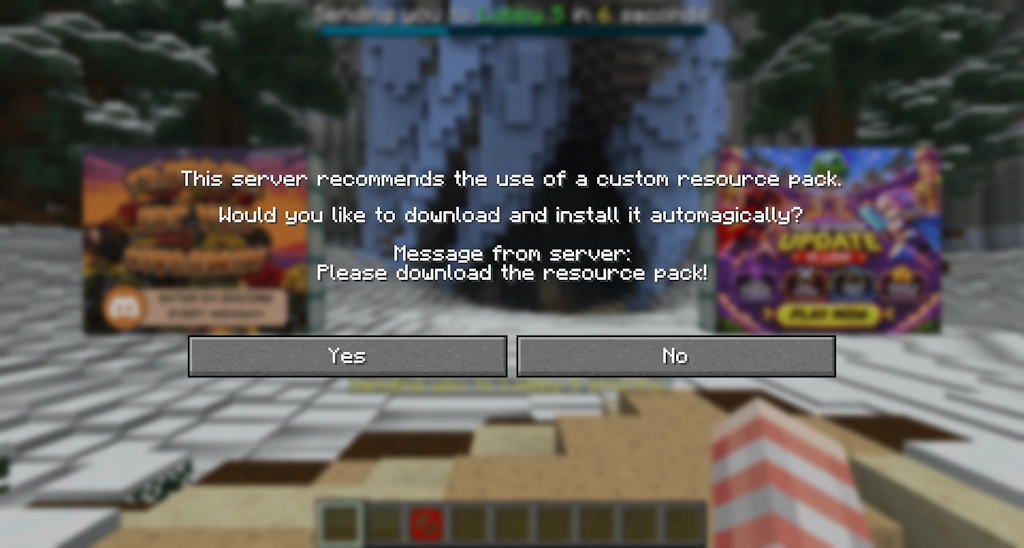 The Minecraft2Shell vulnerability allowed Java Edition server operators to use server-side resource packs, which players can opt to download when joining their servers, to run commands on the downloader’s PC. For example, a command could be run by the malicious operator to open multiple programs. Thankfully, Mojang has since fixed this vulnerability, and it is no longer a threat to those using the latest version on the official Minecraft launcher.
 Minecraft is largely safe to trust, and resource packs, despite being third-party, typically are as well. But it is always best to proceed with some caution. Avoid joining servers or downloading resource packs from servers you do not know or trust. And, most importantly, always ensure servers must ask your permission before downloading anything.
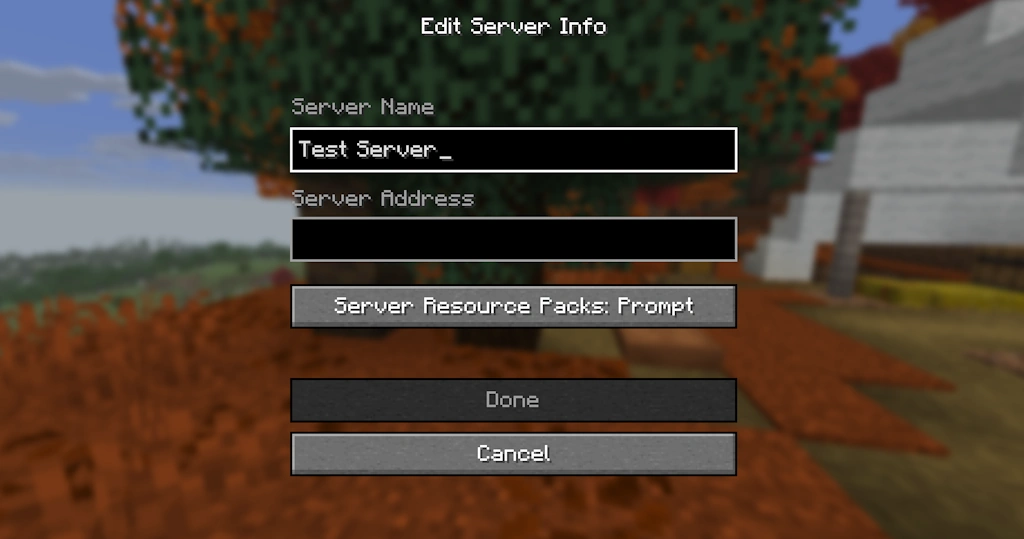
Asking to download resource packs is the default setting for Minecraft. However, if allowed for an individual server, that specific server retains permission to install resource packs in the future. The steps below can be used to change these servers back to the prompt setting so that they must continue to ask.
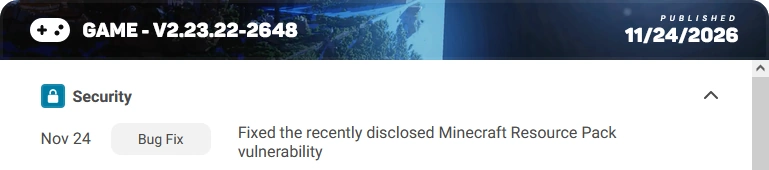 We recommend those on third-party clients confirm that the developers have applied the latest security update from Mojang. Most large clients will have an announcement regarding progress for serious issues such as this within the client, through their social media, or on their website. Lunar client, for example, confirmed the fix within their changelog for client version 2.23.22-2648 on November 24, 2026.
What is the Minecraft2Shell Vulnerability?
The Minecraft2Shell vulnerability allowed Java Edition server operators to use server-side resource packs, which players can opt to download when joining their servers, to run commands on the downloader’s PC. For example, a command could be run by the malicious operator to open multiple programs. Thankfully, Mojang has since fixed this vulnerability, and it is no longer a threat to those using the latest version on the official Minecraft launcher.
Safety & Security
Minecraft is largely safe to trust, and resource packs, despite being third-party, typically are as well. But it is always best to proceed with some caution. Avoid joining servers or downloading resource packs from servers you do not know or trust. And, most importantly, always ensure servers must ask your permission before downloading anything.
Asking to download resource packs is the default setting for Minecraft. However, if allowed for an individual server, that specific server retains permission to install resource packs in the future. The steps below can be used to change these servers back to the prompt setting so that they must continue to ask.
- Open Minecraft Java Edition.
- Click “Multiplayer”.
- Select a server.
- Click “Edit”.
- If Server Resource Packs are “Enabled”, click the button until it becomes “Prompt”.
- Return to step 3 and repeat the process for the next saved server.
Third Party Clients
We recommend those on third-party clients confirm that the developers have applied the latest security update from Mojang. Most large clients will have an announcement regarding progress for serious issues such as this within the client, through their social media, or on their website. Lunar client, for example, confirmed the fix within their changelog for client version 2.23.22-2648 on November 24, 2026.Создайте свой собственный
сервер Minecraft
Выберите тариф, укажите игру и играйте с друзьями!
Подпишитесь на нашу рассылку
Подпишитесь, чтобы получать последние новости из мира игр!

Присоединяйтесь к нашему Discord
Станьте частью нашего сообщества, в котором уже более 20000 единомышленников!
Как бы вы оценили этот блог?
Поделитесь своим мнением и помогите нам сделать наши блоги еще лучше!
Не понравилось
Нейтрально
Понравилось

Нужен игровой сервер?
Арендуйте игровой сервер, где вы и ваши друзья сможете играть в закрытом режиме с низкой задержкой и собственными настройками. Выбирайте из 120+ игр, приглашайте людей со всего мира и наслаждайтесь приватными матчами или создайте свое собственное онлайн-сообщество со своими правилами.

Похожие статьи




УЗНАЙТЕ ВСЕ ПЕРВЫМИ!
Подпишитесь на нашу рассылку, чтобы получать обновления о наших играх, новости компании и эксклюзивные предложения. Будьте в курсе!