

Palworld Controls Guide: All PC and Controller Keybinds
Опубликовано автором

Поделиться:

Поделиться в X

Поделиться в Facebook

Поделиться в Threads

Поделиться в Bluesky

Скопировать в буфер обмена

Поделиться по email
Like starting relatively any game, you must learn the controls for Palworld to play the game efficiently. Note that the game’s controls differ depending on your device. So, keep reading as we go over the controller and keyboard controls for the game in this guide.
 At the time of writing, Palworld was released on the Steam and Game Pass platforms. That means that the available methods of controlling your character and Pals are through a controller or a keyboard and mouse.
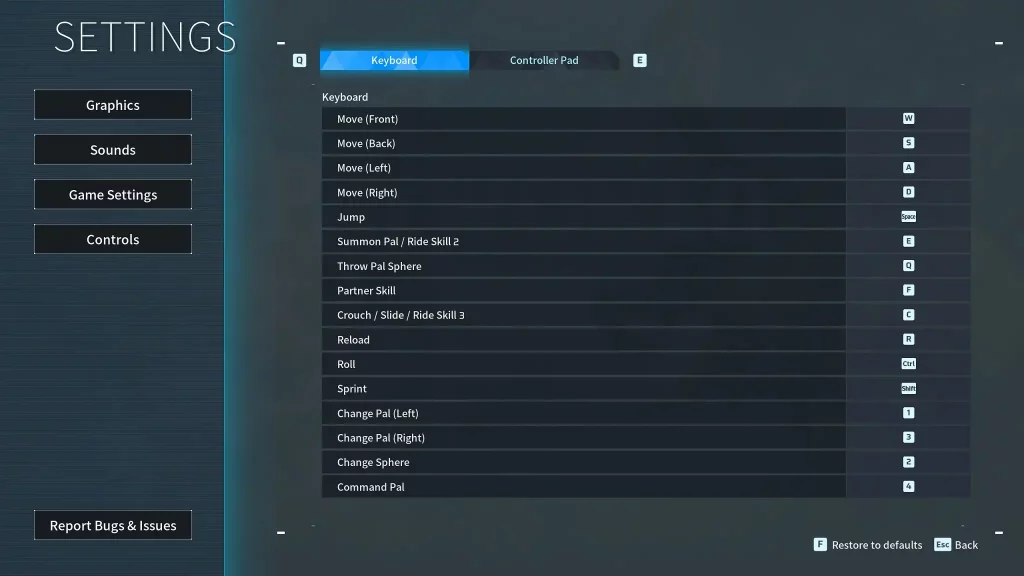 Some players may prefer to use the keyboard and mouse to use Palworld’s controls. However, some users may prefer to change the keyboard keybinds because of their awkward placements. For example, the roll is set to the “Ctrl” key by default. So, you may have difficulty extending a finger to press this button when dodging incoming attacks.
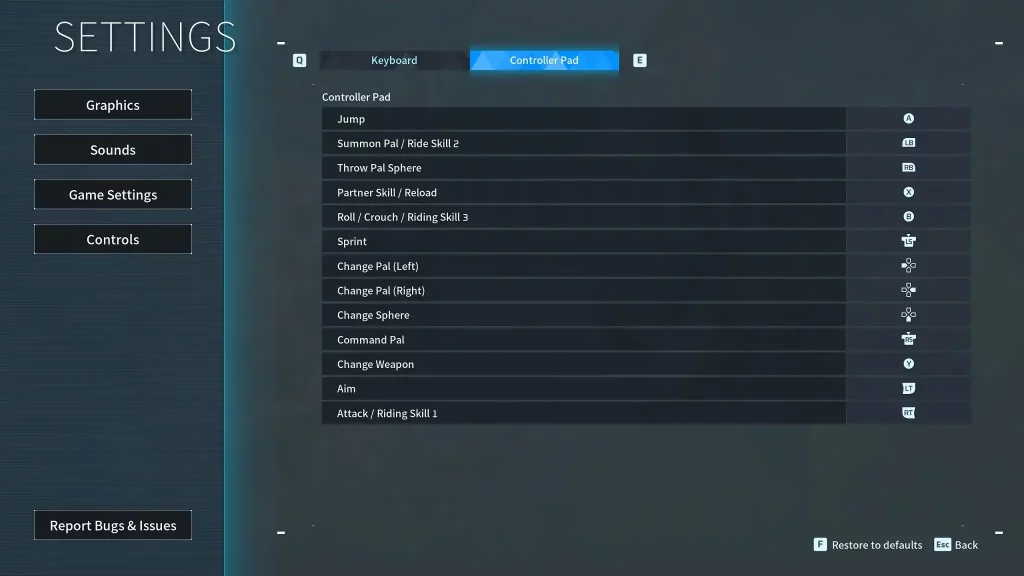 Unlike the keyboard and mouse, the Palworld controls are generally simpler when using a controller. However, the controller controls typically show the button names for the Xbox or standard PC controller model. So, it can become confusing if you use another controller with a different button layout, such as one for the PlayStation.
Palworld Controls and Keybinds
At the time of writing, Palworld was released on the Steam and Game Pass platforms. That means that the available methods of controlling your character and Pals are through a controller or a keyboard and mouse.
Keyboard and Mouse Controls
Some players may prefer to use the keyboard and mouse to use Palworld’s controls. However, some users may prefer to change the keyboard keybinds because of their awkward placements. For example, the roll is set to the “Ctrl” key by default. So, you may have difficulty extending a finger to press this button when dodging incoming attacks.
- Move (Front): W
- Move (Back): S
- Move (Left): A
- Move (Right): D
- Left Click: Attack/Use equipped item
- Right Click: Cancel Pal Sphere throw
- Jump: Space
- Summon Pal/Ride Skill 2: E
- Throw Pal Sphere: Q
- Partner Skill: F
- Crouch/Slide/Ride Skill 3: C
- Reload: R
- Roll: Ctrl
- Sprint: Shift
- Change Pal (Left): 1
- Change Pal (Right): 3
- Change Sphere: 2
- Pal Commands: 4
Controller Controls
Unlike the keyboard and mouse, the Palworld controls are generally simpler when using a controller. However, the controller controls typically show the button names for the Xbox or standard PC controller model. So, it can become confusing if you use another controller with a different button layout, such as one for the PlayStation.
- Movement: Left analog stick
- Aim/Look Around: Right analog stick
- Jump: A
- Summon Pal/Ride Skill 2: Left Bumper
- Throw Pal Sphere: Right Bumper
- Partner Skill/Reload: X
- Roll/Crouch/Riding Skill 3: B
- Sprint: Left analog stick (press)
- Change Pal (Left): Left directional button
- Change Pal (Right): Right directional button
- Change Sphere: Down directional button
- Pal Commands: Right analog stick (press)
- Change Weapon: Y
- Aim: Left Trigger
- Attack/Riding Skill 1: Right Trigger
Создайте свой собственный
сервер Palworld
сервер Palworld
Выберите тариф, укажите игру и играйте с друзьями!
Подпишитесь на нашу рассылку
Подпишитесь, чтобы получать последние новости из мира игр!

Присоединяйтесь к нашему Discord
Станьте частью нашего сообщества, в котором уже более 20000 единомышленников!
Как бы вы оценили этот блог?
Поделитесь своим мнением и помогите нам сделать наши блоги еще лучше!
Не понравилось
Нейтрально
Понравилось

Нужен игровой сервер?
Арендуйте игровой сервер, где вы и ваши друзья сможете играть в закрытом режиме с низкой задержкой и собственными настройками. Выбирайте из 110+ игр, приглашайте людей со всего мира и наслаждайтесь приватными матчами или создайте свое собственное онлайн-сообщество со своими правилами.

Похожие статьи







УЗНАЙТЕ ВСЕ ПЕРВЫМИ!
Подпишитесь на нашу рассылку, чтобы получать обновления о наших играх, новости компании и эксклюзивные предложения. Будьте в курсе!













