

New Minecraft Movie Capes: How to Earn & Redeem Online
Опубликовано автором

Поделиться:

Поделиться в X

Поделиться в Facebook

Поделиться в Threads

Поделиться в Bluesky

Скопировать в буфер обмена

Поделиться по email
The Minecraft movie is only a few weeks away, and to celebrate, Mojang has some new Minecraft movie capes available to earn today! So, come along as we explore step by step how to earn the Home and Menace capes before their codes expire, and they become legacy capes forever.
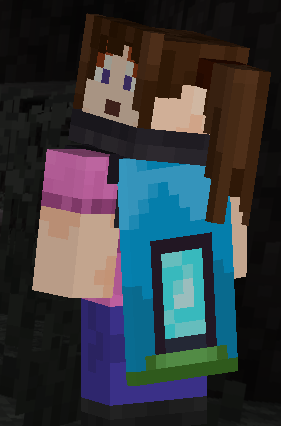 The first of the two new Minecraft Movie capes, titled “Home,” comes from a watch campaign on Twitch and can be obtained until April 6th at 5 PM EDT. To earn this cape, all one needs to do is watch three minutes of any participating Twitch Partner or Affiliate broadcasting in the Minecraft category on a registered Twitch account. The code will be sent automatically upon the campaign’s completion via a Twitch notification, and progress can be reviewed here.
Once the code is obtained, redeeming the cape is as easy as going to the webpage here, entering the code, and clicking “Redeem.” Just make sure you’re logged in to the correct account!
The first of the two new Minecraft Movie capes, titled “Home,” comes from a watch campaign on Twitch and can be obtained until April 6th at 5 PM EDT. To earn this cape, all one needs to do is watch three minutes of any participating Twitch Partner or Affiliate broadcasting in the Minecraft category on a registered Twitch account. The code will be sent automatically upon the campaign’s completion via a Twitch notification, and progress can be reviewed here.
Once the code is obtained, redeeming the cape is as easy as going to the webpage here, entering the code, and clicking “Redeem.” Just make sure you’re logged in to the correct account!
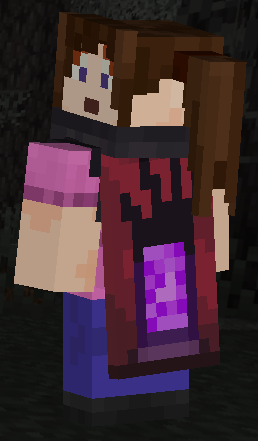 The second of the two new Minecraft Movie capes, titled “Menace,” comes from a watchtime quest on TikTok and can be obtained until April 6th at 5 PM EDT. Similar to the Twitch cape, all one needs to do is watch three minutes of a Minecraft creator’s TikTok live while logged into a registered TikTok account. However, there are a few niche stipulations. The code can only be earned through the IOS and Android apps, not the website, and your account and the TikTok Live being viewed must have rewards enabled. A notification should be sent upon the watchtime quest’s completion.
Once the code is obtained, redeeming the cape is once again as easy as going to the webpage here, entering the code, and clicking “Redeem.” Just make sure you’re logged in to the correct account!
The second of the two new Minecraft Movie capes, titled “Menace,” comes from a watchtime quest on TikTok and can be obtained until April 6th at 5 PM EDT. Similar to the Twitch cape, all one needs to do is watch three minutes of a Minecraft creator’s TikTok live while logged into a registered TikTok account. However, there are a few niche stipulations. The code can only be earned through the IOS and Android apps, not the website, and your account and the TikTok Live being viewed must have rewards enabled. A notification should be sent upon the watchtime quest’s completion.
Once the code is obtained, redeeming the cape is once again as easy as going to the webpage here, entering the code, and clicking “Redeem.” Just make sure you’re logged in to the correct account!
New Minecraft Movie Capes: How to Earn & Redeem Online
Home Cape
The first of the two new Minecraft Movie capes, titled “Home,” comes from a watch campaign on Twitch and can be obtained until April 6th at 5 PM EDT. To earn this cape, all one needs to do is watch three minutes of any participating Twitch Partner or Affiliate broadcasting in the Minecraft category on a registered Twitch account. The code will be sent automatically upon the campaign’s completion via a Twitch notification, and progress can be reviewed here.
Once the code is obtained, redeeming the cape is as easy as going to the webpage here, entering the code, and clicking “Redeem.” Just make sure you’re logged in to the correct account!
Menace Cape
The second of the two new Minecraft Movie capes, titled “Menace,” comes from a watchtime quest on TikTok and can be obtained until April 6th at 5 PM EDT. Similar to the Twitch cape, all one needs to do is watch three minutes of a Minecraft creator’s TikTok live while logged into a registered TikTok account. However, there are a few niche stipulations. The code can only be earned through the IOS and Android apps, not the website, and your account and the TikTok Live being viewed must have rewards enabled. A notification should be sent upon the watchtime quest’s completion.
Once the code is obtained, redeeming the cape is once again as easy as going to the webpage here, entering the code, and clicking “Redeem.” Just make sure you’re logged in to the correct account!
How to Change Capes
Java Edition
To change the cape you are wearing on Java Edition, simply open the official Minecraft website and follow the steps below.- Select “Account” in the top right corner and then “Login.”
- Click “All Games” on the left side of your Minecraft profile.
- Under “Minecraft: Java Edition,” select “Change Skin.”
- Scroll down to “Owned Capes.”
- Click your desired cape.
Bedrock Edition
To change the cape you are wearing on Bedrock Edition, simply open the Bedrock Edition client and follow the steps below.- Login to the Minecraft Bedrock Edition client.
- Select “Dressing Room.”
- Click the red cape icon on the left side of the screen.
- Pick your desired cape and select “Equipped.”
Создайте свой собственный
сервер Minecraft
сервер Minecraft
Выберите тариф, укажите игру и играйте с друзьями!
Подпишитесь на нашу рассылку
Подпишитесь, чтобы получать последние новости из мира игр!

Присоединяйтесь к нашему Discord
Станьте частью нашего сообщества, в котором уже более 20000 единомышленников!
Как бы вы оценили этот блог?
Поделитесь своим мнением и помогите нам сделать наши блоги еще лучше!
Не понравилось
Нейтрально
Понравилось

Нужен игровой сервер?
Арендуйте игровой сервер, где вы и ваши друзья сможете играть в закрытом режиме с низкой задержкой и собственными настройками. Выбирайте из 110+ игр, приглашайте людей со всего мира и наслаждайтесь приватными матчами или создайте свое собственное онлайн-сообщество со своими правилами.

Похожие статьи







УЗНАЙТЕ ВСЕ ПЕРВЫМИ!
Подпишитесь на нашу рассылку, чтобы получать обновления о наших играх, новости компании и эксклюзивные предложения. Будьте в курсе!













