

How to Install RLCraft
Опубликовано автором

Поделиться:

Поделиться в X

Поделиться в Facebook

Поделиться в Threads

Поделиться в Bluesky

Скопировать в буфер обмена

Поделиться по email
(Estimated Read Time: 3 Minutes)
RLCraft is one of the most difficult Minecraft modpacks ever released but installing it shouldn’t be the part that is hard. So, today, we explain step-by-step how to install RLCraft for both single-player and online.Step 1: Install a Mod Manager
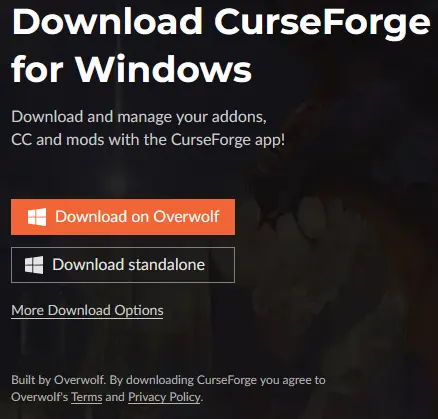 The easiest method for installing RLCraft is using a mod manager such as the CurseForge app. This will not only download all the files but also set them up in a custom Minecraft profile, making the hardest step of this guide merely clicking play.
For this guide, we will be proceeding with the CurseForge app, which can be found here.
The easiest method for installing RLCraft is using a mod manager such as the CurseForge app. This will not only download all the files but also set them up in a custom Minecraft profile, making the hardest step of this guide merely clicking play.
For this guide, we will be proceeding with the CurseForge app, which can be found here.
Step 2: Select “Add a Game”
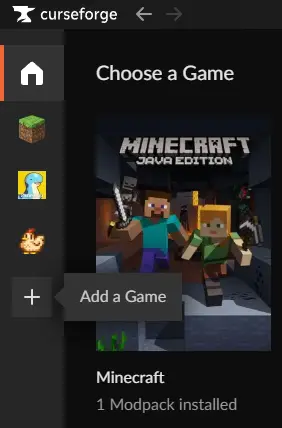 The CurseForge app can be used for many games ranging from Stardew Valley to World of Warcraft, but in this case, our goal is to add Minecraft. Minecraft may already be present for some users, but for others, the scan option or manually locating it are both options found by clicking the “+” symbol on the left side of the window.
Step 3: Install RLCraft
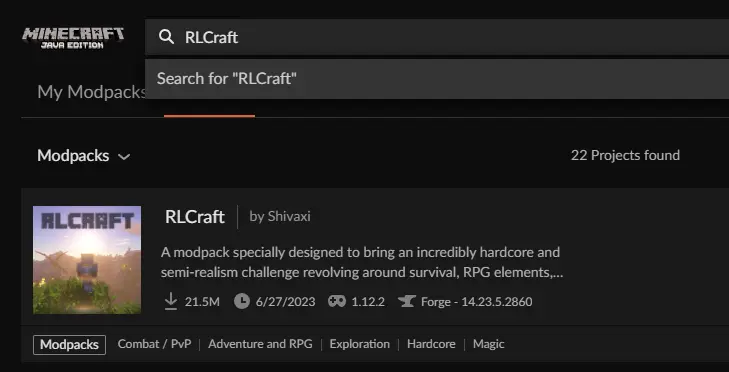 Once Minecraft has been added, select the grass block icon on the left side of the window. This will open a page with “My Modpacks,” “Browse,” and “Servers” along the top. In our case, browse will be selected which should then list a variety of modpacks.
Select the search bar at the top and type RLCraft. The very first modpack should be RLCraft by Shivaxi with over 20,000,000 downloads. Select it and click “Install” on the top right of the window.
Once Minecraft has been added, select the grass block icon on the left side of the window. This will open a page with “My Modpacks,” “Browse,” and “Servers” along the top. In our case, browse will be selected which should then list a variety of modpacks.
Select the search bar at the top and type RLCraft. The very first modpack should be RLCraft by Shivaxi with over 20,000,000 downloads. Select it and click “Install” on the top right of the window.
Step 4: Allocating RAM
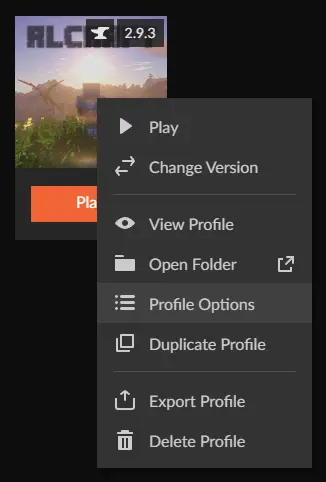 After installing RLCraft, return to the “My Modpacks” tab and right-click RLCraft. A menu should then appear with “Profile Options” listed inside. Select “Profile Options” and uncheck the box next to “Use System Memory Settings.” After doing so, a bar will appear, which can be adjusted.
For large modpacks such as RLCraft, no less than 4000MB is recommended. Once set, select “Done.”
After installing RLCraft, return to the “My Modpacks” tab and right-click RLCraft. A menu should then appear with “Profile Options” listed inside. Select “Profile Options” and uncheck the box next to “Use System Memory Settings.” After doing so, a bar will appear, which can be adjusted.
For large modpacks such as RLCraft, no less than 4000MB is recommended. Once set, select “Done.”
Step 5: Click Play!
 All that remains is simply clicking play. This will open the Minecraft Launcher, where a brand new modded profile is completely set up and ready to go. Upon clicking play there, RLCraft will start up and begin to load.
How to Install RLCraft
With the five steps above complete, RLCraft can now be enjoyed in both multiplayer and alone! For those seeking a server to play with friends, look further than BisectHosting, where code Shivaxi gets 25% off your first order. Until Next Time, BisectHosting =)Создайте свой собственный
сервер Minecraft
сервер Minecraft
Выберите тариф, укажите игру и играйте с друзьями!
Подпишитесь на нашу рассылку
Подпишитесь, чтобы получать последние новости из мира игр!

Присоединяйтесь к нашему Discord
Станьте частью нашего сообщества, в котором уже более 20000 единомышленников!
Как бы вы оценили этот блог?
Поделитесь своим мнением и помогите нам сделать наши блоги еще лучше!
Не понравилось
Нейтрально
Понравилось

Нужен игровой сервер?
Арендуйте игровой сервер, где вы и ваши друзья сможете играть в закрытом режиме с низкой задержкой и собственными настройками. Выбирайте из 110+ игр, приглашайте людей со всего мира и наслаждайтесь приватными матчами или создайте свое собственное онлайн-сообщество со своими правилами.

Похожие статьи







УЗНАЙТЕ ВСЕ ПЕРВЫМИ!
Подпишитесь на нашу рассылку, чтобы получать обновления о наших играх, новости компании и эксклюзивные предложения. Будьте в курсе!













