

How to Find Sulfur Caves in Minecraft
Опубликовано автором

Поделиться:

Поделиться в X

Поделиться в Facebook

Поделиться в Threads

Поделиться в Bluesky

Скопировать в буфер обмена

Поделиться по email
Underground biomes are not always easy to find, but Sulfur Caves come with a few hints that, if known, save a lot of time! So, today, we answer how to find sulfur caves in Minecraft.

 Added as part of Minecraft 26.2 Chaos Cubed, Sulfur Caves are an underground biome made primarily of yellow sulfur blocks, red cinnabar blocks, and pools of water that visibly emit gas and explosions of steam. Sulfur caves also have an exclusive entity called the Sulfur Cube. Sulfur cubes can be fed a block, and depending on the type, the sulfur cube gains various ball-like properties that can facilitate player-made minigames.
Additionally, sulfur caves have the very rare chance of being able to generate partially on the surface. In these instances, the biome is relatively flat and filled with an abundance of gassy pools and geysers.
Added as part of Minecraft 26.2 Chaos Cubed, Sulfur Caves are an underground biome made primarily of yellow sulfur blocks, red cinnabar blocks, and pools of water that visibly emit gas and explosions of steam. Sulfur caves also have an exclusive entity called the Sulfur Cube. Sulfur cubes can be fed a block, and depending on the type, the sulfur cube gains various ball-like properties that can facilitate player-made minigames.
Additionally, sulfur caves have the very rare chance of being able to generate partially on the surface. In these instances, the biome is relatively flat and filled with an abundance of gassy pools and geysers.
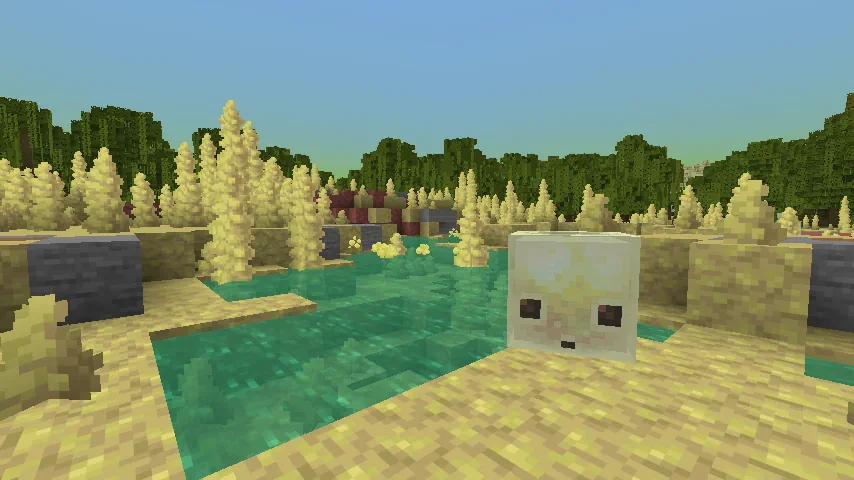 Sulfur caves are primarily an underground biome that can generate below most terrain, excluding oceans and high mountains. When it does generate, it will usually be indicated on the surface by a sulfur spring, which is a singular pool with a geyser surrounded by sulfur, cinnabar, and stone blocks. A sulfur spring will never generate without a sulfur caves beneath it.
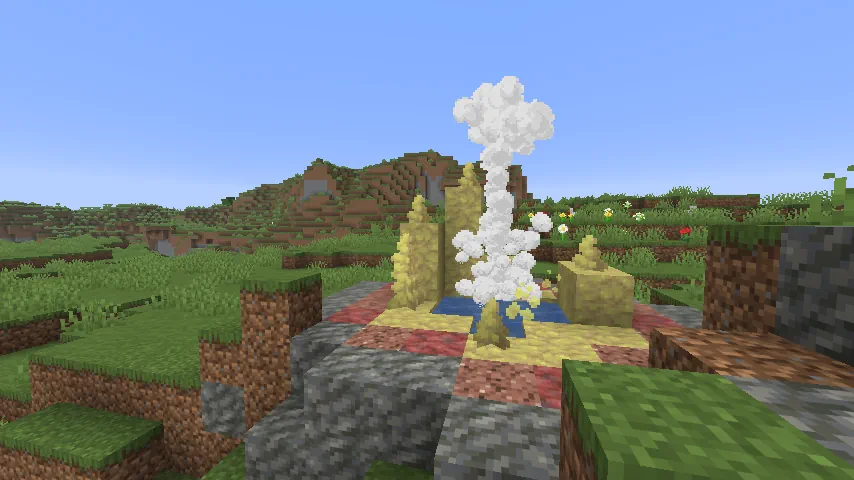 Despite being mostly underground, those searching for a sulfur caves biome will have the most success by quickly traversing the overworld’s surface. This is because finding a sulfur spring on the surface means there is a sulfur caves somewhere beneath it. A quick trip with an elytra will typically lead to finding one, if not more.
Surface sulfur caves, however, are significantly harder to find. This form of generation rarely occurs, and even in the instances where it is possible, sulfur caves must be connected to the surface through ravines and caves. Areas where surface sulfur caves can occur are when the hidden weirdness value is below -1.0. A typical indicator of this is mangrove swamps, which are rare in and of themselves.
The existence of surface sulfur caves stems from a bug that Mojang opted to leave in the game at the request of fans, and this unintended nature sadly leaves it as something few will see through natural means. Those looking to find one will need to be prepared for a long and extensive trip.
Despite being mostly underground, those searching for a sulfur caves biome will have the most success by quickly traversing the overworld’s surface. This is because finding a sulfur spring on the surface means there is a sulfur caves somewhere beneath it. A quick trip with an elytra will typically lead to finding one, if not more.
Surface sulfur caves, however, are significantly harder to find. This form of generation rarely occurs, and even in the instances where it is possible, sulfur caves must be connected to the surface through ravines and caves. Areas where surface sulfur caves can occur are when the hidden weirdness value is below -1.0. A typical indicator of this is mangrove swamps, which are rare in and of themselves.
The existence of surface sulfur caves stems from a bug that Mojang opted to leave in the game at the request of fans, and this unintended nature sadly leaves it as something few will see through natural means. Those looking to find one will need to be prepared for a long and extensive trip.
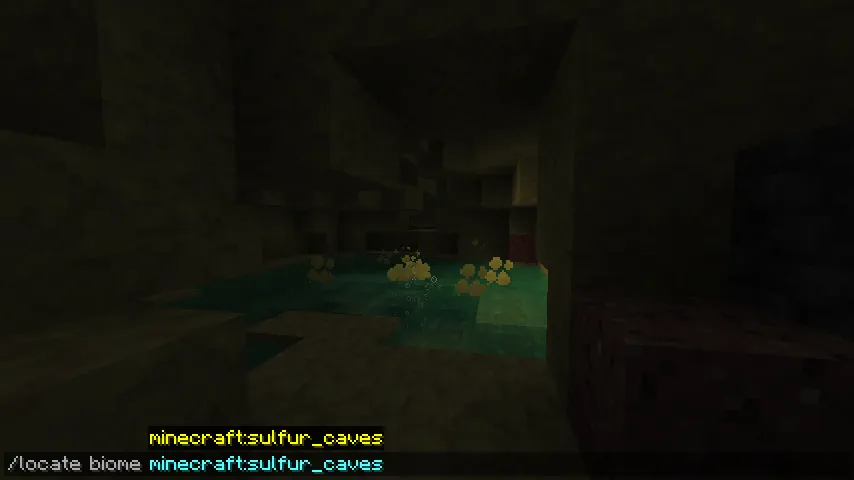 Should it be preferred, there is also the option of using the “/locate” command. This nifty tool provides the exact coordinates of the nearest biome (or structure) of the desired type, and by clicking them, teleports the player there.
The full command is as follows:
Should it be preferred, there is also the option of using the “/locate” command. This nifty tool provides the exact coordinates of the nearest biome (or structure) of the desired type, and by clicking them, teleports the player there.
The full command is as follows:
A Summary of Sulfur Caves
How to Find Sulfur Caves in Minecraft
Sulfur Cave Generation
Sulfur caves are primarily an underground biome that can generate below most terrain, excluding oceans and high mountains. When it does generate, it will usually be indicated on the surface by a sulfur spring, which is a singular pool with a geyser surrounded by sulfur, cinnabar, and stone blocks. A sulfur spring will never generate without a sulfur caves beneath it.
Finding Sulfur Caves Without Commands
Despite being mostly underground, those searching for a sulfur caves biome will have the most success by quickly traversing the overworld’s surface. This is because finding a sulfur spring on the surface means there is a sulfur caves somewhere beneath it. A quick trip with an elytra will typically lead to finding one, if not more.
Surface sulfur caves, however, are significantly harder to find. This form of generation rarely occurs, and even in the instances where it is possible, sulfur caves must be connected to the surface through ravines and caves. Areas where surface sulfur caves can occur are when the hidden weirdness value is below -1.0. A typical indicator of this is mangrove swamps, which are rare in and of themselves.
The existence of surface sulfur caves stems from a bug that Mojang opted to leave in the game at the request of fans, and this unintended nature sadly leaves it as something few will see through natural means. Those looking to find one will need to be prepared for a long and extensive trip.
Finding Sulfur Caves with Commands
Should it be preferred, there is also the option of using the “/locate” command. This nifty tool provides the exact coordinates of the nearest biome (or structure) of the desired type, and by clicking them, teleports the player there.
The full command is as follows:
- /locate biome Minecraft:sulfur_caves
Создайте свой собственный
сервер Minecraft
сервер Minecraft
Выберите тариф, укажите игру и играйте с друзьями!
Подпишитесь на нашу рассылку
Подпишитесь, чтобы получать последние новости из мира игр!

Присоединяйтесь к нашему Discord
Станьте частью нашего сообщества, в котором уже более 20000 единомышленников!
Как бы вы оценили этот блог?
Поделитесь своим мнением и помогите нам сделать наши блоги еще лучше!
Не понравилось
Нейтрально
Понравилось

Нужен игровой сервер?
Арендуйте игровой сервер, где вы и ваши друзья сможете играть в закрытом режиме с низкой задержкой и собственными настройками. Выбирайте из 110+ игр, приглашайте людей со всего мира и наслаждайтесь приватными матчами или создайте свое собственное онлайн-сообщество со своими правилами.

Похожие статьи







УЗНАЙТЕ ВСЕ ПЕРВЫМИ!
Подпишитесь на нашу рассылку, чтобы получать обновления о наших играх, новости компании и эксклюзивные предложения. Будьте в курсе!













