

How to Find Minecraft Fireflies
Опубликовано автором

Поделиться:

Поделиться в X

Поделиться в Facebook

Поделиться в Threads

Поделиться в Bluesky

Скопировать в буфер обмена

Поделиться по email
As of Minecraft snapshot 25w05a, fireflies are illuminating the night and keeping mobs at bay, but not every biome will have their light show on display. So, today, we answer how to find Minecraft fireflies and firefly bush blocks in game.
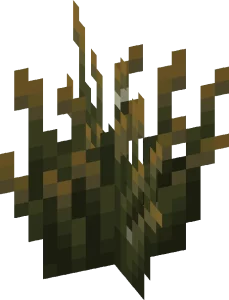
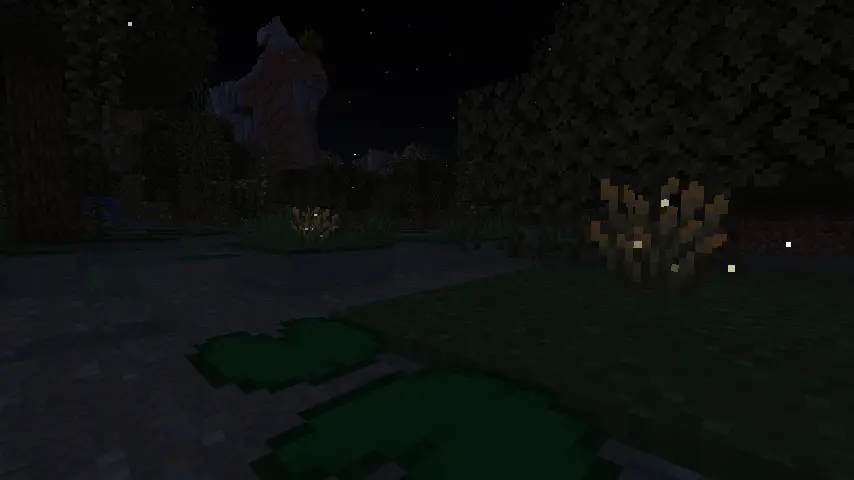 Minecraft fireflies are not mobs like bees or frogs but instead glowing particles that float around a new block called a firefly bush. During the day, these firefly bush blocks can be distinguished from regular bush blocks by their darker green base, yellowish leaf tips, and glowing (firefly) pixels on their leaves. At night, however, fireflies fly around the block’s surroundings in a beautiful mob-like display.
 Players searching for Minecraft Fireflies will need to locate and gather firefly bush blocks, which generate in swamp biomes and along rivers as of Minecraft snapshot 25w05a (Minecraft 1.21.5.) Thankfully, neither swamp biomes nor rivers are rare, and rivers can typically be found by adventuring out into the world within a few minutes’ time.
Once located, Firefly bush blocks can be gathered by hand, placed anywhere, and duplicated with bone meal. They also produce a light level of two, which prevents mobs from spawning in a very small radius around them.
Players searching for Minecraft Fireflies will need to locate and gather firefly bush blocks, which generate in swamp biomes and along rivers as of Minecraft snapshot 25w05a (Minecraft 1.21.5.) Thankfully, neither swamp biomes nor rivers are rare, and rivers can typically be found by adventuring out into the world within a few minutes’ time.
Once located, Firefly bush blocks can be gathered by hand, placed anywhere, and duplicated with bone meal. They also produce a light level of two, which prevents mobs from spawning in a very small radius around them.
 Should bad luck or an unfortunate spawn be encountered, there is always the option of using the “/locate” command. This nifty tool provides the exact coordinates of the nearest structure or biome, and by clicking them, teleports the player there.
Some would consider this cheating, but in Minecraft, that is for you to decide. The full locate biome command for swamp biomes is as follows:
Should bad luck or an unfortunate spawn be encountered, there is always the option of using the “/locate” command. This nifty tool provides the exact coordinates of the nearest structure or biome, and by clicking them, teleports the player there.
Some would consider this cheating, but in Minecraft, that is for you to decide. The full locate biome command for swamp biomes is as follows:
Minecraft Fireflies: Mob Vs Particle
Minecraft fireflies are not mobs like bees or frogs but instead glowing particles that float around a new block called a firefly bush. During the day, these firefly bush blocks can be distinguished from regular bush blocks by their darker green base, yellowish leaf tips, and glowing (firefly) pixels on their leaves. At night, however, fireflies fly around the block’s surroundings in a beautiful mob-like display.
How to Find Minecraft Fireflies
Players searching for Minecraft Fireflies will need to locate and gather firefly bush blocks, which generate in swamp biomes and along rivers as of Minecraft snapshot 25w05a (Minecraft 1.21.5.) Thankfully, neither swamp biomes nor rivers are rare, and rivers can typically be found by adventuring out into the world within a few minutes’ time.
Once located, Firefly bush blocks can be gathered by hand, placed anywhere, and duplicated with bone meal. They also produce a light level of two, which prevents mobs from spawning in a very small radius around them.
How to Find Swamp Biomes with Commands
- /locate biome minecraft:swamp
Создайте свой собственный
сервер Minecraft
сервер Minecraft
Выберите тариф, укажите игру и играйте с друзьями!
Подпишитесь на нашу рассылку
Подпишитесь, чтобы получать последние новости из мира игр!

Присоединяйтесь к нашему Discord
Станьте частью нашего сообщества, в котором уже более 20000 единомышленников!
Как бы вы оценили этот блог?
Поделитесь своим мнением и помогите нам сделать наши блоги еще лучше!
Не понравилось
Нейтрально
Понравилось

Нужен игровой сервер?
Арендуйте игровой сервер, где вы и ваши друзья сможете играть в закрытом режиме с низкой задержкой и собственными настройками. Выбирайте из 110+ игр, приглашайте людей со всего мира и наслаждайтесь приватными матчами или создайте свое собственное онлайн-сообщество со своими правилами.

Похожие статьи







УЗНАЙТЕ ВСЕ ПЕРВЫМИ!
Подпишитесь на нашу рассылку, чтобы получать обновления о наших играх, новости компании и эксклюзивные предложения. Будьте в курсе!













