
Palworld Controls Guide: All PC and Controller Keybinds
Opublikowano przez

Udostępnij:

Udostępnij na X

Udostępnij na Facebooku

Udostępnij na Threads

Udostępnij na Bluesky

Skopiuj do schowka

Udostępnij przez e-mail
Like starting relatively any game, you must learn the controls for Palworld to play the game efficiently. Note that the game’s controls differ depending on your device. So, keep reading as we go over the controller and keyboard controls for the game in this guide.
 At the time of writing, Palworld was released on the Steam and Game Pass platforms. That means that the available methods of controlling your character and Pals are through a controller or a keyboard and mouse.
 Some players may prefer to use the keyboard and mouse to use Palworld’s controls. However, some users may prefer to change the keyboard keybinds because of their awkward placements. For example, the roll is set to the “Ctrl” key by default. So, you may have difficulty extending a finger to press this button when dodging incoming attacks.
 Unlike the keyboard and mouse, the Palworld controls are generally simpler when using a controller. However, the controller controls typically show the button names for the Xbox or standard PC controller model. So, it can become confusing if you use another controller with a different button layout, such as one for the PlayStation.
Palworld Controls and Keybinds
At the time of writing, Palworld was released on the Steam and Game Pass platforms. That means that the available methods of controlling your character and Pals are through a controller or a keyboard and mouse.
Keyboard and Mouse Controls
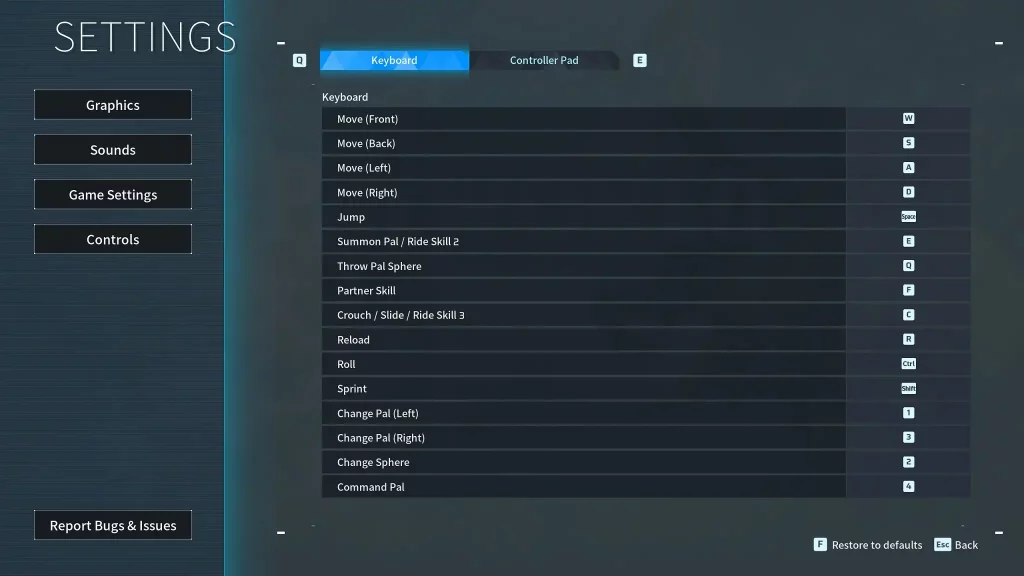
Some players may prefer to use the keyboard and mouse to use Palworld’s controls. However, some users may prefer to change the keyboard keybinds because of their awkward placements. For example, the roll is set to the “Ctrl” key by default. So, you may have difficulty extending a finger to press this button when dodging incoming attacks.
- Move (Front): W
- Move (Back): S
- Move (Left): A
- Move (Right): D
- Left Click: Attack/Use equipped item
- Right Click: Cancel Pal Sphere throw
- Jump: Space
- Summon Pal/Ride Skill 2: E
- Throw Pal Sphere: Q
- Partner Skill: F
- Crouch/Slide/Ride Skill 3: C
- Reload: R
- Roll: Ctrl
- Sprint: Shift
- Change Pal (Left): 1
- Change Pal (Right): 3
- Change Sphere: 2
- Pal Commands: 4
Controller Controls
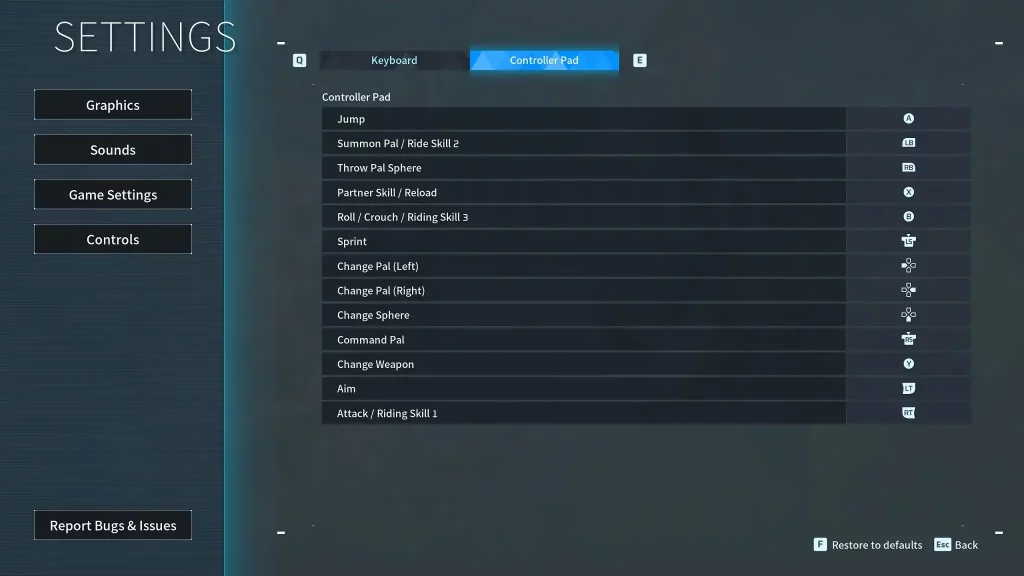
Unlike the keyboard and mouse, the Palworld controls are generally simpler when using a controller. However, the controller controls typically show the button names for the Xbox or standard PC controller model. So, it can become confusing if you use another controller with a different button layout, such as one for the PlayStation.
- Movement: Left analog stick
- Aim/Look Around: Right analog stick
- Jump: A
- Summon Pal/Ride Skill 2: Left Bumper
- Throw Pal Sphere: Right Bumper
- Partner Skill/Reload: X
- Roll/Crouch/Riding Skill 3: B
- Sprint: Left analog stick (press)
- Change Pal (Left): Left directional button
- Change Pal (Right): Right directional button
- Change Sphere: Down directional button
- Pal Commands: Right analog stick (press)
- Change Weapon: Y
- Aim: Left Trigger
- Attack/Riding Skill 1: Right Trigger
Zapisz się do newslettera
Subskrybuj, aby otrzymywać najnowsze informacje ze świata gier!

Dołącz do naszego Discorda
Zostań częścią naszej społeczności ponad 20,000 podobnie myślących członków!
Jak oceniasz ten wpis?
Podziel się swoją opinią i pomóż nam tworzyć jeszcze lepsze artykuły!
Nie podobał mi się
Neutralnie
Podobał mi się

Potrzebujesz serwera do gry?
Wynajmij serwer gier, na którym Ty i Twoi znajomi możecie grać prywatnie z niskim opóźnieniem i własnymi ustawieniami. Wybieraj spośród 110+ gier, zaproś ludzi z całego świata i ciesz się prywatnymi rozgrywkami lub zbuduj własną społeczność online z własnymi zasadami.

Powiązane wpisy







BĄDŹ NA BIEŻĄCO!
Dołącz do naszego newslettera, aby otrzymywać informacje o naszych hostowanych grach, nowościach firmowych i ekskluzywnych ofertach. Bądź na bieżąco!













