

Once Human Controls Guide: All PC & Controller Keybinds (Xbox, PlayStation)
Opublikowano przez

Udostępnij:

Udostępnij na X

Udostępnij na Facebooku

Udostępnij na Threads

Udostępnij na Bluesky

Skopiuj do schowka

Udostępnij przez e-mail
There is danger around every corner in the surreal apocalypse of Once Human. While the game has a tutorial that teaches you the basics, it's always good to brush up on the game's controls when starting. We've gathered all the info you need on Once Human controls when playing on PC with a mouse & keyboard or controller.
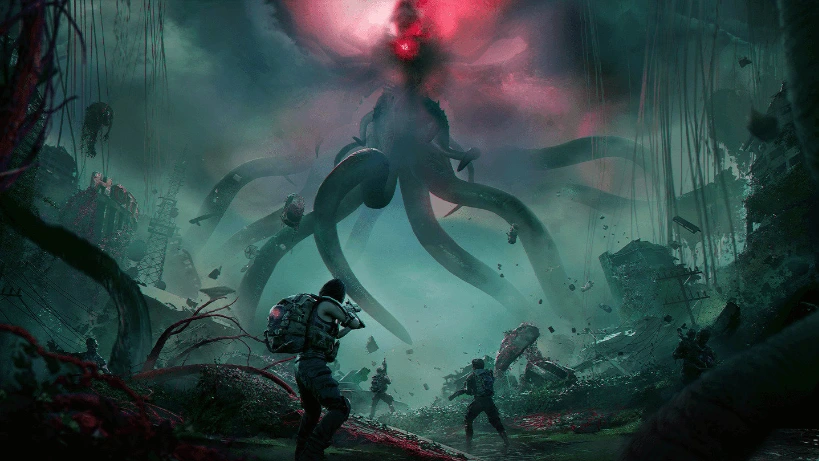 In Once Human, you'll need to manage basic exploration and combat controls. However, you also need to manage situational controls, such as navigating the game's interface, driving vehicles, and more. Pay careful attention to the game's tutorials to learn how everything works. However, you can always return to our handy guide if you need a reminder!
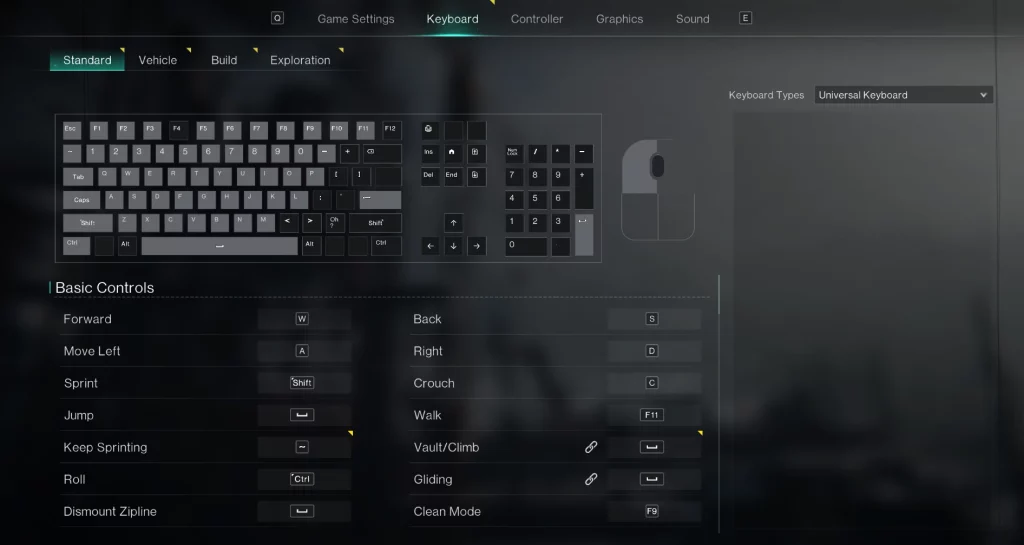
Once Human Controls & Keybinds (PC)
In Once Human, you'll need to manage basic exploration and combat controls. However, you also need to manage situational controls, such as navigating the game's interface, driving vehicles, and more. Pay careful attention to the game's tutorials to learn how everything works. However, you can always return to our handy guide if you need a reminder!
Basic Controls
- Forward: W
- Back: S
- Move Left: A
- Move Right: D
- Sprint: Shift
- Crouch: C
- Jump: Spacebar
- Walk: F11
- Keep Sprinting: ~
- Vault/Climb: Spacebar
- Roll: Ctrl
- Gliding: Spacebar
- Dismount Zipline: Spacebar
- Clean Mode: F9
Common Functions
- Summon Vehicles: G
- Interact with Target: F
- Spacetime: Q
- Collect Water: G
- Launch PvP: P
- Camp: T
- Function Wheel: Tab
- Expressions Wheel: X
- Quick Pin: Click in Scroll Wheel
- Track Task: Y
- Flashlight: N
- Pin Wheel: Click in Scroll Wheel
- Whispers: H
- Check Player: Z
System Interface
- Item Backpack: I
- Gear Backpack: K
- Cradle: O
- Blueprint: Unbound by default
- Mods: Unbound by default
- Cosmetics: Unbound by default
- World Map: M
- Task: L
- Journey: J
- Survival Manual: F6
- Field Guide: Unbound by default
- Build: B
- Team: U
- HIVE: Unbound by default
- Warband: Unbound by default
- Shop: F2
- Battle Pass: Unbound by default
- Sign Up: Y
- Events: F3
- Settings: Unbound by default
- System Menu: Esc
- Manage Eternaland: F7
- Logistics: F8
Combat
- Fire: Left Mouse Click
- Aim: Right Mouse Click
- Reload: R
- Switch to OTS: Right Mouse Click
- Weapon 1: 1
- Weapon 2: 2
- Switch to Melee Weapon: 3
- Quick Switch Weapon: Use Scroll Wheel
- Holster Weapon: H
- Switch Camera: Caps
- Melee Attack: V
- Melee Heavy Attack: Right Mouse Click
- Place Vehicle_Exit: Esc
- Place Vehicle_Confirm: Left Mouse Click
- Vehicle Camera Zoom: Alt + Use Scroll Wheel
- Deviation Control: E
- Deviation Battle Skill: E
- Deviation Signature Move: X
Hotbar
- Item 1: 4
- Item 2: 5
- Item 3: 6
- Item 4: 7
- Item 5: 8
- Item 6: 9
- Item 7: 0
- Item 8: -
Chat
- Send Messages: Enter
- Voice Chat: F5
- Open Private Chat: F1
- Interact: H
Story
- Skip Cutscene: Spacebar
- Upload Configuration data: F10
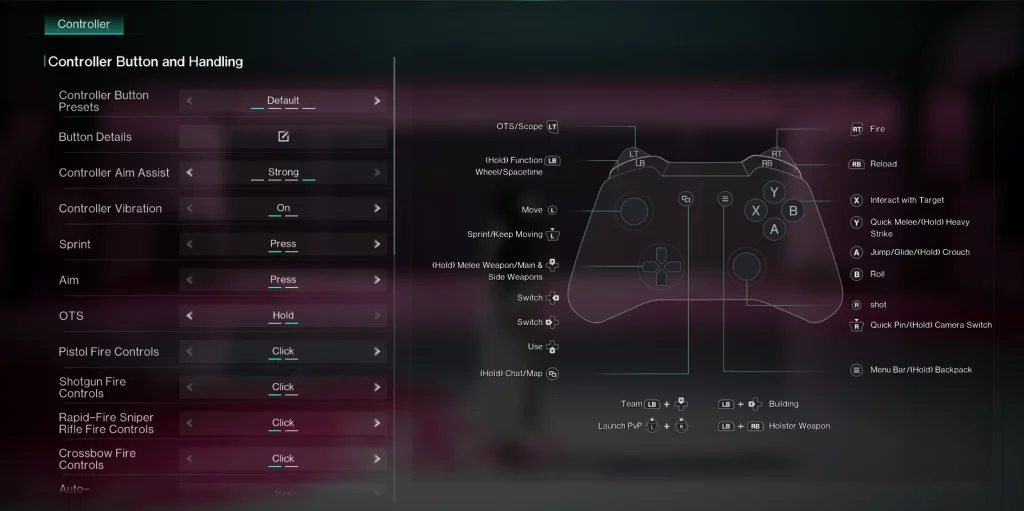
Once Human Controls on Controller (Xbox & PlayStation)
Xbox Controller
- OTS/Scope: LT
- Fire: RT
- (Hold) Function & Wheel/Spacetime: LB
- Reload: RB
- Move: Move Left Stick
- Sprint/Keep Moving: Click in Left Stick
- (Hold) Melee Weapon/Main & Side Weapons: Up on Directional Pad
- Switch: Right & Left on Directional Pad
- Use: Down on Directional Pad
- (Hold) Chat/Map: View Button
- Interact with Target: X
- Quick Melee/(Hold) Heavy Strike: Y
- Jump/Glide/(Hold) Crouch: A
- Roll: B
- Move Camera: Move Right Stick
- Quick Pin/(Hold) Camera Switch: Click in Right Stick
- Menu Bar/(Hold) Backpack: Menu Button
- Team: LB + Up on Directional Pad
- Building: LB + Left on Directional Pad
- Launch PvP: Click in Left Stick + Click in Right Stick
- Holster Weapon: LB + RB
PlayStation Controller
- OTS/Scope: L2
- Fire: R2
- (Hold) Function & Wheel/Spacetime: L1
- Reload: R1
- Move: Move Left Stick
- Sprint/Keep Moving: Click in Left Stick
- (Hold) Melee Weapon/Main & Side Weapons: Up on Directional Pad
- Switch: Right & Left on Directional Pad
- Use: Down on Directional Pad
- (Hold) Chat/Map: Click in Touchpad
- Interact with Target: Square
- Quick Melee/(Hold) Heavy Strike: Triangle
- Jump/Glide/(Hold) Crouch: Cross
- Roll: Circle
- Move Camera: Move Right Stick
- Quick Pin/(Hold) Camera Switch: Click in Right Stick
- Menu Bar/(Hold) Backpack: Options Button
- Team: L1 + Up on Directional Pad
- Building: L1 + Left on Directional Pad
- Launch PvP: Click in Left Stick + Click in Right Stick
- Holster Weapon: L1 + R1
Zapisz się do newslettera
Subskrybuj, aby otrzymywać najnowsze informacje ze świata gier!

Dołącz do naszego Discorda
Zostań częścią naszej społeczności ponad 20,000 podobnie myślących członków!
Jak oceniasz ten wpis?
Podziel się swoją opinią i pomóż nam tworzyć jeszcze lepsze artykuły!
Nie podobał mi się
Neutralnie
Podobał mi się

Potrzebujesz serwera do gry?
Wynajmij serwer gier, na którym Ty i Twoi znajomi możecie grać prywatnie z niskim opóźnieniem i własnymi ustawieniami. Wybieraj spośród 110+ gier, zaproś ludzi z całego świata i ciesz się prywatnymi rozgrywkami lub zbuduj własną społeczność online z własnymi zasadami.

Powiązane wpisy







BĄDŹ NA BIEŻĄCO!
Dołącz do naszego newslettera, aby otrzymywać informacje o naszych hostowanych grach, nowościach firmowych i ekskluzywnych ofertach. Bądź na bieżąco!













