

How to Repair Items in Minecraft
Opublikowano przez

Udostępnij:

Udostępnij na X

Udostępnij na Facebooku

Udostępnij na Threads

Udostępnij na Bluesky

Skopiuj do schowka

Udostępnij przez e-mail
A treasured item never needs to go away! A little love and care, and it is as good as the day it was made. So, today, we explain every Minecraft repair option in “How to Repair Items in Minecraft.”
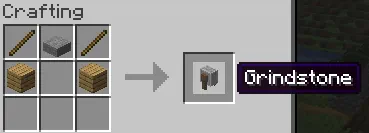 The first of the three options for repairing in Minecraft is exclusively for non-enchanted items. Simply put two identical tools, weapons, or pieces of armor into the crafting grid, and it will combine the durability. This can also be done within a grindstone, which removes enchantments, granting a little XP as well.
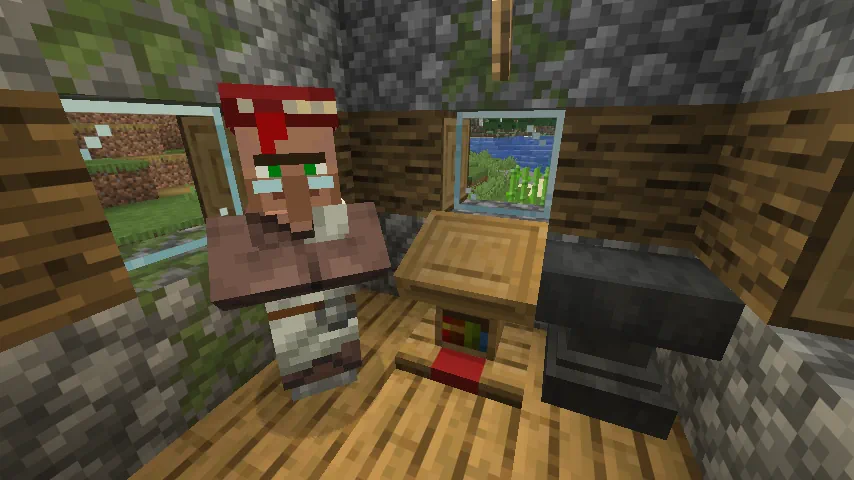 The next option for repairing items within Minecraft is the mending enchantment. Arguably the strongest in the game, it automatically consumes XP points to repair the tool, weapon, or armor it has been applied to, effectively making it last forever. This effect is intended to be balanced by having mending books be quite rare, but by repeatedly breaking and placing the lectern job block of a librarian villager, the trades can be reset until mending appears. The exact steps for this are as follows:
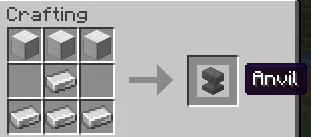 The final method for repairing in Minecraft is placing an item within an anvil alongside a second identical item. Unlike the first option, this allows enchanted items to be repaired or merged for an XP cost. However, every repair done in this way will gradually make the cost increase until it surpasses 50 levels. After that, the item can no longer be repaired as the anvil will state the level cost is too high.
How to Repair Items in Minecraft
Non-Enchanted Items
The first of the three options for repairing in Minecraft is exclusively for non-enchanted items. Simply put two identical tools, weapons, or pieces of armor into the crafting grid, and it will combine the durability. This can also be done within a grindstone, which removes enchantments, granting a little XP as well.
Mending Enchantment
The next option for repairing items within Minecraft is the mending enchantment. Arguably the strongest in the game, it automatically consumes XP points to repair the tool, weapon, or armor it has been applied to, effectively making it last forever. This effect is intended to be balanced by having mending books be quite rare, but by repeatedly breaking and placing the lectern job block of a librarian villager, the trades can be reset until mending appears. The exact steps for this are as follows:
- Block in a jobless villager.
- Place a lectern block.
- After the villager becomes a librarian, check its trades.
- If no mending trade is present, break the lectern job block.
- Repeat steps 1 through 4 until a mending trade appears.
Anvil Repairing
The final method for repairing in Minecraft is placing an item within an anvil alongside a second identical item. Unlike the first option, this allows enchanted items to be repaired or merged for an XP cost. However, every repair done in this way will gradually make the cost increase until it surpasses 50 levels. After that, the item can no longer be repaired as the anvil will state the level cost is too high.Zapisz się do newslettera
Subskrybuj, aby otrzymywać najnowsze informacje ze świata gier!

Dołącz do naszego Discorda
Zostań częścią naszej społeczności ponad 20,000 podobnie myślących członków!
Jak oceniasz ten wpis?
Podziel się swoją opinią i pomóż nam tworzyć jeszcze lepsze artykuły!
Nie podobał mi się
Neutralnie
Podobał mi się

Potrzebujesz serwera do gry?
Wynajmij serwer gier, na którym Ty i Twoi znajomi możecie grać prywatnie z niskim opóźnieniem i własnymi ustawieniami. Wybieraj spośród 110+ gier, zaproś ludzi z całego świata i ciesz się prywatnymi rozgrywkami lub zbuduj własną społeczność online z własnymi zasadami.

Powiązane wpisy







BĄDŹ NA BIEŻĄCO!
Dołącz do naszego newslettera, aby otrzymywać informacje o naszych hostowanych grach, nowościach firmowych i ekskluzywnych ofertach. Bądź na bieżąco!













