

Minecraft 1.19.81 Update (Bedrock): Patch Notes & How To Install
Opublikowano przez

Udostępnij:

Udostępnij na X

Udostępnij na Facebooku

Udostępnij na Threads

Udostępnij na Bluesky

Skopiuj do schowka

Udostępnij przez e-mail
The Minecraft community noticed some issues with one of the game’s latest patches. But Mojang, the developer behind this hit sandbox title, released the Minecraft 1.19.81 update to remedy these concerns.
 The Minecraft 1.19.91 update for Bedrock is available for all supported platforms except for the game’s Nintendo Switch version. However, the patch for Nintendo’s current-generation gaming console will soon be available.
This update fixes the following issues:
The Minecraft 1.19.91 update for Bedrock is available for all supported platforms except for the game’s Nintendo Switch version. However, the patch for Nintendo’s current-generation gaming console will soon be available.
This update fixes the following issues:
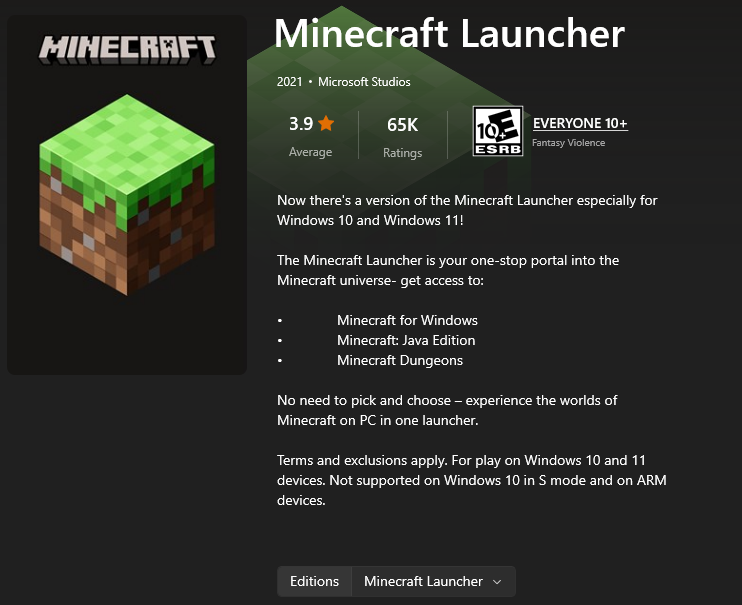 An over-the-air (OTA) update should be available for your gaming platform of choice. For example, force the game to update on your device (e.g., Android, iOS, or PS4) by going to the recommended menu.
The same goes when you’re playing the game on a Windows PC. Open the Minecraft launcher and select the Bedrock edition. The game should automatically update to the 1.19.81 patch.
But, if the automatic update fails, you may install the patch through the Microsoft Store. Open that app, and click on the Library icon at the bottom left corner of the window.
In the Library window, click the “Get Updates” button at the upper right. Note that the period in which the updates finish depends on the number of detected apps with new patches to be installed. After which, open the Minecraft launcher again and check if the game now has the 1.19.81 patch.
If updating through the Microsoft store still fails, you may also try installing the patch through the Xbox App. Open it, and select “My Library.” Here, search for the Minecraft Bedrock edition and click on it. Then, click on the three dots underneath the banner and force the update from there.
At this point, your Minecraft Bedrock app should have the 1.19.81 patch installed. If not, you may need to uninstall the app and reinstall it to get the update.
You can also try out the new features coming to the game. For instance, you can try the Minecraft 1.20 Snapshot 2317A. Alternatively, you may also want to check out Mojang’s latest game, Minecraft Legends.
An over-the-air (OTA) update should be available for your gaming platform of choice. For example, force the game to update on your device (e.g., Android, iOS, or PS4) by going to the recommended menu.
The same goes when you’re playing the game on a Windows PC. Open the Minecraft launcher and select the Bedrock edition. The game should automatically update to the 1.19.81 patch.
But, if the automatic update fails, you may install the patch through the Microsoft Store. Open that app, and click on the Library icon at the bottom left corner of the window.
In the Library window, click the “Get Updates” button at the upper right. Note that the period in which the updates finish depends on the number of detected apps with new patches to be installed. After which, open the Minecraft launcher again and check if the game now has the 1.19.81 patch.
If updating through the Microsoft store still fails, you may also try installing the patch through the Xbox App. Open it, and select “My Library.” Here, search for the Minecraft Bedrock edition and click on it. Then, click on the three dots underneath the banner and force the update from there.
At this point, your Minecraft Bedrock app should have the 1.19.81 patch installed. If not, you may need to uninstall the app and reinstall it to get the update.
You can also try out the new features coming to the game. For instance, you can try the Minecraft 1.20 Snapshot 2317A. Alternatively, you may also want to check out Mojang’s latest game, Minecraft Legends.
Minecraft 1.19.81 Patch Notes
The Minecraft 1.19.91 update for Bedrock is available for all supported platforms except for the game’s Nintendo Switch version. However, the patch for Nintendo’s current-generation gaming console will soon be available.
This update fixes the following issues:
Realm Crashes
- Fixed a crash with the ‘/tell’ command (and some other commands) that could occur on Realms
Infinite Loading With The Purchase Button
- Fixed an issue with Purchase buttons loading infinitely on Featured Servers
Show More Button Disappearance
- Fixed Featured Server offers not displaying the “Show More” button
How To Install The Minecraft 1.19.81 Update
An over-the-air (OTA) update should be available for your gaming platform of choice. For example, force the game to update on your device (e.g., Android, iOS, or PS4) by going to the recommended menu.
The same goes when you’re playing the game on a Windows PC. Open the Minecraft launcher and select the Bedrock edition. The game should automatically update to the 1.19.81 patch.
But, if the automatic update fails, you may install the patch through the Microsoft Store. Open that app, and click on the Library icon at the bottom left corner of the window.
In the Library window, click the “Get Updates” button at the upper right. Note that the period in which the updates finish depends on the number of detected apps with new patches to be installed. After which, open the Minecraft launcher again and check if the game now has the 1.19.81 patch.
If updating through the Microsoft store still fails, you may also try installing the patch through the Xbox App. Open it, and select “My Library.” Here, search for the Minecraft Bedrock edition and click on it. Then, click on the three dots underneath the banner and force the update from there.
At this point, your Minecraft Bedrock app should have the 1.19.81 patch installed. If not, you may need to uninstall the app and reinstall it to get the update.
You can also try out the new features coming to the game. For instance, you can try the Minecraft 1.20 Snapshot 2317A. Alternatively, you may also want to check out Mojang’s latest game, Minecraft Legends.
Zapisz się do newslettera
Subskrybuj, aby otrzymywać najnowsze informacje ze świata gier!

Dołącz do naszego Discorda
Zostań częścią naszej społeczności ponad 20,000 podobnie myślących członków!
Jak oceniasz ten wpis?
Podziel się swoją opinią i pomóż nam tworzyć jeszcze lepsze artykuły!
Nie podobał mi się
Neutralnie
Podobał mi się

Potrzebujesz serwera do gry?
Wynajmij serwer gier, na którym Ty i Twoi znajomi możecie grać prywatnie z niskim opóźnieniem i własnymi ustawieniami. Wybieraj spośród 110+ gier, zaproś ludzi z całego świata i ciesz się prywatnymi rozgrywkami lub zbuduj własną społeczność online z własnymi zasadami.

Powiązane wpisy







BĄDŹ NA BIEŻĄCO!
Dołącz do naszego newslettera, aby otrzymywać informacje o naszych hostowanych grach, nowościach firmowych i ekskluzywnych ofertach. Bądź na bieżąco!













