

How to Import Hytale Prefabs
Opublikowano przez

Udostępnij:

Udostępnij na X

Udostępnij na Facebooku

Udostępnij na Threads

Udostępnij na Bluesky

Skopiuj do schowka

Udostępnij przez e-mail
Prefabs are a nifty tool that allow builds to come with you, no matter the server or world. All it takes is a file and navigating some menus to place it and begin anew! So, today, we answer how to import Hytale prefabs, both created in-game and found online, for your solo world or multiplayer server.
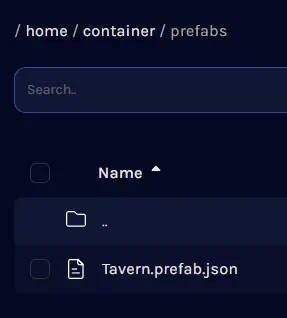 After downloading a prefab.json file from a trusted source such as CurseForge, the next step is adding it to the Hytale files so it can be loaded and placed in-game. Separate instructions for single-player worlds and servers can be found below.
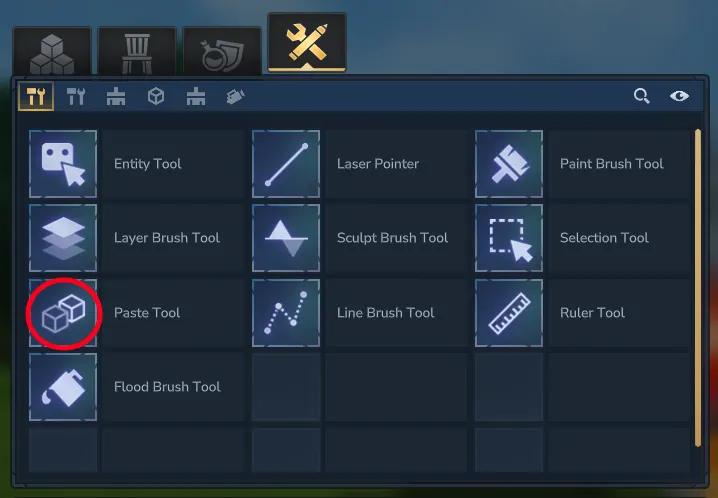 The uploaded prefab, or one created in-game, can be imported and placed in the world with a few clicks and some menu navigation. The only difficult part is that the name of the desired prefab file must be remembered, so we recommend double-checking the name before proceeding.
Where to Place Prefabs Found Online
After downloading a prefab.json file from a trusted source such as CurseForge, the next step is adding it to the Hytale files so it can be loaded and placed in-game. Separate instructions for single-player worlds and servers can be found below.
Singleplayer Worlds
- Open the Hytale Launcher.
- Click the small gear on the top left.
- Select “Open Directory”.
- Enter the “UserData” folder.
- Enter the “Saves” folder.
- Open the folder of your desired world.
- Create a folder inside called “prefabs” in all lowercase. If a prefabs folder already exists, this step can be skipped.
- Enter the “prefabs” folder.
- Move or paste the prefab.json file inside the “prefabs” folder.
Servers
- Open the server files. With BisectHosting, this can be done via the file manager on the game server panel. If the “logs” and “universe” folders can be seen, you are in the right place!
- Create a folder called “prefabs” in all lowercase. If a prefabs folder already exists, this step can be skipped.
- Open the “prefabs” folder.
- Upload the prefab.json file into the “prefabs” folder.
- Restart the server.
How to Import Hytale Prefabs
The uploaded prefab, or one created in-game, can be imported and placed in the world with a few clicks and some menu navigation. The only difficult part is that the name of the desired prefab file must be remembered, so we recommend double-checking the name before proceeding.
- Open a creative world or enter creative mode.
- Open your inventory.
- Select the creative tools tab at the top. It should appear as a wrench crossed with a pencil.
- Click the “Paste Tool” and add it to your hotbar.
- Ready the paste tool in hand and click “E”.
- Select the desired prefab file. If not visible, try the other file destinations in the drop-down menu.
- Find a location for the prefab and left-click to place.
Zapisz się do newslettera
Subskrybuj, aby otrzymywać najnowsze informacje ze świata gier!

Dołącz do naszego Discorda
Zostań częścią naszej społeczności ponad 20,000 podobnie myślących członków!
Jak oceniasz ten wpis?
Podziel się swoją opinią i pomóż nam tworzyć jeszcze lepsze artykuły!
Nie podobał mi się
Neutralnie
Podobał mi się

Potrzebujesz serwera do gry?
Wynajmij serwer gier, na którym Ty i Twoi znajomi możecie grać prywatnie z niskim opóźnieniem i własnymi ustawieniami. Wybieraj spośród 110+ gier, zaproś ludzi z całego świata i ciesz się prywatnymi rozgrywkami lub zbuduj własną społeczność online z własnymi zasadami.

Powiązane wpisy







BĄDŹ NA BIEŻĄCO!
Dołącz do naszego newslettera, aby otrzymywać informacje o naszych hostowanych grach, nowościach firmowych i ekskluzywnych ofertach. Bądź na bieżąco!













