

How to Install RLCraft
Opublikowano przez

Udostępnij:

Udostępnij na X

Udostępnij na Facebooku

Udostępnij na Threads

Udostępnij na Bluesky

Skopiuj do schowka

Udostępnij przez e-mail
(Estimated Read Time: 3 Minutes)
RLCraft is one of the most difficult Minecraft modpacks ever released but installing it shouldn’t be the part that is hard. So, today, we explain step-by-step how to install RLCraft for both single-player and online.Step 1: Install a Mod Manager
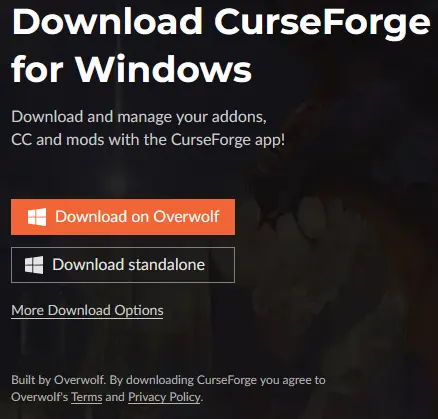 The easiest method for installing RLCraft is using a mod manager such as the CurseForge app. This will not only download all the files but also set them up in a custom Minecraft profile, making the hardest step of this guide merely clicking play.
For this guide, we will be proceeding with the CurseForge app, which can be found here.
The easiest method for installing RLCraft is using a mod manager such as the CurseForge app. This will not only download all the files but also set them up in a custom Minecraft profile, making the hardest step of this guide merely clicking play.
For this guide, we will be proceeding with the CurseForge app, which can be found here.
Step 2: Select “Add a Game”
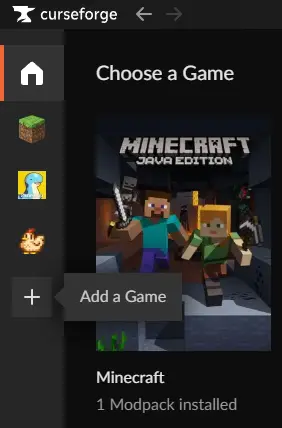 The CurseForge app can be used for many games ranging from Stardew Valley to World of Warcraft, but in this case, our goal is to add Minecraft. Minecraft may already be present for some users, but for others, the scan option or manually locating it are both options found by clicking the “+” symbol on the left side of the window.
Step 3: Install RLCraft
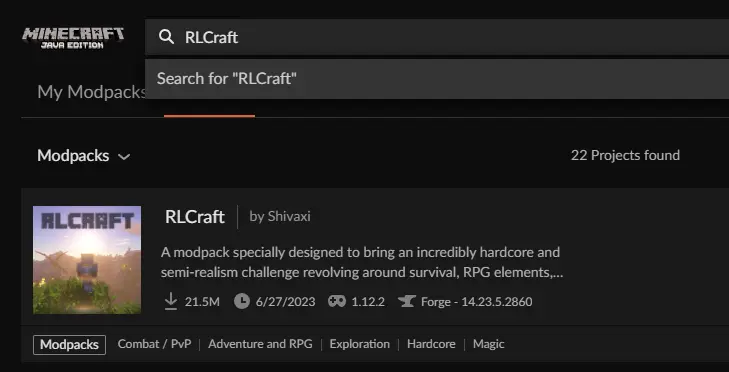 Once Minecraft has been added, select the grass block icon on the left side of the window. This will open a page with “My Modpacks,” “Browse,” and “Servers” along the top. In our case, browse will be selected which should then list a variety of modpacks.
Select the search bar at the top and type RLCraft. The very first modpack should be RLCraft by Shivaxi with over 20,000,000 downloads. Select it and click “Install” on the top right of the window.
Once Minecraft has been added, select the grass block icon on the left side of the window. This will open a page with “My Modpacks,” “Browse,” and “Servers” along the top. In our case, browse will be selected which should then list a variety of modpacks.
Select the search bar at the top and type RLCraft. The very first modpack should be RLCraft by Shivaxi with over 20,000,000 downloads. Select it and click “Install” on the top right of the window.
Step 4: Allocating RAM
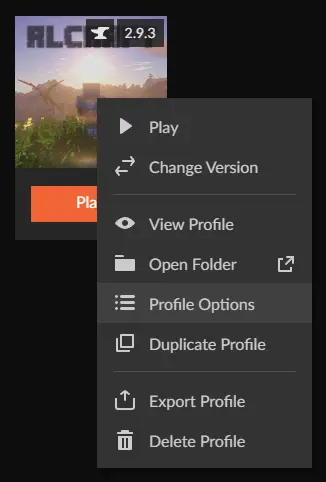 After installing RLCraft, return to the “My Modpacks” tab and right-click RLCraft. A menu should then appear with “Profile Options” listed inside. Select “Profile Options” and uncheck the box next to “Use System Memory Settings.” After doing so, a bar will appear, which can be adjusted.
For large modpacks such as RLCraft, no less than 4000MB is recommended. Once set, select “Done.”
After installing RLCraft, return to the “My Modpacks” tab and right-click RLCraft. A menu should then appear with “Profile Options” listed inside. Select “Profile Options” and uncheck the box next to “Use System Memory Settings.” After doing so, a bar will appear, which can be adjusted.
For large modpacks such as RLCraft, no less than 4000MB is recommended. Once set, select “Done.”
Step 5: Click Play!
 All that remains is simply clicking play. This will open the Minecraft Launcher, where a brand new modded profile is completely set up and ready to go. Upon clicking play there, RLCraft will start up and begin to load.
How to Install RLCraft
With the five steps above complete, RLCraft can now be enjoyed in both multiplayer and alone! For those seeking a server to play with friends, look further than BisectHosting, where code Shivaxi gets 25% off your first order. Until Next Time, BisectHosting =)Zapisz się do newslettera
Subskrybuj, aby otrzymywać najnowsze informacje ze świata gier!

Dołącz do naszego Discorda
Zostań częścią naszej społeczności ponad 20,000 podobnie myślących członków!
Jak oceniasz ten wpis?
Podziel się swoją opinią i pomóż nam tworzyć jeszcze lepsze artykuły!
Nie podobał mi się
Neutralnie
Podobał mi się

Potrzebujesz serwera do gry?
Wynajmij serwer gier, na którym Ty i Twoi znajomi możecie grać prywatnie z niskim opóźnieniem i własnymi ustawieniami. Wybieraj spośród 110+ gier, zaproś ludzi z całego świata i ciesz się prywatnymi rozgrywkami lub zbuduj własną społeczność online z własnymi zasadami.

Powiązane wpisy







BĄDŹ NA BIEŻĄCO!
Dołącz do naszego newslettera, aby otrzymywać informacje o naszych hostowanych grach, nowościach firmowych i ekskluzywnych ofertach. Bądź na bieżąco!













