

How to Find Minecraft Fireflies
Opublikowano przez

Udostępnij:

Udostępnij na X

Udostępnij na Facebooku

Udostępnij na Threads

Udostępnij na Bluesky

Skopiuj do schowka

Udostępnij przez e-mail
As of Minecraft snapshot 25w05a, fireflies are illuminating the night and keeping mobs at bay, but not every biome will have their light show on display. So, today, we answer how to find Minecraft fireflies and firefly bush blocks in game.
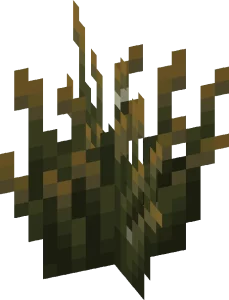
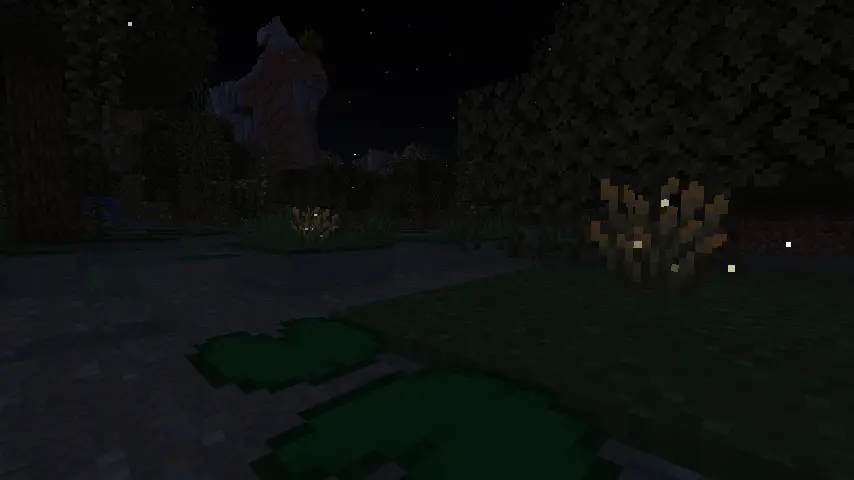 Minecraft fireflies are not mobs like bees or frogs but instead glowing particles that float around a new block called a firefly bush. During the day, these firefly bush blocks can be distinguished from regular bush blocks by their darker green base, yellowish leaf tips, and glowing (firefly) pixels on their leaves. At night, however, fireflies fly around the block’s surroundings in a beautiful mob-like display.
 Players searching for Minecraft Fireflies will need to locate and gather firefly bush blocks, which generate in swamp biomes and along rivers as of Minecraft snapshot 25w05a (Minecraft 1.21.5.) Thankfully, neither swamp biomes nor rivers are rare, and rivers can typically be found by adventuring out into the world within a few minutes’ time.
Once located, Firefly bush blocks can be gathered by hand, placed anywhere, and duplicated with bone meal. They also produce a light level of two, which prevents mobs from spawning in a very small radius around them.
Players searching for Minecraft Fireflies will need to locate and gather firefly bush blocks, which generate in swamp biomes and along rivers as of Minecraft snapshot 25w05a (Minecraft 1.21.5.) Thankfully, neither swamp biomes nor rivers are rare, and rivers can typically be found by adventuring out into the world within a few minutes’ time.
Once located, Firefly bush blocks can be gathered by hand, placed anywhere, and duplicated with bone meal. They also produce a light level of two, which prevents mobs from spawning in a very small radius around them.
 Should bad luck or an unfortunate spawn be encountered, there is always the option of using the “/locate” command. This nifty tool provides the exact coordinates of the nearest structure or biome, and by clicking them, teleports the player there.
Some would consider this cheating, but in Minecraft, that is for you to decide. The full locate biome command for swamp biomes is as follows:
Should bad luck or an unfortunate spawn be encountered, there is always the option of using the “/locate” command. This nifty tool provides the exact coordinates of the nearest structure or biome, and by clicking them, teleports the player there.
Some would consider this cheating, but in Minecraft, that is for you to decide. The full locate biome command for swamp biomes is as follows:
Minecraft Fireflies: Mob Vs Particle
Minecraft fireflies are not mobs like bees or frogs but instead glowing particles that float around a new block called a firefly bush. During the day, these firefly bush blocks can be distinguished from regular bush blocks by their darker green base, yellowish leaf tips, and glowing (firefly) pixels on their leaves. At night, however, fireflies fly around the block’s surroundings in a beautiful mob-like display.
How to Find Minecraft Fireflies
Players searching for Minecraft Fireflies will need to locate and gather firefly bush blocks, which generate in swamp biomes and along rivers as of Minecraft snapshot 25w05a (Minecraft 1.21.5.) Thankfully, neither swamp biomes nor rivers are rare, and rivers can typically be found by adventuring out into the world within a few minutes’ time.
Once located, Firefly bush blocks can be gathered by hand, placed anywhere, and duplicated with bone meal. They also produce a light level of two, which prevents mobs from spawning in a very small radius around them.
How to Find Swamp Biomes with Commands
- /locate biome minecraft:swamp
Zapisz się do newslettera
Subskrybuj, aby otrzymywać najnowsze informacje ze świata gier!

Dołącz do naszego Discorda
Zostań częścią naszej społeczności ponad 20,000 podobnie myślących członków!
Jak oceniasz ten wpis?
Podziel się swoją opinią i pomóż nam tworzyć jeszcze lepsze artykuły!
Nie podobał mi się
Neutralnie
Podobał mi się

Potrzebujesz serwera do gry?
Wynajmij serwer gier, na którym Ty i Twoi znajomi możecie grać prywatnie z niskim opóźnieniem i własnymi ustawieniami. Wybieraj spośród 110+ gier, zaproś ludzi z całego świata i ciesz się prywatnymi rozgrywkami lub zbuduj własną społeczność online z własnymi zasadami.

Powiązane wpisy







BĄDŹ NA BIEŻĄCO!
Dołącz do naszego newslettera, aby otrzymywać informacje o naszych hostowanych grach, nowościach firmowych i ekskluzywnych ofertach. Bądź na bieżąco!













