

Clone Hero: How to Add Songs
Opublikowano przez

Udostępnij:

Udostępnij na X

Udostępnij na Facebooku

Udostępnij na Threads

Udostępnij na Bluesky

Skopiuj do schowka

Udostępnij przez e-mail
Unlock near-endless music adventures in Clone Hero by adding more tracks to the game’s library. Although adding custom songs is a rewarding experience, some players may have trouble completing this task successfully. So, here’s a guide on how to add songs in Clone Hero to help you expand your personal in-game playlist today.
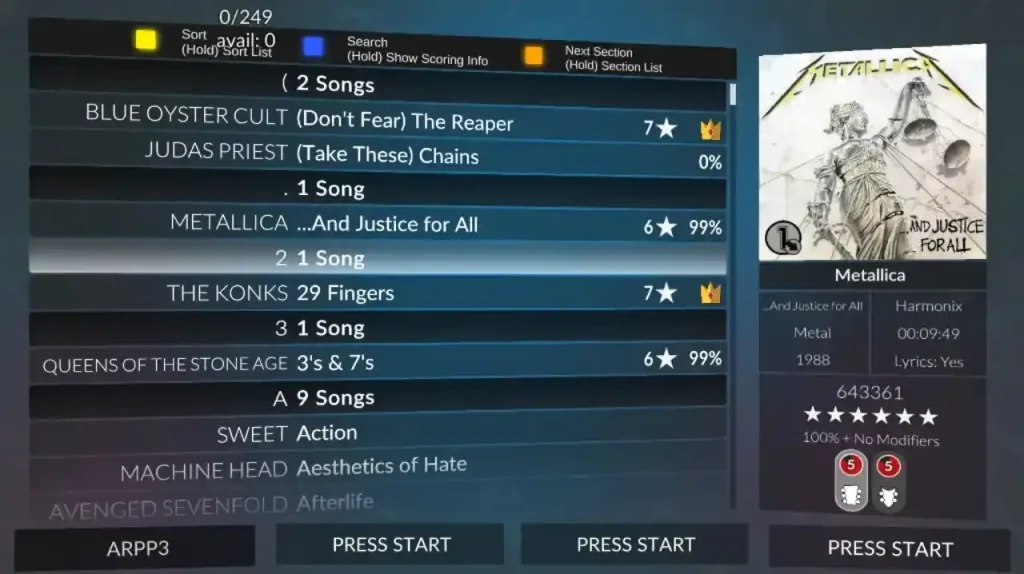 Note that Clone Hero is a freeware music rhythm game with a loyal and active community. With that, certain community members frequently add chart tracks for Clone Hero for other players to download and play.
With that, the first step to adding songs to Clone Hero is to download the files. Some notable portals are the following:
Custom Songs Central
Chorus Encore
RhythmVerse
Clone Hero Download Sheet Master List
Extract the files if they come in a .zip/.rar/.7z or similar format. Then, place the extracted files in the game’s Songs folder. Remember, the files must have an audio file, song.ini, and notes.chart/notes.mid. Normally, the Clone Hero's Songs folder should be under the main Documents folder on your Windows PC unless moved. If you’re playing Clone Hero in portable mode, ensure to place the songs and other files in the Songs folder in the PlayerData folder of the game’s location on your PC.
As for Mac users, the Songs folder should be in your system’s Home folder by default. In particular, navigate to the Clone Hero folder and open the Songs folder from there. Linux users can find the Songs folder in the ~/.clonehero folder.
Next, launch Clone Hero and navigate to the Settings menu from the main screen. Here, click the General tab, and then select “Scan Songs.” Confirm the action afterward, which may take a few seconds to a few minutes, depending on various factors.
Finally, go back to the main screen and select “Quickplay.” If successful, you should see the newly added songs in the list. Now, all that’s left is to play the song and unleash your inner guitar maestro.
Note that Clone Hero is a freeware music rhythm game with a loyal and active community. With that, certain community members frequently add chart tracks for Clone Hero for other players to download and play.
With that, the first step to adding songs to Clone Hero is to download the files. Some notable portals are the following:
Custom Songs Central
Chorus Encore
RhythmVerse
Clone Hero Download Sheet Master List
Extract the files if they come in a .zip/.rar/.7z or similar format. Then, place the extracted files in the game’s Songs folder. Remember, the files must have an audio file, song.ini, and notes.chart/notes.mid. Normally, the Clone Hero's Songs folder should be under the main Documents folder on your Windows PC unless moved. If you’re playing Clone Hero in portable mode, ensure to place the songs and other files in the Songs folder in the PlayerData folder of the game’s location on your PC.
As for Mac users, the Songs folder should be in your system’s Home folder by default. In particular, navigate to the Clone Hero folder and open the Songs folder from there. Linux users can find the Songs folder in the ~/.clonehero folder.
Next, launch Clone Hero and navigate to the Settings menu from the main screen. Here, click the General tab, and then select “Scan Songs.” Confirm the action afterward, which may take a few seconds to a few minutes, depending on various factors.
Finally, go back to the main screen and select “Quickplay.” If successful, you should see the newly added songs in the list. Now, all that’s left is to play the song and unleash your inner guitar maestro.
How to Add Songs in Clone Hero
Note that Clone Hero is a freeware music rhythm game with a loyal and active community. With that, certain community members frequently add chart tracks for Clone Hero for other players to download and play.
With that, the first step to adding songs to Clone Hero is to download the files. Some notable portals are the following:
Custom Songs Central
Chorus Encore
RhythmVerse
Clone Hero Download Sheet Master List
Extract the files if they come in a .zip/.rar/.7z or similar format. Then, place the extracted files in the game’s Songs folder. Remember, the files must have an audio file, song.ini, and notes.chart/notes.mid. Normally, the Clone Hero's Songs folder should be under the main Documents folder on your Windows PC unless moved. If you’re playing Clone Hero in portable mode, ensure to place the songs and other files in the Songs folder in the PlayerData folder of the game’s location on your PC.
As for Mac users, the Songs folder should be in your system’s Home folder by default. In particular, navigate to the Clone Hero folder and open the Songs folder from there. Linux users can find the Songs folder in the ~/.clonehero folder.
Next, launch Clone Hero and navigate to the Settings menu from the main screen. Here, click the General tab, and then select “Scan Songs.” Confirm the action afterward, which may take a few seconds to a few minutes, depending on various factors.
Finally, go back to the main screen and select “Quickplay.” If successful, you should see the newly added songs in the list. Now, all that’s left is to play the song and unleash your inner guitar maestro.Zapisz się do newslettera
Subskrybuj, aby otrzymywać najnowsze informacje ze świata gier!

Dołącz do naszego Discorda
Zostań częścią naszej społeczności ponad 20,000 podobnie myślących członków!
Jak oceniasz ten wpis?
Podziel się swoją opinią i pomóż nam tworzyć jeszcze lepsze artykuły!
Nie podobał mi się
Neutralnie
Podobał mi się

Potrzebujesz serwera do gry?
Wynajmij serwer gier, na którym Ty i Twoi znajomi możecie grać prywatnie z niskim opóźnieniem i własnymi ustawieniami. Wybieraj spośród 110+ gier, zaproś ludzi z całego świata i ciesz się prywatnymi rozgrywkami lub zbuduj własną społeczność online z własnymi zasadami.

Powiązane wpisy







BĄDŹ NA BIEŻĄCO!
Dołącz do naszego newslettera, aby otrzymywać informacje o naszych hostowanych grach, nowościach firmowych i ekskluzywnych ofertach. Bądź na bieżąco!













