

7 Days to Die: How to Play the Experimental Branch
Opublikowano przez

Udostępnij:

Udostępnij na X

Udostępnij na Facebooku

Udostępnij na Threads

Udostępnij na Bluesky

Skopiuj do schowka

Udostępnij przez e-mail
Starting June 16, zombie apocalypse survivors can experience the 7 Days to Die 2.0: Storm’s Brewing Update, along with its new content, features, and improvements, by playing in the Experimental Branch. So, keep reading to learn how to access the Experimental Branch in 7 Days to Die, and enjoy Update 2.0 before everyone else!
 Note that the 7 Days to Die Experimental Branch is only available for PC players through Steam. The game’s console versions, particularly on PlayStation and Xbox, will generally receive the stable versions of each patch, including Update 2.0. Thankfully, the update's Stable version should be released on June 30, not too long after the Experimental Branch's version's launch date.
With that, here’s how to access the 7 Days to Die Experimental Branch and experience Update 2.0:
Note that the 7 Days to Die Experimental Branch is only available for PC players through Steam. The game’s console versions, particularly on PlayStation and Xbox, will generally receive the stable versions of each patch, including Update 2.0. Thankfully, the update's Stable version should be released on June 30, not too long after the Experimental Branch's version's launch date.
With that, here’s how to access the 7 Days to Die Experimental Branch and experience Update 2.0:
How to Play in the 7 Days to Die Experimental Branch
Note that the 7 Days to Die Experimental Branch is only available for PC players through Steam. The game’s console versions, particularly on PlayStation and Xbox, will generally receive the stable versions of each patch, including Update 2.0. Thankfully, the update's Stable version should be released on June 30, not too long after the Experimental Branch's version's launch date.
With that, here’s how to access the 7 Days to Die Experimental Branch and experience Update 2.0:
- 1. Log into your Steam account
- 2. Access your game Library and right-click on 7 Days to Die in the left sidebar
- 3. Select Properties in the context menu
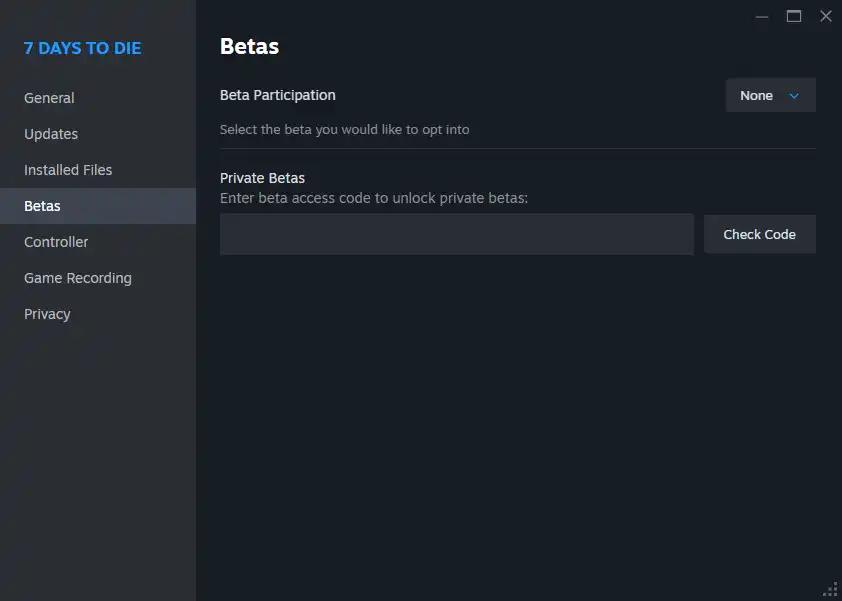
- 4. Select the Betas tab in the Properties window
- 5. Click the dropdown box next to Beta Participation, and choose the latest experimental version from the list
Zapisz się do newslettera
Subskrybuj, aby otrzymywać najnowsze informacje ze świata gier!

Dołącz do naszego Discorda
Zostań częścią naszej społeczności ponad 20,000 podobnie myślących członków!
Jak oceniasz ten wpis?
Podziel się swoją opinią i pomóż nam tworzyć jeszcze lepsze artykuły!
Nie podobał mi się
Neutralnie
Podobał mi się

Potrzebujesz serwera do gry?
Wynajmij serwer gier, na którym Ty i Twoi znajomi możecie grać prywatnie z niskim opóźnieniem i własnymi ustawieniami. Wybieraj spośród 110+ gier, zaproś ludzi z całego świata i ciesz się prywatnymi rozgrywkami lub zbuduj własną społeczność online z własnymi zasadami.

Powiązane wpisy







BĄDŹ NA BIEŻĄCO!
Dołącz do naszego newslettera, aby otrzymywać informacje o naszych hostowanych grach, nowościach firmowych i ekskluzywnych ofertach. Bądź na bieżąco!













