

Trackmania Controls Guide: All PC & Controller Keybinds (Xbox, PlayStation)
Pubblicato il da

Condividi:

Condividi su X

Condividi su Facebook

Condividi su Threads

Condividi su Bluesky

Copia negli Appunti

Condividi via email
Trackmania is all about speed, but you won't be able to cruise past your competition without knowing how to control your vehicle. Whether playing on PC, PlayStation, or Xbox, giving your settings a quick look can make a huge difference in your driving performance. Look below to see all of the Trackmania controls and decide what will work best for you!
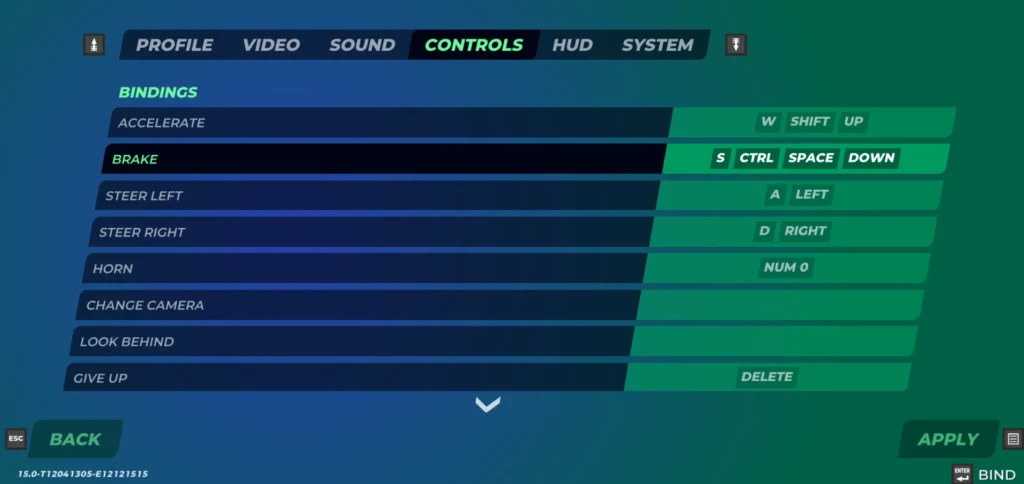 The best part about the keybinds in Trackmania is that you can change them. You can switch up your controls to be exactly what you need for your playstyle! Of course, you can find the default controls listed below if you aren't one for remapping keybinds.
Additionally, not all controls in Trackmania are mapped by default. Make sure to look through the game's settings yourself so that you can adjust your preferred keymapping and have access to all of the controls you want. Especially when playing on PlayStation or Xbox, you'll find that many keybindings haven't been set.
Some gameplay functions, such as spectating players, might not be as essential. As a result, you can easily take the keybindings away from those functions and use them for something else. Neither the Square button on PlayStation nor the X button on Xbox is used by default, and each is an excellent option for giving yourself even more racing control.
The best part about the keybinds in Trackmania is that you can change them. You can switch up your controls to be exactly what you need for your playstyle! Of course, you can find the default controls listed below if you aren't one for remapping keybinds.
Additionally, not all controls in Trackmania are mapped by default. Make sure to look through the game's settings yourself so that you can adjust your preferred keymapping and have access to all of the controls you want. Especially when playing on PlayStation or Xbox, you'll find that many keybindings haven't been set.
Some gameplay functions, such as spectating players, might not be as essential. As a result, you can easily take the keybindings away from those functions and use them for something else. Neither the Square button on PlayStation nor the X button on Xbox is used by default, and each is an excellent option for giving yourself even more racing control.
All Controls & Keybinds for Trackmania (Keyboard & Mouse, PlayStation and Xbox Controllers)
The best part about the keybinds in Trackmania is that you can change them. You can switch up your controls to be exactly what you need for your playstyle! Of course, you can find the default controls listed below if you aren't one for remapping keybinds.
Additionally, not all controls in Trackmania are mapped by default. Make sure to look through the game's settings yourself so that you can adjust your preferred keymapping and have access to all of the controls you want. Especially when playing on PlayStation or Xbox, you'll find that many keybindings haven't been set.
Some gameplay functions, such as spectating players, might not be as essential. As a result, you can easily take the keybindings away from those functions and use them for something else. Neither the Square button on PlayStation nor the X button on Xbox is used by default, and each is an excellent option for giving yourself even more racing control.
PC (Keyboard & Mouse)
- Accelerate: W/Shift/Up
- Brake: S/Ctrl/Space/Down
- Steer Left: A/Left
- Steer Right: D/Right
- Horn: Num 0
- Give Up: Delete
- Respawn: Backspace
- Action Slot 1: 1
- Action Slot 2: 2
- Action Slot 3: 3
- Action Slot 4: 4
- Action Slot 5: 5
- Show/Hide Ghost: G
- Show/Hide Opponents: O
- Save Replay: R
- Save Previous Replay: P
- Menu: Esc
- Show/Hide Interface: *
- Show/Hide Names: '
- Show/Hide Scores: Tab
- Prev Score/Chat Page: Home
- Next Score/Chat Page: End
- Save Screenshot: F10
- Chat: Enter
- Chat to All: T
- Open/Close Chat: C
- Voice Push-to-Talk: X
- Analyser: -
- Spectate Previous Player: Page Up
- Spectate Next Player: Page Down
- Auto Spectator: Numpadcomma
- Camera 1: Num 1
- Camera 2: Num 2
- Camera 3: Num 3
- Camera 4: Num 4
- Camera 5: Num 5
- Camera 6: Num 6
- Camera Free: Num 7
PlayStation Controller
- Accelerate: R2
- Brake: L2
- Steer Left: Push Left Analog Stick left
- Steer Right: Push Left Analog Stick right
- Horn: L3
- Change Camera: R3
- Give Up: Circle
- Respawn: Triangle
- Menu: Options Button
- Show/Hide Scores: R1
- Prev Score/Chat Page: D-Pad Up
- Next Score/Chat Page: D-Pad Down
- Chat: Touchpad
- Spectate Previous Player: D-Pad Left
- Spectate Next Player: D-Pad Right
- Auto Spectator: Cross
Xbox Controller
- Accelerate: RT
- Brake: LT
- Steer Left: Push Left Analog Stick left
- Steer Right: Push Left Analog Stick right
- Horn: L
- Change Camera: R
- Give Up: B
- Respawn: Y
- Menu: Menu Button
- Show/Hide Scores: RB
- Prev Score/Chat Page: D-Pad Up
- Next Score/Chat Page: D-Pad Down
- Chat: View Button
- Spectate Previous Player: D-Pad Left
- Spectate Next Player: D-Pad Right
- Auto Spectator: A
Crea il tuo server
Trackmania
Trackmania
Scegli un piano, seleziona un gioco e gioca con i tuoi amici!
Iscriviti alla nostra Newsletter
Iscriviti per ricevere gli ultimi aggiornamenti sul mondo del gaming!

Unisciti al nostro Discord
Entra a far parte della nostra community con oltre 20.000 membri appassionati come te!
Come valuteresti questo blog?
Condividi la tua opinione e aiutaci a migliorare sempre di più i nostri blog!
Non mi è piaciuto
Neutrale
Mi è piaciuto

Hai bisogno di un server di gioco?
Noleggia un server di gioco dove tu e i tuoi amici potrete giocare in privato con bassa latenza e impostazioni personalizzate. Scegli tra 110+ giochi, invita persone da tutto il mondo, goditi le partite private o costruisci la tua community online con le tue regole.

Blog Pertinenti







SCOPRI LE ULTIME NOVITÀ!
Iscriviti alla nostra newsletter per ricevere aggiornamenti sui nostri giochi ospitati, novità aziendali e offerte esclusive. Rimani sempre aggiornato!













