
Palworld Controls Guide: All PC and Controller Keybinds
Pubblicato il da

Condividi:

Condividi su X

Condividi su Facebook

Condividi su Threads

Condividi su Bluesky

Copia negli Appunti

Condividi via email
Like starting relatively any game, you must learn the controls for Palworld to play the game efficiently. Note that the game’s controls differ depending on your device. So, keep reading as we go over the controller and keyboard controls for the game in this guide.
 At the time of writing, Palworld was released on the Steam and Game Pass platforms. That means that the available methods of controlling your character and Pals are through a controller or a keyboard and mouse.
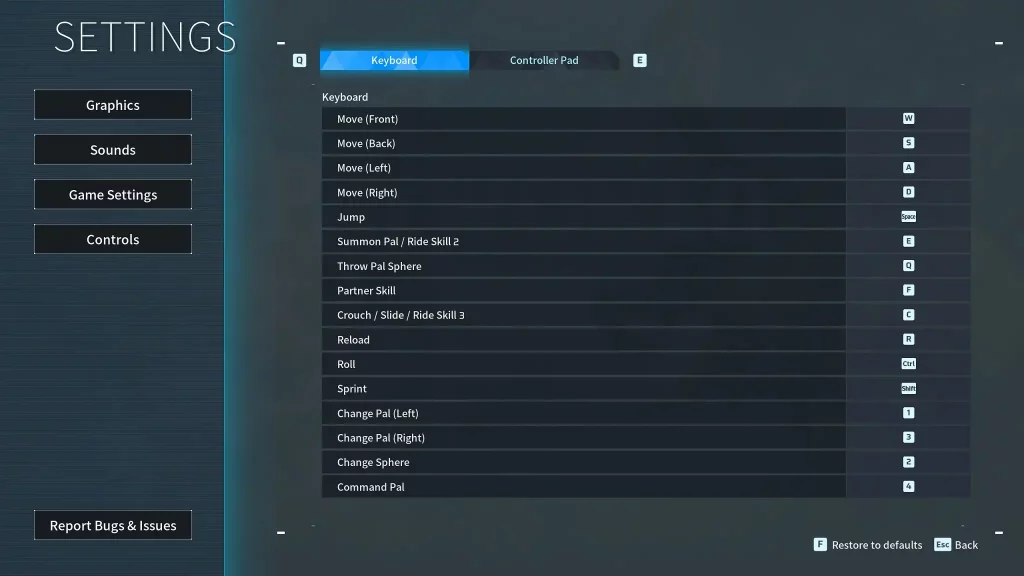 Some players may prefer to use the keyboard and mouse to use Palworld’s controls. However, some users may prefer to change the keyboard keybinds because of their awkward placements. For example, the roll is set to the “Ctrl” key by default. So, you may have difficulty extending a finger to press this button when dodging incoming attacks.
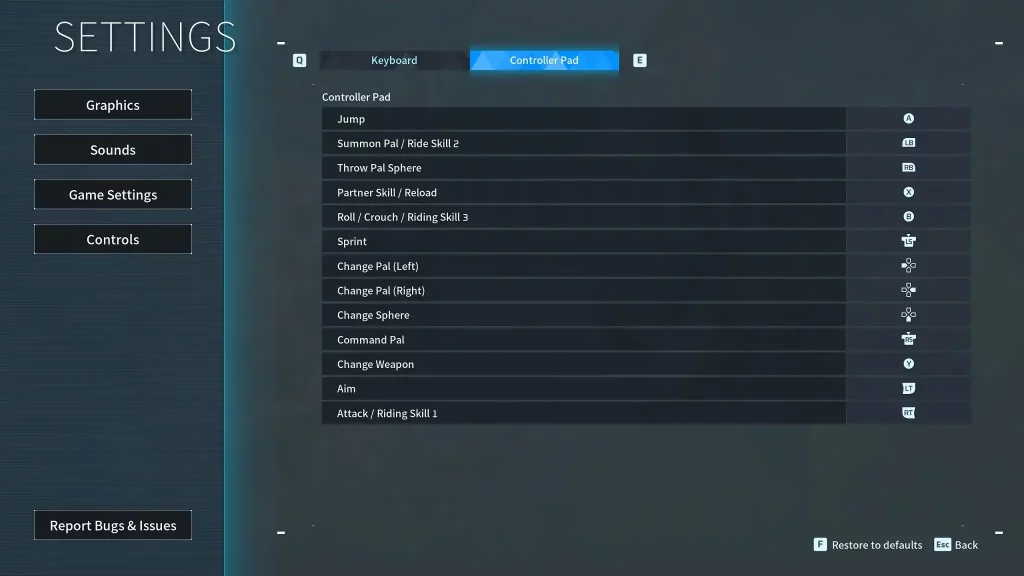 Unlike the keyboard and mouse, the Palworld controls are generally simpler when using a controller. However, the controller controls typically show the button names for the Xbox or standard PC controller model. So, it can become confusing if you use another controller with a different button layout, such as one for the PlayStation.
Palworld Controls and Keybinds
At the time of writing, Palworld was released on the Steam and Game Pass platforms. That means that the available methods of controlling your character and Pals are through a controller or a keyboard and mouse.
Keyboard and Mouse Controls
Some players may prefer to use the keyboard and mouse to use Palworld’s controls. However, some users may prefer to change the keyboard keybinds because of their awkward placements. For example, the roll is set to the “Ctrl” key by default. So, you may have difficulty extending a finger to press this button when dodging incoming attacks.
- Move (Front): W
- Move (Back): S
- Move (Left): A
- Move (Right): D
- Left Click: Attack/Use equipped item
- Right Click: Cancel Pal Sphere throw
- Jump: Space
- Summon Pal/Ride Skill 2: E
- Throw Pal Sphere: Q
- Partner Skill: F
- Crouch/Slide/Ride Skill 3: C
- Reload: R
- Roll: Ctrl
- Sprint: Shift
- Change Pal (Left): 1
- Change Pal (Right): 3
- Change Sphere: 2
- Pal Commands: 4
Controller Controls
Unlike the keyboard and mouse, the Palworld controls are generally simpler when using a controller. However, the controller controls typically show the button names for the Xbox or standard PC controller model. So, it can become confusing if you use another controller with a different button layout, such as one for the PlayStation.
- Movement: Left analog stick
- Aim/Look Around: Right analog stick
- Jump: A
- Summon Pal/Ride Skill 2: Left Bumper
- Throw Pal Sphere: Right Bumper
- Partner Skill/Reload: X
- Roll/Crouch/Riding Skill 3: B
- Sprint: Left analog stick (press)
- Change Pal (Left): Left directional button
- Change Pal (Right): Right directional button
- Change Sphere: Down directional button
- Pal Commands: Right analog stick (press)
- Change Weapon: Y
- Aim: Left Trigger
- Attack/Riding Skill 1: Right Trigger
Crea il tuo server
Palworld
Palworld
Scegli un piano, seleziona un gioco e gioca con i tuoi amici!
Iscriviti alla nostra Newsletter
Iscriviti per ricevere gli ultimi aggiornamenti sul mondo del gaming!

Unisciti al nostro Discord
Entra a far parte della nostra community con oltre 20.000 membri appassionati come te!
Come valuteresti questo blog?
Condividi la tua opinione e aiutaci a migliorare sempre di più i nostri blog!
Non mi è piaciuto
Neutrale
Mi è piaciuto

Hai bisogno di un server di gioco?
Noleggia un server di gioco dove tu e i tuoi amici potrete giocare in privato con bassa latenza e impostazioni personalizzate. Scegli tra 110+ giochi, invita persone da tutto il mondo, goditi le partite private o costruisci la tua community online con le tue regole.

Blog Pertinenti







SCOPRI LE ULTIME NOVITÀ!
Iscriviti alla nostra newsletter per ricevere aggiornamenti sui nostri giochi ospitati, novità aziendali e offerte esclusive. Rimani sempre aggiornato!













