

Minecraft Shelves Guide: Powered Shelf Blocks, Storage Limits, & More
Pubblicato il da

Condividi:

Condividi su X

Condividi su Facebook

Condividi su Threads

Condividi su Bluesky

Copia negli Appunti

Condividi via email
A new way to store items has arrived, and like item frames, everything within the block is visible at all times! So, today, we explore shelf blocks, and the secret features they hide, in our Minecraft shelves guide.
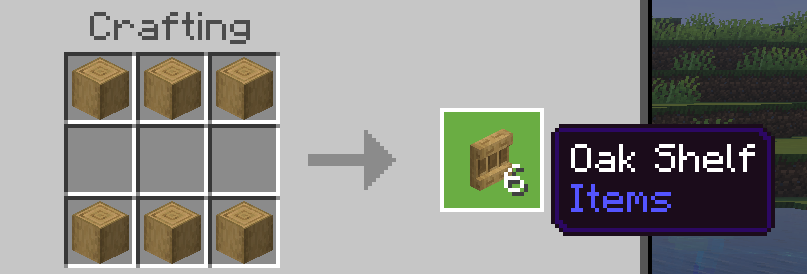 Shelf blocks have been added to all existing wood sets, including bamboo, crimson fungi, and warped fungi. To craft some of these nifty storage blocks of your very own, you need only gather six matching stripped logs and place them along the top and bottom row of a crafting table. This will produce six shelves, matching the stripped logs used to craft them.
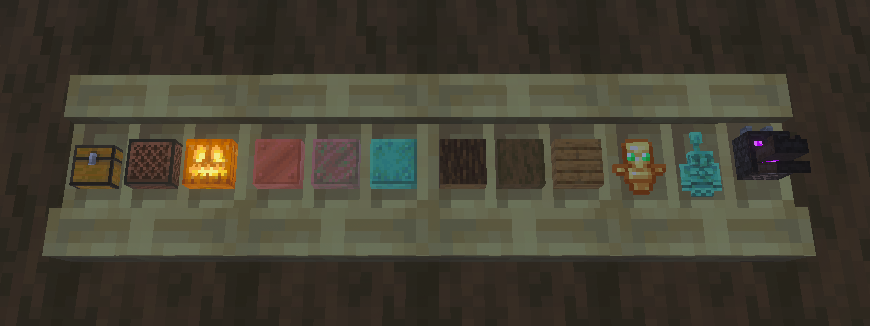 Each shelf block can store three items, with one stack of storage space for each. To store an item, simply right-click an open spot on the shelf. This will visibly store the item, much like an item frame. Right-clicking the item again will retrieve the entire stack.
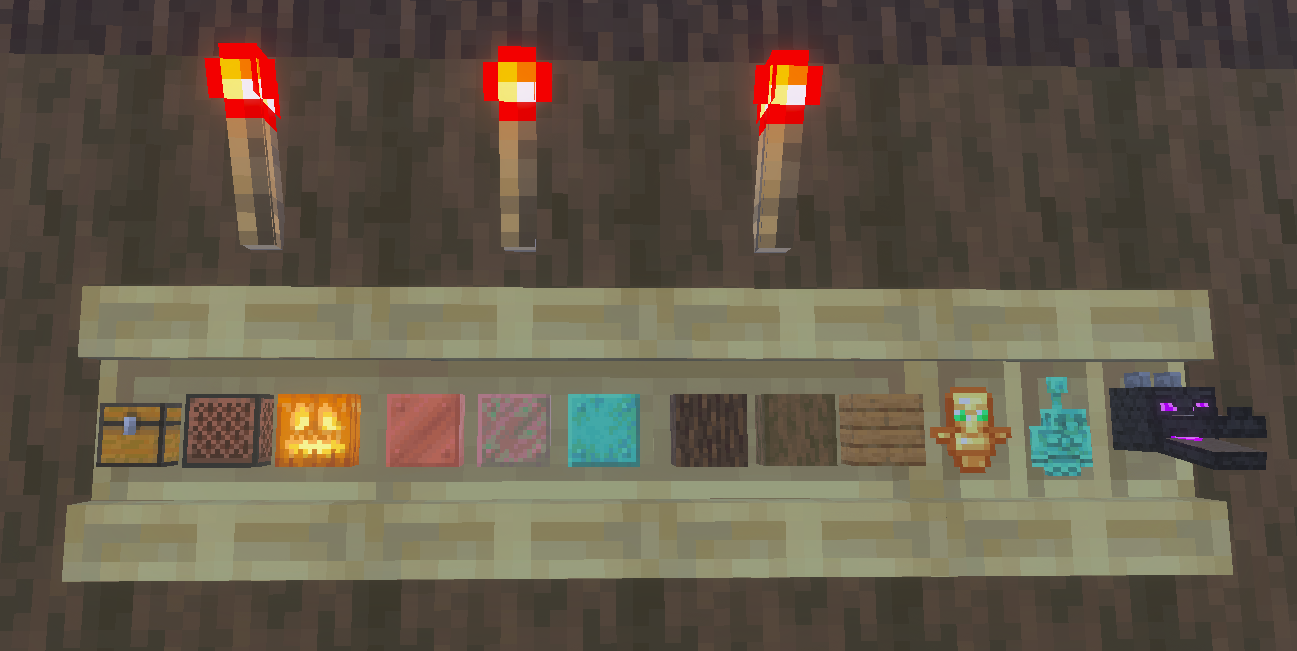 When a shelf block is powered by redstone of any kind, such as a redstone torch, it gains a new appearance alongside new features. Any player that right-clicks a powered shelf block will automatically swap the last three item slots on their hotbar with whatever is stored. This feature can be expanded further by connecting three powered shelf blocks, allowing players to swap their entire hotbar with the click of a button.
This effectively allows players to create loadouts that can be swapped with ease at any time. For example, three powered shelf blocks could be used to swap your mining hotbar on the way out of the mines for a building or combat oriented one. One could even create an armory where the most effective loadouts are available for each and every boss.
To tell if your Minecraft shelves are powered, check to see if the vertical lines that divide the stored items are still present. If they are, the shelves are not powered.
When a shelf block is powered by redstone of any kind, such as a redstone torch, it gains a new appearance alongside new features. Any player that right-clicks a powered shelf block will automatically swap the last three item slots on their hotbar with whatever is stored. This feature can be expanded further by connecting three powered shelf blocks, allowing players to swap their entire hotbar with the click of a button.
This effectively allows players to create loadouts that can be swapped with ease at any time. For example, three powered shelf blocks could be used to swap your mining hotbar on the way out of the mines for a building or combat oriented one. One could even create an armory where the most effective loadouts are available for each and every boss.
To tell if your Minecraft shelves are powered, check to see if the vertical lines that divide the stored items are still present. If they are, the shelves are not powered.
How to Craft Minecraft Shelves
Shelf blocks have been added to all existing wood sets, including bamboo, crimson fungi, and warped fungi. To craft some of these nifty storage blocks of your very own, you need only gather six matching stripped logs and place them along the top and bottom row of a crafting table. This will produce six shelves, matching the stripped logs used to craft them.
Unpowered Shelf Blocks
Each shelf block can store three items, with one stack of storage space for each. To store an item, simply right-click an open spot on the shelf. This will visibly store the item, much like an item frame. Right-clicking the item again will retrieve the entire stack.
Powered Shelf Blocks
When a shelf block is powered by redstone of any kind, such as a redstone torch, it gains a new appearance alongside new features. Any player that right-clicks a powered shelf block will automatically swap the last three item slots on their hotbar with whatever is stored. This feature can be expanded further by connecting three powered shelf blocks, allowing players to swap their entire hotbar with the click of a button.
This effectively allows players to create loadouts that can be swapped with ease at any time. For example, three powered shelf blocks could be used to swap your mining hotbar on the way out of the mines for a building or combat oriented one. One could even create an armory where the most effective loadouts are available for each and every boss.
To tell if your Minecraft shelves are powered, check to see if the vertical lines that divide the stored items are still present. If they are, the shelves are not powered.Crea il tuo server
Minecraft
Minecraft
Scegli un piano, seleziona un gioco e gioca con i tuoi amici!
Iscriviti alla nostra Newsletter
Iscriviti per ricevere gli ultimi aggiornamenti sul mondo del gaming!

Unisciti al nostro Discord
Entra a far parte della nostra community con oltre 20.000 membri appassionati come te!
Come valuteresti questo blog?
Condividi la tua opinione e aiutaci a migliorare sempre di più i nostri blog!
Non mi è piaciuto
Neutrale
Mi è piaciuto

Hai bisogno di un server di gioco?
Noleggia un server di gioco dove tu e i tuoi amici potrete giocare in privato con bassa latenza e impostazioni personalizzate. Scegli tra 110+ giochi, invita persone da tutto il mondo, goditi le partite private o costruisci la tua community online con le tue regole.

Blog Pertinenti







SCOPRI LE ULTIME NOVITÀ!
Iscriviti alla nostra newsletter per ricevere aggiornamenti sui nostri giochi ospitati, novità aziendali e offerte esclusive. Rimani sempre aggiornato!













