

Minecraft Conduit Guide: Crafting Recipe, Uses, How to Set Up, & More
Pubblicato il da

Condividi:

Condividi su X

Condividi su Facebook

Condividi su Threads

Condividi su Bluesky

Copia negli Appunti

Condividi via email
When it comes to forgotten and underutilized blocks, conduits could very well be near the top, despite all the benefits they provide, if simply set up. So, today, we explore how to get your conduit online, alongside why it is worth the time in our Minecraft conduit guide.
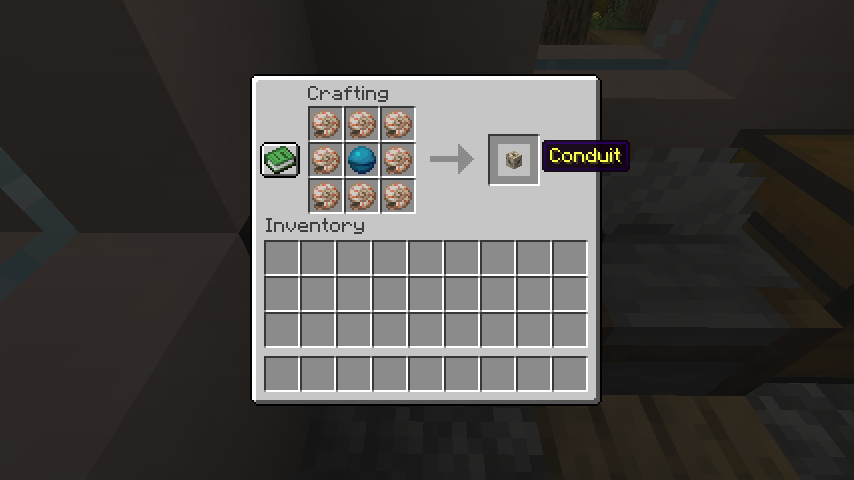 Conduits are crafted on a crafting table by placing one heart of the sea directly in the middle, surrounded by eight nautilus shells. The heart of the sea can be looted from buried treasure chests found at the end of treasure maps, while the nautilus shells can be obtained from fishing, trading with wandering traders, or as occasional loot from drowned that spawn carrying one.
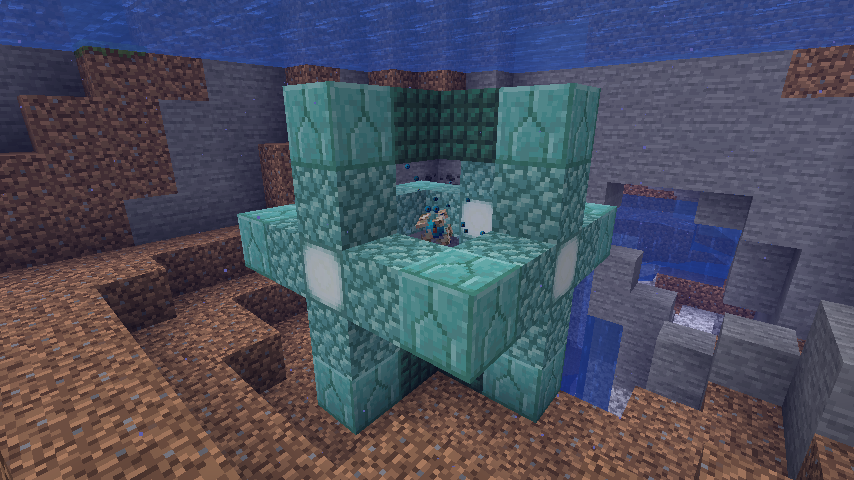 Much like how a beacon requires a pyramid of blocks beneath it to fully activate, conduits also require a specific setup to come online. The blocks required in this case are any mixture of 42 prismarine, dark prismarine, prismarine bricks, and sea lanterns. All four types can be looted from ocean monuments.
Once 42 are in hand, a submerged location will need to be selected. When one has been found, start by placing one block to mark the center of the structure, then two blocks north, east, south, and west, forming a plus sign. Next, build four block-tall towers on top of all four tips of the plus sign before connecting them to create a second matching plus sign on top.
If done correctly, there should be an empty three-by-three area of water inside the partially built structure. From there, turn all four of the block towers built previously into matching plus signs as well, while retaining the empty three-by-three area of water within. That three-by-three area must always be filled with water for the conduit to function.
Finally, place a temporary block on top of the center block inside the structure, and then place the conduit on top of that so that the conduit is in the exact center of the cube. Once placed, break the temporary block to bring your conduit online.
If all is correct, the conduit will expand, revealing the heart of the sea and begin absorbing particles from its surroundings.
Much like how a beacon requires a pyramid of blocks beneath it to fully activate, conduits also require a specific setup to come online. The blocks required in this case are any mixture of 42 prismarine, dark prismarine, prismarine bricks, and sea lanterns. All four types can be looted from ocean monuments.
Once 42 are in hand, a submerged location will need to be selected. When one has been found, start by placing one block to mark the center of the structure, then two blocks north, east, south, and west, forming a plus sign. Next, build four block-tall towers on top of all four tips of the plus sign before connecting them to create a second matching plus sign on top.
If done correctly, there should be an empty three-by-three area of water inside the partially built structure. From there, turn all four of the block towers built previously into matching plus signs as well, while retaining the empty three-by-three area of water within. That three-by-three area must always be filled with water for the conduit to function.
Finally, place a temporary block on top of the center block inside the structure, and then place the conduit on top of that so that the conduit is in the exact center of the cube. Once placed, break the temporary block to bring your conduit online.
If all is correct, the conduit will expand, revealing the heart of the sea and begin absorbing particles from its surroundings.
Minecraft Conduit Recipe
Conduits are crafted on a crafting table by placing one heart of the sea directly in the middle, surrounded by eight nautilus shells. The heart of the sea can be looted from buried treasure chests found at the end of treasure maps, while the nautilus shells can be obtained from fishing, trading with wandering traders, or as occasional loot from drowned that spawn carrying one.
The Benefits of a Conduit
- Water Breathing
- Night Vision
- Haste
- Automated Defence
Setting up a Conduit
Much like how a beacon requires a pyramid of blocks beneath it to fully activate, conduits also require a specific setup to come online. The blocks required in this case are any mixture of 42 prismarine, dark prismarine, prismarine bricks, and sea lanterns. All four types can be looted from ocean monuments.
Once 42 are in hand, a submerged location will need to be selected. When one has been found, start by placing one block to mark the center of the structure, then two blocks north, east, south, and west, forming a plus sign. Next, build four block-tall towers on top of all four tips of the plus sign before connecting them to create a second matching plus sign on top.
If done correctly, there should be an empty three-by-three area of water inside the partially built structure. From there, turn all four of the block towers built previously into matching plus signs as well, while retaining the empty three-by-three area of water within. That three-by-three area must always be filled with water for the conduit to function.
Finally, place a temporary block on top of the center block inside the structure, and then place the conduit on top of that so that the conduit is in the exact center of the cube. Once placed, break the temporary block to bring your conduit online.
If all is correct, the conduit will expand, revealing the heart of the sea and begin absorbing particles from its surroundings.Crea il tuo server
Minecraft
Minecraft
Scegli un piano, seleziona un gioco e gioca con i tuoi amici!
Iscriviti alla nostra Newsletter
Iscriviti per ricevere gli ultimi aggiornamenti sul mondo del gaming!

Unisciti al nostro Discord
Entra a far parte della nostra community con oltre 20.000 membri appassionati come te!
Come valuteresti questo blog?
Condividi la tua opinione e aiutaci a migliorare sempre di più i nostri blog!
Non mi è piaciuto
Neutrale
Mi è piaciuto

Hai bisogno di un server di gioco?
Noleggia un server di gioco dove tu e i tuoi amici potrete giocare in privato con bassa latenza e impostazioni personalizzate. Scegli tra 110+ giochi, invita persone da tutto il mondo, goditi le partite private o costruisci la tua community online con le tue regole.

Blog Pertinenti







SCOPRI LE ULTIME NOVITÀ!
Iscriviti alla nostra newsletter per ricevere aggiornamenti sui nostri giochi ospitati, novità aziendali e offerte esclusive. Rimani sempre aggiornato!













