

How to Update Minecraft Bedrock on PC
Pubblicato il da

Condividi:

Condividi su X

Condividi su Facebook

Condividi su Threads

Condividi su Bluesky

Copia negli Appunti

Condividi via email
Minecraft Bedrock Edition should update automatically upon being opened, but in the rare instances where that is not the case, we have a few easy steps to try. Today, we answer how to update Minecraft Bedrock on PC.
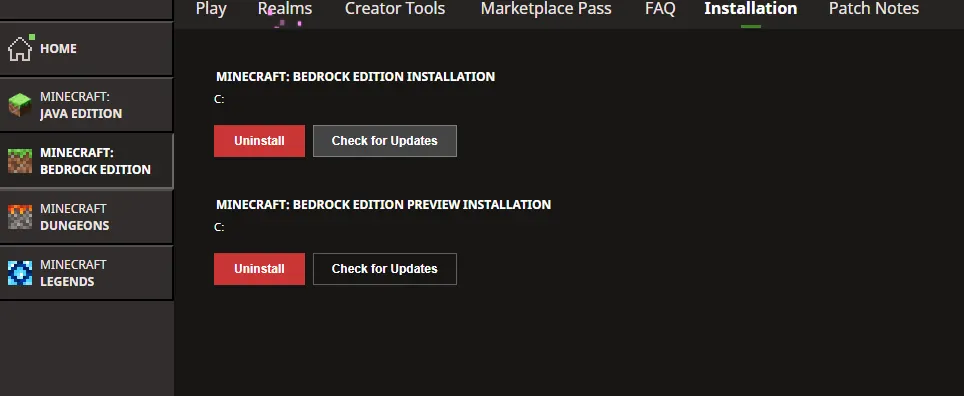 The first fix to attempt is manually checking for updates within the Minecraft launcher. This is done following the short few steps below.
 The second fix to attempt is forcing the update via the Microsoft Store. The exact steps for this will vary slightly depending on the version of Windows in use, but it is a feature on at least Windows 10 and up. Below are a general set of steps that should get you there.
 If both methods above were attempted with no luck, the update itself may simply not be out yet. Mojang has a tendency not to give out exact release times, and that can make when the update actually hits the launcher pretty random. Coming back in thirty minutes to an hour could very well resolve the problem.
Minecraft Launcher Update Check
The first fix to attempt is manually checking for updates within the Minecraft launcher. This is done following the short few steps below.
- Open the Minecraft Launcher.
- Select Minecraft Bedrock Edition in the left sidebar.
- Select the installation tab at the top of the screen.
- Click the “Check for Updates” Button.
Microsoft Store
The second fix to attempt is forcing the update via the Microsoft Store. The exact steps for this will vary slightly depending on the version of Windows in use, but it is a feature on at least Windows 10 and up. Below are a general set of steps that should get you there.
- Open the Microsoft Store.
- Click “Library” on the left sidebar. (Windows 11 Users may see an updates tab instead.)
- Find Minecraft for Windows in the list.
- Click Update.
Not Yet Out
If both methods above were attempted with no luck, the update itself may simply not be out yet. Mojang has a tendency not to give out exact release times, and that can make when the update actually hits the launcher pretty random. Coming back in thirty minutes to an hour could very well resolve the problem.Crea il tuo server
Minecraft
Minecraft
Scegli un piano, seleziona un gioco e gioca con i tuoi amici!
Iscriviti alla nostra Newsletter
Iscriviti per ricevere gli ultimi aggiornamenti sul mondo del gaming!

Unisciti al nostro Discord
Entra a far parte della nostra community con oltre 20.000 membri appassionati come te!
Come valuteresti questo blog?
Condividi la tua opinione e aiutaci a migliorare sempre di più i nostri blog!
Non mi è piaciuto
Neutrale
Mi è piaciuto

Hai bisogno di un server di gioco?
Noleggia un server di gioco dove tu e i tuoi amici potrete giocare in privato con bassa latenza e impostazioni personalizzate. Scegli tra 110+ giochi, invita persone da tutto il mondo, goditi le partite private o costruisci la tua community online con le tue regole.

Blog Pertinenti







SCOPRI LE ULTIME NOVITÀ!
Iscriviti alla nostra newsletter per ricevere aggiornamenti sui nostri giochi ospitati, novità aziendali e offerte esclusive. Rimani sempre aggiornato!













