

How to Get the Minecraft Twitch Cape & Glitch Mask
Pubblicato il da

Condividi:

Condividi su X

Condividi su Facebook

Condividi su Threads

Condividi su Bluesky

Copia negli Appunti

Condividi via email
(Estimated Read Time: 4 Minutes)
Minecraft’s 15th anniversary is finally here, featuring multiple celebrations with more already near! So, today, we explore how to get the Minecraft Twitch cape and glitch mask alongside other secrets that Mojang is likely to share.Minecraft’s 15th Anniversary Celebration!
https://twitter.com/Minecraft/status/1790446035996639572In celebration of Minecraft’s 15th anniversary, Mojang will be releasing new cosmetics every day for the next 15 days, including the Minecraft Twitch cape and glitch mask, which we have provided the details for below. Each daily reward will have different requirements, and many will likely come from collaborations, with TikTok being a confirmed example of another one. Regardless of their source, all Minecraft 15th anniversary codes expire towards the end of June 2024, so make sure to get them before they are gone!
How to Get the Minecraft Twitch Cape & Glitch Mask
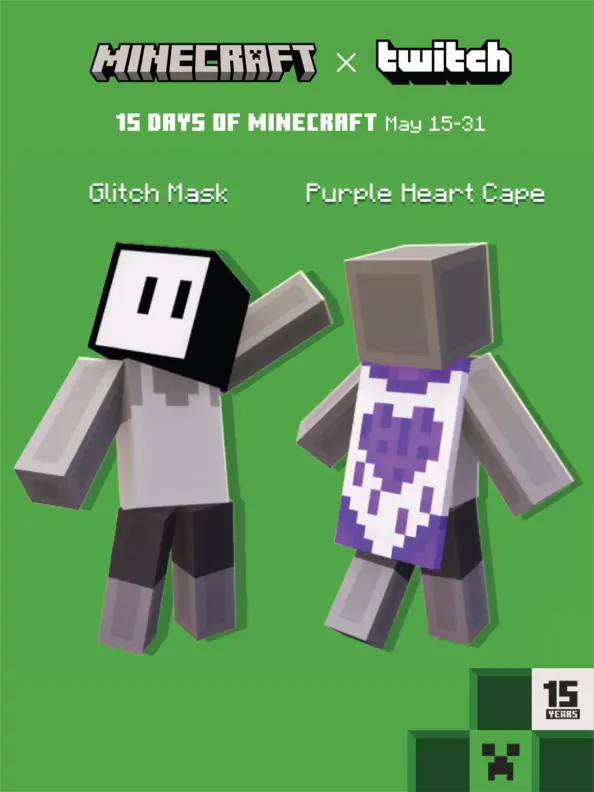 Twitch users will have a chance to earn two exclusive codes from May 15 to May 31. The Minecraft Twitch cape is confirmed to be rewarded from a watch quest, while the glitch mask is confirmed to be from a support a streamer event. Below, we have listed the exact requirements for both.
- Minecraft Twitch Cape: Watch 15 minutes of any participating Twitch Partner or Affiliate broadcasting in the Minecraft category.
- Glitch Mask: Visit any participating Twitch Partner or Affiliate broadcasting in the Minecraft category and purchase one subscription of any tier. Prime Subs will not grant the reward.
How to Change Capes: Java Edition
To check if you have any capes or to change the one you are wearing on Java Edition, simply open the official Minecraft website and follow the steps below.- Select “Account” in the top right corner and then “Login.”
- Click “My Games” on the left side of your Minecraft profile.
- Under “Minecraft: Java Edition,” select “Change Skin.”
- Scroll down to “Change Your Cape - PC/Mac.”
- Click your desired cape.
How to Change Capes: Bedrock Edition
To check if you have any capes or to change the one you are wearing on Bedrock Edition, simply open the Bedrock Edition client and follow the steps below.- Login to the Minecraft Bedrock Edition client.
- Select “Dressing Room.”
- Click the red cape icon on the left side of the screen.
- Pick your desired cape and select “Equipped.”
Crea il tuo server
Minecraft
Minecraft
Scegli un piano, seleziona un gioco e gioca con i tuoi amici!
Iscriviti alla nostra Newsletter
Iscriviti per ricevere gli ultimi aggiornamenti sul mondo del gaming!

Unisciti al nostro Discord
Entra a far parte della nostra community con oltre 20.000 membri appassionati come te!
Come valuteresti questo blog?
Condividi la tua opinione e aiutaci a migliorare sempre di più i nostri blog!
Non mi è piaciuto
Neutrale
Mi è piaciuto

Hai bisogno di un server di gioco?
Noleggia un server di gioco dove tu e i tuoi amici potrete giocare in privato con bassa latenza e impostazioni personalizzate. Scegli tra 110+ giochi, invita persone da tutto il mondo, goditi le partite private o costruisci la tua community online con le tue regole.

Blog Pertinenti







SCOPRI LE ULTIME NOVITÀ!
Iscriviti alla nostra newsletter per ricevere aggiornamenti sui nostri giochi ospitati, novità aziendali e offerte esclusive. Rimani sempre aggiornato!













